Steelcase Series 2 is a solid chair, but small problems can still show up after daily use. This guide walks through the common Series 2 fixes, part replacement options, warranty help, manuals, and repair tips so you can get your chair working comfortably again.
Quick Fix to Common Steelcase Series 2 Problems
Steelcase Series 2 seat will not stay up: If your Series 2 slowly sinks while you sit, the pneumatic gas cylinder is usually worn out. Measure the old cylinder before replacing it because chair cylinders can vary by height and taper fit. You can search for a compatible office chair gas cylinder replacement if the chair is out of warranty.
Steelcase Series 2 seat height lever feels loose: The height paddle under the Series 2 seat can feel loose if the actuator tab is not pressing the cylinder button correctly. Flip the chair carefully, inspect the lever connection, and check whether the cylinder button is aligned. If the lever is cracked or disconnected, the seat mechanism may need replacement through Steelcase or an authorized dealer.
Steelcase Series 2 backrest feels wobbly: A loose back on the Series 2 is often caused by loosened fasteners where the back frame connects to the seat mechanism. Tighten visible bolts carefully using the correct bit size and avoid over-tightening into plastic or frame parts. If the back frame itself is cracked, contact Steelcase because the Air LiveBack frame is model-specific.
Steelcase Series 2 recline tension does not change: The Series 2 uses a comfort dial for back tension and recline feel. If turning the dial does nothing, inspect for debris around the underside mechanism and make sure the dial is not stripped. If the dial spins freely with no resistance, the internal tension mechanism may be damaged and should be handled with a proper Series 2 replacement mechanism.
Steelcase Series 2 recline lock is stuck: If the back will not recline or will not stay locked, first confirm the recline control is not halfway between positions. Sit fully back in the chair, reset the control, and test again. If the lock still sticks, check for jammed debris under the seat. Do not force the lever because the internal tilt-control parts can break.
Steelcase Series 2 armrest pad is cracked or peeling: Series 2 arm caps can wear from elbows, desk edges, or cleaning chemicals. If only the top pad is damaged, replacing the arm pad is better than replacing the entire arm assembly. Search for Steelcase Series 2 arm pad replacement or contact a Steelcase dealer for exact-match parts.
Steelcase Series 2 4D arms will not slide or pivot properly: Dirt, hair, or dried residue can make the Series 2 adjustable arms feel jammed. Clean around the arm slides with a dry cloth first, then test height, width, depth, and pivot movement. If an arm button no longer clicks or the arm drops by itself, the internal arm mechanism may be worn.
Steelcase Series 2 lumbar support keeps slipping: The optional adjustable lumbar on the Series 2 can slip if the track is dirty or the lumbar piece is not seated evenly on both sides. Move it slowly up and down, clean the side tracks, and snap it back evenly. If the plastic tab is cracked, replace the lumbar part instead of forcing it.
Steelcase Series 2 seat cushion feels flat: The Series 2 seat cushion can compress after long use, especially in a full-time work setup. Check whether the seat pan is still firm and not cracked. If the foam is the only issue, a replacement seat assembly from Steelcase is ideal. A temporary office chair seat cushion can help, but it may change your ergonomic height.
Steelcase Series 2 seat feels loose or rocks side to side: Side-to-side movement can come from loose seat bolts, a worn cylinder, or a damaged control mechanism. Flip the chair over and check the fasteners between the seat pan, mechanism, and cylinder. If the wobble comes from the center column, the gas cylinder may be worn and should be replaced.
Steelcase Series 2 casters are noisy or stuck: Hair, dust, carpet fibers, and grit can build up around the caster wheels. Pull the casters out, clean the stems and wheel axles, and test each wheel separately. If the wheel is cracked or still drags, replace the set with compatible office chair caster wheels.
Steelcase Series 2 rolls too easily on hard floors: Standard casters may roll too freely on tile, laminate, or hardwood. Use the correct caster type for your floor and avoid dragging the chair sideways because it can stress the base. For hard floors, look for soft wheel office chair wheels for hardwood floors.
Steelcase Series 2 base feels unstable: Check the five-star base for cracks around the cylinder socket and caster sockets. A loose caster can make the chair feel unstable even when the base is fine. If the base is cracked, stop using the chair until it is replaced because a broken base can fail suddenly under weight.
Steelcase Series 2 makes clicking sounds when reclining: Some clicking can happen when controls engage, but loud repeated clicking usually means a loose bolt, dry pivot point, or damaged tilt-control part. Tighten the accessible fasteners and clean around the mechanism. Avoid spraying heavy lubricant into the control box because it can attract dust and create more problems.
Steelcase Series 2 squeaks when you move: Squeaks usually come from the caster stems, cylinder socket, arm mounts, or recline mechanism. Identify the sound by moving one part at a time. Clean the caster stems and tighten seat screws first. If needed, use a small amount of chair-safe lubricant on metal contact points, not on upholstery or mesh.
Steelcase Series 2 mesh back feels loose or stretched: The Series 2 has an Air LiveBack-style back with a flexible support structure. If the back material feels loose, check whether the frame is cracked or the back is not fully attached. The mesh/back assembly is not a generic part, so replacement should be done with an exact Steelcase Series 2 back part.
Steelcase Series 2 headrest is loose: If your Series 2 has the optional headrest, check the headrest mounting screws and the back-frame attachment point. Tighten only to firm resistance and do not overtighten into plastic. If the headrest bracket is cracked or the height adjustment will not hold, contact Steelcase or a dealer for the correct headrest assembly.
Steelcase Series 2 fabric has stains or odor: Vacuum the seat first, then spot-clean with mild upholstery cleaner using a damp cloth. Avoid soaking the cushion because moisture can get into the foam and create odor. For heavy staining, use a fabric-safe office chair fabric upholstery cleaner and test in a hidden area first.

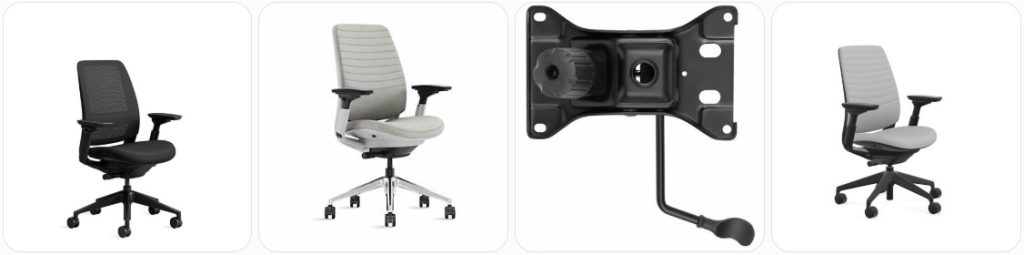
Besitu 500Lbs Office Chair Replacement Parts, w/ 6'' x 10.2" Mounting Holes Chair Base Heavy Duty Plate Swivel Tilt Control Seat Mechanism for Executive and Gaming Chairs

HYEJDRV Heavy Duty 500LBs Office Chair Tilt Control Mechanism Replacement Parts, Office Chair Swivel Tilt Base W/6" x 10.2" Mounting Holes - Black

Omyoffice 5.5” Office Chair Gas Lift Cylinder Replacement, Class 4 Piston | Heavy-Duty 1000 lbs, Hydraulic Pneumatic Gas Lift, Universal Fit Most Executive Gaming Desk Chairs, Black
How much does it cost to repair a Steelcase Series 2?
- Gas cylinder replacement: Usually around $25 to $70 for the part if you repair it yourself. Professional replacement can cost around $60 to $140 depending on labor. For a Steelcase Series 2 still under warranty, check with Steelcase first before buying a generic cylinder.
- Replacement caster set: Usually around $20 to $60 for a full set of five wheels. Soft-wheel casters for hard floors may cost slightly more. Make sure the stem size matches before ordering because poor-fit casters can wobble or fall out.
- Arm pad replacement: Usually around $25 to $80 for a pair, depending on whether you find exact Series 2 pads or compatible aftermarket pads. If the full arm assembly is damaged, the repair can be more expensive and is better handled through a Steelcase dealer.
- Arm assembly repair or replacement: Often around $80 to $200+ per side depending on the arm type, color, and availability. Series 2 adjustable arms are not the same as every other Steelcase chair arm, so confirm the part by model before ordering.
- Lumbar support replacement: Usually around $30 to $100 if the adjustable lumbar piece or track is broken. If the back frame is also damaged, the cost can increase because the Series 2 back assembly is model-specific.
- Seat cushion or seat pan replacement: Usually around $100 to $250+ depending on upholstery, color, and whether the complete seat assembly is needed. This repair is worth checking through Steelcase if the foam failed under normal use.
- Backrest or back frame replacement: Usually around $150 to $350+ depending on finish, upholstery, lumbar option, and local parts availability. Since the Series 2 back is a major ergonomic component, avoid generic replacements.
- Tilt mechanism replacement: Usually around $120 to $300+ for parts and labor. If the recline control, tension dial, or lock mechanism fails, the entire under-seat control may need to be replaced instead of repaired piece by piece.
- Headrest repair or replacement: Usually around $50 to $150+ depending on whether only the headrest is loose or the mounting hardware is broken. Exact Series 2 headrest compatibility matters because the mounting design is specific.
- Professional inspection or service: Usually around $40 to $100 if available locally. This may be worth it for a used Steelcase Series 2 when you are not sure whether the issue is the cylinder, tilt mechanism, seat pan, or back frame.
Order Parts for Your Broken Steelcase Series 2
- Steelcase authorized dealer: Best option for exact Steelcase Series 2 parts such as back frame, seat assembly, arm assemblies, lumbar support, headrest parts, and warranty-related repairs.
- Steelcase support or warranty channel: Best option if your chair was purchased new and may still be covered. Contact Steelcase before replacing major parts yourself because some repairs may be covered.
- Amazon replacement parts: Useful for common wear parts such as casters, gas cylinders, seat cushions, cleaning supplies, and some arm pads. Always compare size, stem, finish, and compatibility before buying.
- Used office furniture refurbishers: Good for discontinued colors, take-off parts, and used Series 2 components, but inspect photos carefully and ask whether the part came from a Steelcase Series 2, not Series 1, Amia, Leap, or Think.
When ordering parts for a broken Steelcase Series 2, start by identifying the exact problem before buying anything. A sinking chair usually points to the cylinder, while recline problems point to the under-seat control. Loose arms, cracked pads, lumbar slipping, or back-frame damage need model-specific parts. If your Series 2 still has warranty coverage, contact Steelcase or an authorized dealer first. For common non-warranty parts, you can search for Steelcase Series 2 replacement parts, office chair gas lift cylinder, or office chair caster wheels.
Besitu 500Lbs Office Chair Replacement Parts, w/ 6'' x 10.2" Mounting Holes Chair Base Heavy Duty Plate Swivel Tilt Control Seat Mechanism for Executive and Gaming Chairs
HYEJDRV Heavy Duty 500LBs Office Chair Tilt Control Mechanism Replacement Parts, Office Chair Swivel Tilt Base W/6" x 10.2" Mounting Holes - Black
Omyoffice 5.5” Office Chair Gas Lift Cylinder Replacement, Class 4 Piston | Heavy-Duty 1000 lbs, Hydraulic Pneumatic Gas Lift, Universal Fit Most Executive Gaming Desk Chairs, Black
Steelcase Series 2 Repair & Service Center Near You
The best place to find Steelcase Series 2 repair help near you is through an official Steelcase authorized dealer. Steelcase dealers can help with warranty claims, replacement parts, service questions, and model-specific repairs that generic office chair repair shops may not handle correctly. You can use the official Steelcase dealer locator here: Steelcase Authorized Dealers.
If you need help with a warranty question, replacement part request, or product support, you can also use the official Steelcase contact page: Steelcase Contact Us. When contacting them, include the chair model, purchase details, photos of the broken area, and a short description of the issue. For example, say whether the Series 2 is sinking, the back is loose, the recline control is stuck, or the armrest no longer adjusts.
Warranty Coverage for Steelcase Series 2
Steelcase Series 2 is sold with Steelcase warranty coverage, and Steelcase lists the Series 2 chair and stool as backed by the Steelcase Limited Lifetime Warranty with 12 years, multi-shift, 24/7 parts and labor coverage for the Series 2. Warranty terms can depend on country, seller, proof of purchase, product condition, and whether the chair was used normally.
Warranty may help with defects in covered parts, but it usually does not cover abuse, incorrect installation, unauthorized modification, accidental damage, normal cosmetic wear, improper cleaning, or damage from using the wrong replacement parts. If your Steelcase Series 2 was bought used, refurbished, or from a third-party marketplace, coverage may be different, so it is best to verify directly with Steelcase or an authorized dealer.
Before paying for major repairs like a broken back frame, failed tilt mechanism, defective arm assembly, or collapsed seat cushion, check the official Steelcase warranty page here: Steelcase Warranty. Keep your receipt, order confirmation, product tag photos, and clear images of the problem ready when asking for warranty help.
Steelcase Series 2 Diagram & Manual
For Steelcase Series 2 diagrams, assembly information, adjustment instructions, and user guides, use the official Steelcase assembly instructions page: Steelcase Assembly Instructions. On that page, look for the Steelcase Series 2 section, where Steelcase provides Series 2 assembly videos, adjustability video, assembly instructions, headrest assembly instructions, and user guide resources.
The manual is especially useful if your chair has a loose headrest, back attachment issue, arm adjustment problem, recline confusion, or seat-height control issue. It can help you confirm how the chair is supposed to be assembled before you assume a part is broken. If you bought a used Series 2, reviewing the official guide is a good idea because some chairs may be missing lumbar parts, wrong casters, wrong arms, or an incorrectly installed headrest.
Tips to Make Your Steelcase Series 2 Last Longer
- Use the comfort dial correctly: Do not force the recline tension dial past its normal range. If the Series 2 recline feels too tight or too loose, adjust gradually while seated and test each setting before turning more.
- Keep the Air LiveBack area clean: Dust and debris can collect around the flexible back support and lumbar area. Clean it gently with a soft cloth so the back support and adjustable lumbar can move without binding.
- Do not lift the chair by the arms: Series 2 arms are adjustable parts, not carry handles. Lifting the chair by the arms can loosen the arm posts, damage the height lock, or make the pads wobble.
- Use the right casters for your floor: Carpet and hard-floor caster needs are different. Wrong casters can make the chair roll poorly, damage flooring, or stress the base and caster sockets.
- Check seat and back bolts occasionally: If your Series 2 starts clicking or rocking, inspect the underside fasteners before the looseness gets worse. Tighten gently with the correct tool and do not strip the hardware.
- Avoid harsh cleaners on arm pads and fabric: Strong chemicals can dry out arm caps, discolor fabric, or damage plastic trim. Use mild cleaner, a damp cloth, and spot testing before cleaning a visible area.
- Do not overload the chair: Steelcase lists the Series 2 chair and stool as durable enough to handle up to 400 lbs, but repeated misuse, leaning sideways, standing on the chair, or dropping into the seat can still damage components.
- Keep the cylinder and base area free of dirt: Dust and hair around the cylinder, caster stems, and base can create squeaks and rolling problems. Clean the lower chair area regularly, especially if used on carpet.
- Adjust the lumbar gently: If your Series 2 has adjustable lumbar support, move it evenly with both sides seated in the track. Forcing one side can crack the lumbar tab or make it slip later.
- Fix small noises early: A small squeak or click can turn into a loose mechanism, worn caster, or cracked mount. Inspect the chair as soon as the sound appears instead of waiting until the part fails.
Broken Steelcase Series 2 Repair FAQ
Why does my Steelcase Series 2 keep sinking?
A sinking Steelcase Series 2 usually has a worn gas lift cylinder. If the chair slowly lowers while you sit, the cylinder seal is probably failing. Replace the cylinder if the chair is out of warranty, but check Steelcase warranty support first if the chair was purchased new.
Can I replace the Steelcase Series 2 gas cylinder myself?
Yes, many owners can replace the gas cylinder with basic tools, but removing the old cylinder can be difficult if it is stuck in the base or mechanism. Make sure the replacement cylinder matches the height and fit, and avoid damaging the under-seat control while removing it.
Why is my Steelcase Series 2 backrest loose?
A loose Series 2 backrest can be caused by loose mounting hardware, an improperly installed back, or a cracked back frame. Tighten accessible fasteners carefully. If the back frame or Air LiveBack structure is cracked, contact Steelcase or an authorized dealer for the correct part.
Why does my Steelcase Series 2 recline not work?
The recline issue may come from the comfort dial, recline lock, internal tilt mechanism, or debris under the seat. First check that the recline control is fully engaged in the correct position. If the dial or lock feels broken, the under-seat mechanism may need professional replacement.
Can I replace Steelcase Series 2 arm pads?
Yes, arm pads can often be replaced if only the top surface is cracked, peeling, sticky, or worn. The important part is matching the correct Series 2 arm style. If the height-adjustment button or arm post is broken, you may need the full arm assembly instead.
Why do my Steelcase Series 2 arms keep sliding down?
If the arms slide down, the arm height lock may be worn, dirty, or broken. Clean around the adjustment button and track first. If the arm still drops after locking, the internal arm mechanism is likely damaged and may need a replacement arm assembly.
Can I fix a broken Steelcase Series 2 lumbar support?
If the lumbar support slipped out of place, you may be able to reseat it evenly on the back track. If the plastic tab, track, or lumbar piece is cracked, replacement is the better repair. Avoid forcing it because the Series 2 back frame can be damaged.
Why is my Steelcase Series 2 making squeaking noises?
Squeaking usually comes from the caster stems, cylinder socket, arm mounts, seat bolts, or recline mechanism. Clean the lower chair area, tighten accessible screws, and test one moving part at a time. Use only a small amount of suitable lubricant on metal contact points.
Can I use generic office chair wheels on Steelcase Series 2?
You can use replacement casters if the stem size and wheel type match, but not every generic wheel will fit properly. Poor-fit casters can wobble, fall out, or damage the base. If unsure, confirm the caster stem size or order through Steelcase or a dealer.
Why does my Steelcase Series 2 seat feel wobbly?
A wobbly Series 2 seat can come from loose seat bolts, a worn gas cylinder, a damaged base socket, or a failing tilt mechanism. Flip the chair over and inspect the seat-to-mechanism bolts first. If the wobble is centered around the cylinder, the cylinder may need replacement.
Is the Steelcase Series 2 back mesh replaceable?
The Series 2 back is model-specific, so replacing the back material is not the same as replacing generic mesh on a basic chair. If the back support, frame, or upholstery is damaged, contact Steelcase or a dealer to confirm the correct replacement back assembly.
Where can I buy genuine Steelcase Series 2 parts?
The best place to buy genuine Steelcase Series 2 parts is through Steelcase or an authorized Steelcase dealer. This is especially important for the back frame, seat assembly, lumbar support, tilt mechanism, headrest, and arm assemblies.
Is it worth repairing a Steelcase Series 2?
Yes, it is usually worth repairing if the chair frame, back, and mechanism are still in good condition. Small repairs like casters, arm pads, cleaning, or a gas cylinder are much cheaper than replacing the chair. Major repairs should be compared with warranty coverage first.
Can I repair a used Steelcase Series 2 chair?
Yes, a used Steelcase Series 2 can often be repaired, especially if it only needs casters, a cylinder, arm pads, cleaning, or minor tightening. Before buying parts, inspect the back frame, seat pan, arm locks, recline control, and cylinder socket so you do not spend money on a chair with major damage.
What should I check before buying replacement parts for Steelcase Series 2?
Check the exact chair model, color, arm type, lumbar option, headrest option, caster type, and the broken part location. Take photos of the chair label and damaged area. Steelcase Series 2 parts may not interchange with Series 1, Leap, Amia, Think, or Gesture parts.
Summary
Steelcase Series 2 repairs are usually very manageable if you diagnose the problem first. Sinking seats, noisy casters, loose arms, slipping lumbar, and recline issues all have different fixes, so avoid guessing and replacing random parts. For model-specific parts, warranty help, manuals, and service, Steelcase or an authorized dealer is the safest route. For simple wear items, Amazon replacement parts can be useful when compatibility is checked carefully.
Besitu 500Lbs Office Chair Replacement Parts, w/ 6'' x 10.2" Mounting Holes Chair Base Heavy Duty Plate Swivel Tilt Control Seat Mechanism for Executive and Gaming Chairs
HYEJDRV Heavy Duty 500LBs Office Chair Tilt Control Mechanism Replacement Parts, Office Chair Swivel Tilt Base W/6" x 10.2" Mounting Holes - Black