
If your Hbada J1 is squeaking, sinking, or just not feeling as solid as it used to, don’t stress. Most problems come down to a few replaceable parts and some basic maintenance. With a little DIY effort, you can get your J1 feeling new again.
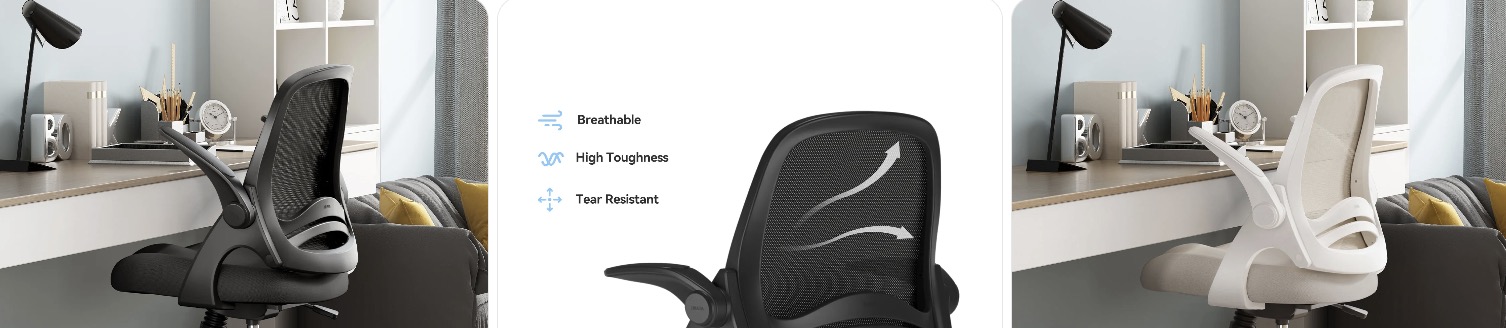
Quick Fix to Common Hbada J1 Problems
Sinking Hbada J1 (chair won’t stay up): When your J1 slowly drops while you sit, the gas lift cylinder is usually failing. Swapping it for a compatible replacement fixes the issue fast. Look for a quality unit by searching for a office chair gas lift cylinder replacement and match overall length and diameter.
Wobbly or tilted feeling at the base: If the chair feels like it’s leaning or shifting, check that all five casters are seated fully in the base and that the gas lift is firmly pressed into both the base and the mechanism. Replace any cracked base or bent cylinder and make sure the new parts match the original dimensions.
Flip-up armrests loose or squeaky: The J1’s flip-up arms can loosen at the hinges and mounting bolts. Tighten all visible screws on the arm brackets and under the seat using a metric Allen key and Phillips screwdriver. If the arms are cracked or won’t hold position, look for compatible flip-up armrest replacements similar to flip-up office chair armrests.
Seat cushion feels flat or uneven: Over time, the J1’s cushion can compress, causing discomfort or hip pressure. First, make sure none of the seat mounting screws are loose or missing. If the foam is clearly worn out, consider replacing the entire seat assembly or adding a supportive cushion like those found by searching for a memory foam seat cushion.
Noisy or rough-rolling wheels: Hair and grit can jam the small J1 casters and create grinding noises. Pull each wheel out, clean the stems and sockets, and remove any wrapped debris. If the wheels are chipped or still rough, upgrade to soft, floor-safe casters such as rollerblade-style office chair wheels that match your stem size.
Backrest creaks or feels flexy: Creaks in the J1’s “penguin” mesh back often come from slightly loose bolts or the connection between the backrest and seat. Tighten all fasteners at the back support and check that the bracket isn’t cracked. If the mesh or frame is damaged, you may need a full backrest assembly from Hbada or a compatible parts supplier.

Omyoffice Office Chair Cylinder Replacement,Heavy-Duty Highest End Class 4 Hydraulic Pneumatic Piston, Universal Size Fits Most Chairs

Besitu 500Lbs Office Chair Replacement Parts, w/ 6'' x 10.2" Mounting Holes Chair Base Heavy Duty Plate Swivel Tilt Control Seat Mechanism for Executive and Gaming Chairs

Omyoffice 5.5 inch Office Chair Gas Lift Cylinder-Office Chair Replacement Parts,Universal Size Fits Most Chairs,Heavy Duty Gas Lift Hydraulic/Pneumatic Piston(Black)
How much does it cost to repair a Hbada J1?
- Basic tune-up (tightening and lubrication): If you already have tools, this can be free. Otherwise, expect around $15–$30 for basics like a metric Allen key set and silicone spray lubricant.
- Gas lift cylinder replacement: A compatible gas lift generally costs about $20–$40. It’s one of the most common repairs and can completely solve sinking issues if the rest of the chair is in good shape.
- Caster (wheel) replacement: A full set of upgraded casters usually costs $20–$50 depending on the style and weight rating. This can dramatically improve rolling smoothness and floor protection.
- Armrest replacement: New flip-up armrests or pads often run $25–$60 for a pair, depending on how close they are to the original Hbada style and build quality.
- Seat or backrest assembly: Full seat or back assemblies are typically pricier, often $60–$140+, and availability may vary. At that price range, compare your total repair cost to a brand-new chair.
- Professional repair service: A local chair repair tech or ergonomic service might charge $50–$120 or more for labor, plus the cost of parts. This can be worth it if you don’t want to disassemble the chair yourself.
Order Parts for Your Broken Hbada J1
- Official Hbada store and support: Check Hbada’s official site first for warranty-covered parts and guidance on what’s available for your J1 model.
- Amazon: For general wear items like gas lifts, casters, and cushions, you can browse compatible options by searching for Hbada office chair parts and comparing specs and reviews.
- eBay and local resellers: Occasionally, you’ll find salvaged or open-box Hbada J1 parts pulled from returns or damaged units. Always confirm the shape and color match your chair before buying.
Ordering parts for your broken Hbada J1 is easier if you gather details first. Take photos of the damaged parts, measure key dimensions like cylinder length and caster stems, and keep your original order info nearby. If compatibility is unclear, send these details to Hbada support so they can point you to the right replacement.
Hbada J1 Repair & Service Center Near You
Hbada doesn’t run physical repair shops everywhere, but their support team can help you identify the correct parts and advise on service options. If you need guidance or think the issue might be covered by warranty, start with Hbada’s official contact page at hbada.com/pages/contact-us. Share your order number, photos of the chair, and a short description of the problem so they can recommend the best repair path near you or via mail.
Warranty Coverage for Hbada J1
Hbada advertises a multi-year warranty (typically three years on parts) and lifetime customer support for many of its chairs, covering defects in materials and workmanship for a set period after purchase. Exact terms can vary by region and where you bought the J1, so it’s important to read the current policy on their official Warranty & Service page and check your original receipt. Contact Hbada quickly if you suspect a warranty issue, especially for structural failures, broken mechanisms, or defective components.
Hbada J1 Diagram & Manual
For exploded diagrams, part names, and assembly steps, rely on Hbada’s own user manual hub instead of random PDFs. Hbada hosts manuals, assembly guides, and videos for its chairs on a dedicated support page. Visit the user manual and assembly guide hub at hbada.com/pages/hbada-user-manual-assembly-guide, then look for the Hbada J1 or the specific model number from your order to download the latest instructions.
Tips to Make Your Hbada J1 Last Longer
- Avoid dropping into the chair or rocking violently; that kind of shock load can wear out the gas lift and tilt mechanism. If you like to recline heavily, consider pairing the J1 with a supportive under-desk footrest so you’re not slamming back into the chair.
- Stay within the recommended weight rating so the cushion, base, and casters don’t fail prematurely. Heavier users might want to upgrade to a stronger base such as a heavy-duty office chair base that matches the J1’s gas lift and caster stems.
- Clean hair and grit from the casters every few weeks. When the wheels start to feel rough, swap to rollerblade-style office chair wheels to protect your floors and reduce rolling resistance.
- Check arm, seat, and backrest bolts a few times a year and snug them up with a metric Allen key set. Fixing small wobbles early helps prevent cracked brackets and noisy joints later.
- Use gentle cleaners on the mesh and plastic shell—avoid harsh solvents or abrasive pads that could weaken or scratch surfaces. A mild upholstery cleaner for office chairs plus a soft cloth is usually enough.
- Get in the habit of quick checkups: if you hear a new squeak or feel a change in recline, stop and inspect it. Keeping a small office chair repair kit nearby makes it easy to tighten, lube, or replace small parts before they cause bigger damage.
Conclusion
A broken Hbada J1 doesn’t automatically mean shopping for a new chair. Most issues come down to a tired gas lift, worn casters, or loose hardware. With a few targeted replacements, some basic tools, and Hbada’s manuals, you can keep your J1 comfy and reliable for years.

