
DXRacer Craft parts can be a little tricky because some pieces look universal, but the fit still matters. This guide covers the main DXRacer Craft replacement parts, where to buy them online, what to check before ordering, and how to avoid damaging your chair again.
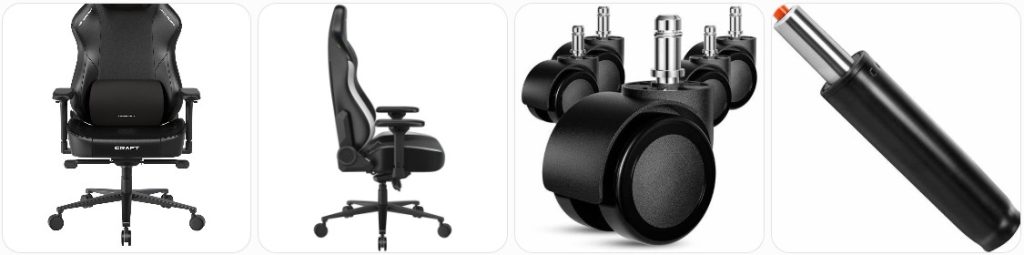
Buy DXRacer Craft Parts Online
If your DXRacer Craft chair is squeaking, sinking, leaning, wobbling, or missing a part, the easiest place to start is with the common replacement parts below. The Craft Series uses parts such as 4D armrests, a multi-functional tilt mechanism, Class 4 hydraulics, aluminum base, and 2.36-inch PU casters, so always compare your chair’s size, mounting holes, and part style before buying.
Replace broken, loose, cracked, or sticky Craft armrests with compatible 4D armrest assemblies or armrest pads. Match the mounting hole spacing under the seat before ordering. » find on amazon / find on ebay
Good for peeling, cracked, uncomfortable, or scratched arm pads when the armrest base still works. Check whether your Craft uses screw-on pads or a full armrest assembly. » find on amazon / find on ebay
This part sits under the seat and controls rocking, tilt lock, height control, and chair balance. Replace it if the chair leans, rocks oddly, or the lever no longer works. » find on amazon / find on ebay
A sinking Craft chair usually means the gas lift is failing. Look for a Class 4 replacement cylinder with the right height range and standard office chair taper fit. » find on amazon / find on ebay
Replace the base if one leg is cracked, bent, loose, or the chair wobbles even after checking the casters and gas cylinder. Confirm the center cylinder socket size. » find on amazon / find on ebay
Craft chairs commonly use 2.36-inch PU casters. Replace noisy, cracked, stuck, or floor-scratching wheels with the same stem style and wheel size. » find on amazon / find on ebay
Replace the head pillow if the magnets are weak, the cover is damaged, or the foam no longer supports your neck. Look for Craft-style magnetic pillow compatibility. » find on amazon / find on ebay
The Craft uses integrated lumbar support, so internal lumbar parts are harder to match. Contact DXRacer first, then compare knobs, brackets, and internal support pieces carefully. » find on amazon / find on ebay
If the backrest will not recline or lock properly, the issue may be the recline lever, side bracket, spring, or backrest hinge area instead of the tilt plate. » find on amazon / find on ebay
Use matching bolts for the backrest brackets, armrests, and tilt plate. Avoid random hardware that is too long, too short, or the wrong thread pitch. » find on amazon / find on ebay
Side covers hide the backrest brackets and keep the chair looking clean. Replace cracked covers, missing screw caps, or broken decorative trim after backrest repairs. » find on amazon / find on ebay
Some Craft models and modular setups may use an extendable footrest. Check whether your chair originally included one before buying rails, brackets, pads, or a full footrest kit. » find on amazon / find on ebay
Buy DXRacer Craft Parts From a Local Authorized Dealer or Repairman Near You
For exact-fit DXRacer Craft parts, start with the official DXRacer After-Sales Service page or the DXRacer contact page. Give them your order number, model name, size, upholstery, color, and photos of the broken part. If you bought the chair locally, ask the store if they can order Craft-specific parts for you. A local office chair repairman can also help remove stuck gas cylinders, replace casters, swap the tilt mechanism, tighten backrest brackets, and confirm whether a universal part will actually fit before you spend money.
Tips for Ordering DXRacer Craft Replacement Parts
- Confirm your exact Craft model and size: DXRacer Craft chairs can come in different sizes and versions, so do not order parts based only on the word “Craft.” Check your order email, product label, or original listing.
- Match the Craft armrest type: The Craft Series uses 4D armrests, so a basic 2D or 3D armrest may bolt on differently or feel wrong when adjusted.
- Check the tilt mechanism bolt pattern: Measure the under-seat mounting holes before buying a replacement multi-functional tilt mechanism. A close-looking plate can still have the wrong spacing.
- Do not guess on the gas lift height: A cylinder that is too tall or too short can change the sitting height and make the Craft uncomfortable, even if it fits the base.
- Use the same caster stem style: The wheel size matters, but the metal stem is just as important. Compare the old caster stem before ordering new 2.36-inch PU casters.
- Contact DXRacer for integrated lumbar issues: Since the Craft has built-in lumbar support, internal lumbar parts are not as simple as replacing a loose pillow.
- Save all screws during disassembly: Craft backrest brackets, side covers, armrests, and the tilt plate may use different screw lengths. Keep them separated and labeled.
- Take photos before removing parts: Photos help you remember the correct orientation of the tilt lever, recline handle, side covers, washers, and brackets.
- Compare left and right parts carefully: Armrests, side covers, brackets, and recline parts may be side-specific. Do not assume the left and right pieces are interchangeable.
- Buy official parts when safety is involved: For load-bearing parts like the base, gas lift, tilt mechanism, and backrest brackets, official or exact-compatible parts are safer than unknown generic replacements.
Tools Needed to Repair DXRacer Craft
- Metric Allen Wrench Set: Most gaming chair repairs involve hex bolts. Use the correct size so you do not strip the Craft backrest, armrest, or tilt mechanism bolts.
- Phillips Screwdriver Set: Helpful for side covers, small trim pieces, screw caps, and plastic covers around the backrest bracket area.
- Rubber Mallet: Useful for loosening a stuck base or cylinder without hitting the chair with a metal hammer.
- Pipe Wrench: Often needed when the gas lift cylinder is stuck inside the tilt mechanism. Wrap the cylinder if you want to reduce scratches.
- Office Chair Cylinder Removal Tool: A safer option for removing stubborn gas cylinders from the Craft base or tilt plate without excessive force.
- Adjustable Wrench: Useful for holding nuts, tightening certain hardware, and working around brackets where a socket may not fit.
- Metric Socket Set: Speeds up removal of larger bolts on the tilt mechanism, armrest mounts, and underside hardware when the bolt heads allow it.
- Blue Threadlocker: Use a small amount on bolts that repeatedly loosen, especially under the seat. Avoid permanent red threadlocker unless you know what you are doing.
- Measuring Tape: Use it to measure bolt spacing, caster wheel diameter, gas lift height, and tilt mechanism plate dimensions before ordering parts.
- Work Gloves: Protects your hands when pulling casters, handling metal brackets, or removing a stuck cylinder from the base.
DXRacer Craft Diagram & Manual
For the safest repair information, use the official DXRacer After-Sales Service page and the official DXRacer Craft Series page. The after-sales page is especially useful because it includes Craft-related replacement part categories and assembly/disassembly guidance for parts like the 4D adjustable armrest, multi-functional tilt mechanism, Class 4 hydraulics, aluminum base, and 2.36-inch PU casters.
If you need a diagram for your exact chair, check the printed manual that came inside the box, your order page, or contact DXRacer with your model information. A diagram from a different DXRacer series may look similar, but it may not show the same Craft backrest, armrest, lumbar, base, or tilt mechanism layout.
How to Prevent Damage to DXRacer Craft Parts
- Do not sit down hard on the front edge: The Craft has a thick seat cushion, but dropping your weight onto the front edge can stress the tilt plate, gas lift, and seat frame over time.
- Keep the recline angle within the chair’s intended range: Avoid forcing the backrest past its stopping point. If the recline lever resists, inspect the mechanism instead of pulling harder.
- Tighten the backrest bolts regularly: Loose side bolts can make the backrest wiggle and can also damage side covers, brackets, and screw holes.
- Do not use the armrests to lift the chair: Craft 4D armrests are adjustable support parts, not lifting handles. Lifting from the armrests can loosen or crack the mounts.
- Clean the casters often: Hair, thread, dust, and carpet fibers can jam the 2.36-inch PU casters and make the chair drag instead of roll smoothly.
- Use the chair on a suitable floor surface: Rough floors can wear casters faster, while deep carpet can strain the base and wheels when you force the chair to roll.
- Do not over-tighten plastic covers: Side covers and trim pieces can crack if screws are tightened too aggressively.
- Use the lumbar knob gently: The Craft’s integrated lumbar support should be adjusted smoothly. If it feels stuck, stop and inspect it instead of forcing the knob.
- Avoid standing on the wheelbase: The aluminum base is strong for normal sitting use, but standing on the legs can bend or stress the base unevenly.
- Keep food, sweat, and spills off the upholstery: Wipe the Craft seat and backrest regularly so moisture and dirt do not damage the surface or stitching.
DXRacer Craft Parts FAQ
Where can I buy official DXRacer Craft replacement parts?
Start with the official DXRacer After-Sales Service page or contact DXRacer directly. They are the best option for exact Craft parts like armrests, tilt mechanisms, hydraulics, bases, and casters.
Are DXRacer Craft parts universal?
Some parts may use common office chair sizing, but you should not assume every part is universal. Armrests, tilt mechanisms, side covers, lumbar parts, and footrest parts can vary by model, size, and version.
What gas lift does the DXRacer Craft use?
The Craft Series is commonly listed with Class 4 hydraulics. When replacing it, check the cylinder height, taper fit, and sitting height range before buying.
Can I replace the DXRacer Craft armrests?
Yes, the Craft uses 4D adjustable armrests, and replacements may be available through DXRacer or marketplaces. Match the mounting holes and left/right orientation before ordering.
Why is my DXRacer Craft chair sinking?
A sinking chair usually points to a worn gas lift cylinder. Replacing the Class 4 gas lift is usually the main fix if the chair slowly lowers while you sit.
Why does my DXRacer Craft wobble?
Wobbling can come from loose backrest bolts, worn casters, a damaged wheelbase, a failing gas lift, or a loose tilt mechanism under the seat. Check each part before ordering replacements.
Can I replace only the armrest pad instead of the whole armrest?
Sometimes, yes. If the 4D adjustment still works and only the top pad is cracked or peeling, an armrest pad replacement may be enough. Check whether the pad is removable on your exact Craft armrest.
What size casters does the DXRacer Craft use?
The Craft after-sales information references 2.36-inch PU casters. Still, check your existing caster stem and wheel size before buying replacements.
Can I add a footrest to a DXRacer Craft?
Some DXRacer information mentions extendable footrest compatibility with the Craft Series, but you should confirm with DXRacer before buying a kit because fit may depend on the exact model and mounting points.
Where can I find a DXRacer Craft manual or diagram?
Check your original box/manual first, then use the official DXRacer After-Sales Service page or contact DXRacer with your model and order details. Avoid using diagrams from a different DXRacer series unless DXRacer confirms compatibility.
Is it worth repairing a DXRacer Craft chair?
Yes, if the main frame and upholstery are still in good shape. Replacing casters, armrests, the gas lift, or the tilt mechanism can be much cheaper than replacing the whole chair.
Should I buy DXRacer Craft parts from Amazon or eBay?
Amazon and eBay are useful for generic-compatible parts, but official DXRacer parts are usually safer for exact fit. For load-bearing parts, compare dimensions carefully or contact DXRacer first.
Summary
DXRacer Craft parts are usually easy to replace when you identify the exact failed part first. For common issues, check the 4D armrests, gas lift, tilt mechanism, aluminum base, casters, and head pillow. Amazon and eBay are convenient for compatible parts, but official DXRacer support is the better choice for exact-fit or warranty-related replacements. Take photos, measure everything, and avoid forcing parts that do not line up.

Besitu 500Lbs Office Chair Replacement Parts, w/ 6'' x 10.2" Mounting Holes Chair Base Heavy Duty Plate Swivel Tilt Control Seat Mechanism for Executive and Gaming Chairs

HYEJDRV Heavy Duty 500LBs Office Chair Tilt Control Mechanism Replacement Parts, Office Chair Swivel Tilt Base W/6" x 10.2" Mounting Holes - Black
