
Fixing a DXRacer Craft chair is usually pretty doable if you know which part is acting up. Most issues come from loose bolts, worn casters, a sinking gas lift, a sticky recline lever, or upholstery wear. This guide walks you through the common fixes, costs, parts, warranty, and maintenance.
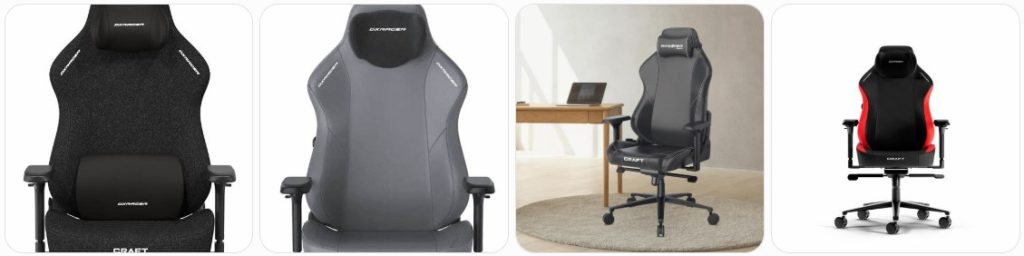
Quick Fix to Common DXRacer Craft Problems
DXRacer Craft chair keeps sinking: If your DXRacer Craft slowly drops while you sit, the gas lift cylinder is usually failing. First, check that the height lever is not stuck or pressing the release button. If the lever is fine, replace the hydraulic piston with a compatible gaming chair gas lift cylinder.
DXRacer Craft height adjustment does not work: A Craft chair that will not raise or lower may have a disconnected height lever, misaligned tilt mechanism, or bad gas lift. Turn the chair over and inspect the lever connection under the seat. If the lever moves but the cylinder does nothing, the hydraulic piston is likely the part that needs replacing.
DXRacer Craft gas lift is stuck in the base: The cylinder is pressure-fitted into the wheelbase and tilt plate, so it can be stubborn. Apply penetrating oil around the joint, wait, then twist the cylinder loose with a pipe wrench. A chair cylinder removal tool can make this much easier and reduce damage.
DXRacer Craft recline is not working: The Craft uses a reclining backrest and multi-function tilt mechanism, so check both controls. Make sure the recline lever is not locked and the backrest bolts are not overtightened. If the lever moves but the backrest does not, the recline bracket or internal backrest mechanism may need service or replacement.
DXRacer Craft backrest will not lock: If the backrest reclines but will not stay in place, the recline lever may not be fully engaging the locking teeth. Sit upright, move the backrest to the desired angle, then slowly pull the lever into position. If it slips under body weight, stop using recline mode until the mechanism is repaired.
DXRacer Craft rocking function is too loose: The rocking tension may be set too soft for your weight. Turn the large tension knob under the seat clockwise to increase resistance. Test it a few turns at a time. If the chair still rocks too easily, inspect the tilt mechanism for worn springs, loose bolts, or damaged mounting holes.
DXRacer Craft rocking function feels stuck: If the seat does not rock at all, check that the tilt lock is released. On many gaming chairs, users accidentally leave the tilt locked and think the mechanism is broken. Turn the tension knob counterclockwise to soften resistance. If the lever feels jammed, inspect the tilt plate before forcing it.
DXRacer Craft tilt mechanism clicks loudly: Some light clicking can happen when the tilt lock engages, but loud popping usually means loose seat bolts, worn tilt hardware, or movement between the gas lift and mechanism. Tighten all underside bolts evenly. If the sound comes from inside the metal tilt plate, consider replacing the gaming chair tilt mechanism.
DXRacer Craft armrest wobbles: The Craft uses adjustable armrests, so a little movement can happen at the sliding parts. However, heavy wobble usually comes from loose underside bolts or worn armrest posts. Tighten the mounting bolts under the seat first. If the top pad or height post is loose, the armrest assembly may need replacement.
DXRacer Craft 4D armrest button is stuck: Dust, crumbs, or dried residue can jam the armrest adjustment buttons. Wipe around the button and gently move the armrest while pressing the release. Do not flood it with oily lubricant. If the button stays sunken or does not spring back, the internal latch may be broken.
DXRacer Craft arm pad is cracked: Cracked arm pads usually come from pressure, age, or repeated leaning on one side. If the pad is only slightly split, an armrest cover can hide the damage temporarily. For a cleaner repair, replace the armrest top or full armrest with a compatible gaming chair armrest replacement.
DXRacer Craft magnetic head pillow keeps falling: Make sure the magnetic head pillow is aligned with the correct backrest area and not attached too low or too high. Clean the pillow and upholstery surface so there is no dust reducing grip. If the magnets feel weak or the pillow is damaged, contact DXRacer for a replacement pillow.
DXRacer Craft head pillow feels uncomfortable: The magnetic pillow works best when positioned near your neck curve, not directly behind the top of your head. Move it slightly up or down until it supports your neck without pushing your chin forward. If it still feels wrong, try using the chair briefly without the pillow.
DXRacer Craft lumbar support feels too hard: The Craft has built-in lumbar support, so the fix is usually posture and positioning rather than removing a cushion. Sit fully back in the chair and adjust the recline angle slightly. If the support still feels too aggressive, adding a thin back cushion may soften the pressure without modifying the chair.
DXRacer Craft lumbar support does not feel supportive: If the lumbar area feels too flat, make sure you are sitting deep enough into the seat. Gaming chairs with sculpted backs need your hips positioned against the backrest. If you sit too far forward, the lumbar section will not contact your lower back properly.
DXRacer Craft seat feels uneven: An uneven seat is often caused by assembly alignment, loose side bolts, or a caster not fully inserted. Put the chair on a level floor, check all five wheels, then loosen and retighten the seat and backrest bolts evenly. If the seat plate is bent, it may need replacement.
DXRacer Craft backrest leans to one side: Check the side brackets where the backrest bolts to the seat. If one side was tightened fully before the other during assembly, the backrest can sit crooked. Loosen both sides slightly, center the backrest, then retighten each bolt gradually. Damaged bracket holes may require warranty support.
DXRacer Craft side covers are loose: The Craft has decorative side covers around the backrest bracket area. If a cover is loose, remove it carefully and check whether the clip, screw, or magnetic attachment is seated correctly. Do not glue it permanently until you confirm the backrest bolts underneath do not need future adjustment.
DXRacer Craft casters are not rolling smoothly: Hair, dust, and carpet fibers often wrap around the wheel axles. Pull each caster out, clean the axle area, and inspect the wheel surface. If the wheels are cracked or flat-spotted, replace them with compatible gaming chair replacement casters.
DXRacer Craft wheels scratch the floor: Standard casters can drag grit across hardwood, vinyl, or laminate. Clean the wheels regularly and use a chair mat if needed. For smoother rolling, upgrade to soft polyurethane or rollerblade-style rollerblade office chair wheels, but measure the caster stem first.
DXRacer Craft wheelbase is cracked: Stop using the chair if the five-star base is cracked, bent, or flexing. This is a structural safety issue, not a cosmetic problem. Do not repair it with glue or tape. Replace the base with a properly rated compatible wheelbase or contact DXRacer support for an official replacement part.
DXRacer Craft seat cushion feels too firm: The Craft is designed with a firmer gaming-chair seat, so some firmness is normal. Give the foam time to break in, especially if the chair is new. If it causes pressure points, adjust the seat height and recline angle, or use a thin seat cushion that does not raise you too much.
DXRacer Craft seat cushion is sagging: Foam sag usually happens after long use, heavy daily sitting, or uneven sitting posture. Check that the seat plate and frame are not loose first. If the cushion itself has collapsed, the cleanest repair is replacing the seat base or cushion assembly rather than stuffing extra foam under the upholstery.
DXRacer Craft leatherette is peeling: Peeling leatherette is usually surface wear from sweat, friction, sunlight, or harsh cleaners. Clean the area gently and avoid alcohol-based products. A leather and vinyl repair kit can improve small spots, but large peeling areas may require reupholstery or replacement parts.
DXRacer Craft fabric is stained: Blot spills immediately instead of rubbing them into the fabric. Check the cleaning label before using water or solvent cleaners. Use a mild upholstery cleaner on a hidden area first. Avoid soaking the cushion because moisture trapped under the fabric can create odor and damage the foam.
DXRacer Craft stitching is coming loose: Small loose threads can be trimmed carefully, but do not pull them because that can open the seam. If a seam is separating, use upholstery thread or contact a local upholstery repair shop. If the chair is still under warranty, ask DXRacer before sewing or modifying the cover.
DXRacer Craft makes squeaking noises: Squeaks usually come from the tilt plate, backrest brackets, armrest mounts, or caster sockets. Tighten all visible bolts first. Then apply a small amount of dry silicone lubricant spray only to metal contact points, keeping it away from the upholstery and floor.
DXRacer Craft bolts keep loosening: Repeated movement can loosen seat, backrest, and armrest bolts. Remove one bolt at a time, clean the threads, and reinstall it firmly. If the same bolt keeps backing out, use removable blue threadlocker. Do not use permanent threadlocker because future disassembly may become difficult.
DXRacer Craft footrest accessory feels unstable: Some Craft versions may support an optional retractable footrest accessory. If yours has one, check the slide rails, mounting screws, and extension brackets. Do not sit or stand on the footrest. If the rail is bent, replace the footrest assembly rather than forcing it back into shape.
DXRacer Craft arrived with a broken part: Photograph the damaged part, box, shipping label, and chair label before assembly. Do not throw away the packaging immediately. Contact DXRacer support or the retailer with your order number. For a brand-new chair, replacement parts or warranty help are usually better than doing a DIY repair right away.

HYEJDRV Heavy Duty 500LBs Office Chair Tilt Control Mechanism Replacement Parts, Office Chair Swivel Tilt Base W/6" x 10.2" Mounting Holes - Black

Omyoffice 5.5” Office Chair Gas Lift Cylinder Replacement, Class 4 Piston | Heavy-Duty 1000 lbs, Hydraulic Pneumatic Gas Lift, Universal Fit Most Executive Gaming Desk Chairs, Black

Besitu 500Lbs Office Chair Replacement Parts, w/ 6'' x 10.2" Mounting Holes Chair Base Heavy Duty Plate Swivel Tilt Control Seat Mechanism for Executive and Gaming Chairs
How much does it cost to repair a DXRacer Craft?
- Basic tightening and adjustment: $0 to $20 if you do it yourself. Most DXRacer Craft alignment, wobble, and squeak issues can start with tightening the backrest bracket bolts, armrest bolts, tilt plate bolts, and caster sockets.
- Gas lift cylinder replacement: $25 to $70 for a compatible replacement cylinder. If you pay someone to remove the old stuck cylinder and install the new one, total cost may reach $70 to $150.
- Gas cylinder removal tool: $15 to $45. This is not always required, but it can save time if the hydraulic piston is tightly stuck in the DXRacer Craft base or tilt mechanism.
- Replacement caster set: $20 to $60. Standard chair wheels are cheaper, while larger rollerblade-style wheels may cost more. Always compare stem size before installing aftermarket casters on a Craft wheelbase.
- Replacement wheelbase: $40 to $100 for an aftermarket base, or more for an official DXRacer part depending on availability. Replace the base immediately if it is cracked or flexing.
- Replacement tilt mechanism: $50 to $130 for the part. Labor may add $50 to $100. For the Craft, match the bolt pattern, lever direction, tilt function, and gas lift opening before ordering.
- Recline mechanism repair: $60 to $150 depending on whether the side bracket, recline lever, or internal backrest hardware is damaged. A genuine DXRacer part is recommended because backrest brackets are model-specific.
- Replacement armrest: $30 to $90 for one armrest or $60 to $150 for a pair. DXRacer Craft armrests need the correct mount pattern and height/angle adjustment style.
- Magnetic head pillow replacement: $25 to $70 depending on color, material, and availability. Official DXRacer pillows are best because the magnet placement and shape should match the Craft backrest.
- Leatherette repair kit: $10 to $35 for small scuffs, cracks, or peeling spots. This is a cosmetic repair only and will not fully restore badly peeling upholstery.
- Fabric cleaning or upholstery treatment: $10 to $50 for cleaner, brush, microfiber cloths, and deodorizer. Professional upholstery cleaning may cost $40 to $120 depending on the shop.
- Seat cushion or seat base replacement: $80 to $200 depending on part availability. Since the Craft seat shape, stitching, and foam are model-specific, contact DXRacer before buying generic cushions.
- Backrest replacement: $100 to $250 depending on the model, color, upholstery, and shipping. A broken reclining bracket or torn upholstery may make a full backrest replacement more practical than repair.
- Professional chair repair service: $50 to $150 for simple work and $150+ for larger repairs. Because the DXRacer Craft is a premium gaming chair, repair can be worth it if the frame and upholstery are still in good condition.
- Warranty replacement part: $0 to shipping cost if the part is covered. Contact DXRacer with photos, order number, serial/model information, and a clear description before buying parts yourself.
Order Parts for Your Broken DXRacer Craft
- DXRacer official support: Start with the official DXRacer Contact Us page if you need a model-specific Craft part, warranty help, or confirmation about compatibility.
- DXRacer after-sales service: Use the official DXRacer After-Sales Service page for replacement-part guidance, service steps, and damaged-part support.
- Amazon aftermarket parts: Amazon is useful for common parts such as gaming chair gas lift cylinders, casters, tilt mechanisms, wheelbases, repair kits, and tools.
- Local upholstery or office-chair repair shops: These can help with stitching, cushion wear, squeaks, gas lift removal, and basic mechanical repairs, but model-specific parts should still be confirmed through DXRacer first.
Before ordering DXRacer Craft parts, check the label under the chair and write down the exact model, size, upholstery type, and color. The Craft series may come in different sizes and material versions, so a part that fits one Craft chair may not match another perfectly. Take clear photos of the broken part, the bolt holes, the underside mechanism, and the full chair.
For common parts like casters and gas cylinders, measure before buying. For model-specific parts like the backrest, seat base, armrests, magnetic pillow, side covers, and recline brackets, official DXRacer support is usually the safest route. Do not drill new holes, cut upholstery, or permanently glue structural parts until you know whether the chair is covered by warranty.
HYEJDRV Heavy Duty 500LBs Office Chair Tilt Control Mechanism Replacement Parts, Office Chair Swivel Tilt Base W/6" x 10.2" Mounting Holes - Black
Omyoffice 5.5” Office Chair Gas Lift Cylinder Replacement, Class 4 Piston | Heavy-Duty 1000 lbs, Hydraulic Pneumatic Gas Lift, Universal Fit Most Executive Gaming Desk Chairs, Black
Besitu 500Lbs Office Chair Replacement Parts, w/ 6'' x 10.2" Mounting Holes Chair Base Heavy Duty Plate Swivel Tilt Control Seat Mechanism for Executive and Gaming Chairs
DXRacer Craft Repair & Service Center Near You
DXRacer does not usually work like a car brand with a public repair center in every city. For a broken DXRacer Craft, the best starting point is the official DXRacer Contact Us page. Use it to ask about replacement parts, warranty coverage, after-sales support, and the correct repair steps for your exact Craft model.
You can also check the official DXRacer After-Sales Service page for guidance on damaged parts and replacement support. If the chair is still under warranty, contact DXRacer before paying a local repair shop. They may request your order number, photos, product label, shipping information, and a description of what failed.
If you need local help, search for office chair repair, gaming chair repair, furniture repair, or upholstery repair near you. A local repairer can usually help with gas lift removal, caster replacement, loose bolts, squeaks, upholstery stitching, and basic mechanical work. However, for DXRacer Craft-specific parts such as the backrest, armrests, side covers, magnetic head pillow, and recline brackets, official DXRacer support is still the better source.
Warranty Coverage for DXRacer Craft
DXRacer warranty coverage can depend on the country, seller, order date, and exact chair model. For the Craft series, always check the official DXRacer Warranty Policy page and the warranty statement connected to your order.
In general, warranty help is usually meant for manufacturing defects, failed parts, and problems that happen under normal use. It may not cover damage from misuse, accidental breakage, improper assembly, stains, scratches, heavy impact, unauthorized modification, or normal wear on upholstery and cushions.
Before filing a warranty claim for your DXRacer Craft, prepare the following:
- Proof of purchase: Keep your order confirmation, invoice, receipt, or retailer purchase record.
- Chair model details: Take a clear photo of the label under the seat so DXRacer can identify the exact Craft version.
- Photos of the damage: Show the broken part from several angles, including close-up and full-chair photos.
- Short problem description: Explain when the issue started, what function failed, and whether the chair was recently assembled or moved.
- Do not throw parts away: Keep the broken part and original packaging until DXRacer or the retailer tells you what to do next.
- Do not modify the chair first: Drilling, welding, cutting, gluing, or using non-compatible parts can make warranty approval harder.
If your Craft chair is out of warranty, you may still be able to buy replacement parts through DXRacer after-sales support or use compatible aftermarket parts for basic repairs like casters, gas cylinders, and some tilt mechanisms.
DXRacer Craft Diagram & Manual
For DXRacer Craft diagrams, assembly help, and usage guidance, start with the official DXRacer Craft Series page. The Craft page includes a specifications and resources area with product information, technical specifications, box contents, and usage or assembly guide resources.
You can also use the official DXRacer FAQ page for general assembly, replacement-part, and care guidance. If you are repairing the chair, the assembly guide is useful because it shows the correct order for the wheelbase, hydraulic piston, tilt mechanism, seat base, backrest, side covers, head pillow, and adjustment controls.
When using the DXRacer Craft manual or guide for repair, pay attention to the following:
- Backrest bracket direction: The backrest must sit correctly on the side brackets before the bolts are tightened.
- Gas lift position: The hydraulic piston should be seated vertically into the base and tilt mechanism.
- Tilt mechanism direction: The seat plate must face the correct way so the levers work properly.
- Bolt length: Do not mix bolts if you remove multiple parts. A wrong bolt length can damage threads or upholstery.
- Side cover placement: Decorative covers should be installed only after the backrest bolts are correctly tightened.
- Head pillow placement: The magnetic pillow should be positioned on the proper upper-back area for the best hold and support.
- Final safety check: Test height, recline, rocking, swivel, armrests, and casters before using the chair normally.
If your Craft version is not shown clearly on the product page, contact DXRacer directly and ask for the correct assembly guide, diagram, or replacement-part reference for your exact model number.
Tips to Make Your DXRacer Craft Last Longer
- Stay within the correct size and weight rating: The Craft series comes in different size options, so use the chair within the recommended body size and weight range for your specific model.
- Sit down gently: Dropping into the chair puts sudden stress on the gas lift, seat plate, foam, and wheelbase. Lower yourself into the seat instead of falling into it.
- Do not lean all your weight on one armrest: The 4D armrests are adjustable support parts, not handles for lifting your full body weight. Heavy sideways pressure can loosen or damage them.
- Clean leatherette carefully: Wipe with a soft damp cloth and avoid alcohol, bleach, harsh solvents, and abrasive pads. Harsh cleaning products can speed up cracking and peeling.
- Follow the fabric cleaning label: If your Craft is fabric, check whether the material calls for water, solvent, or both. Test cleaners on a hidden area first.
- Keep the chair out of direct sunlight: Long sun exposure can dry leatherette, fade fabric, weaken stitching, and make plastic trim more brittle.
- Tighten bolts every few months: Check the backrest bracket bolts, tilt mechanism bolts, armrest bolts, and underside seat bolts. Small movement can turn into a bigger repair if ignored.
- Clean the caster wheels: Remove hair, dust, and carpet fibers from the wheels so they roll smoothly and do not strain the base sockets.
- Use a chair mat on rough floors: Rough tile, uneven flooring, and dirty carpet can wear casters faster. A mat also protects hardwood and laminate floors.
- Do not force the recline lever: If the recline feels stuck, check the lock and tension first. Forcing the lever can damage the recline mechanism.
- Adjust tilt tension for your weight: Too much or too little rocking resistance can make the chair uncomfortable and increase stress on the mechanism.
- Protect the magnetic head pillow: Do not pull it aggressively or store it where magnets can collect metal debris. Keep the contact area clean for better grip.
- Avoid sitting on the front edge only: Sitting too far forward can compress the front foam unevenly and make the seat feel like it is sagging faster.
- Do not stand on the chair: The DXRacer Craft is not a ladder. Standing on it can damage the base, casters, gas lift, and seat frame.
- Fix squeaks early: A squeak may be a loose bolt, dry pivot, or shifting bracket. Inspect it early before it becomes a cracked part or stripped thread.
- Save your receipt and model label: Warranty claims and replacement-part orders are much easier when you have the exact order information and chair model details.
Broken DXRacer Craft Repair FAQ
Can a DXRacer Craft chair be repaired?
Yes. Many DXRacer Craft problems can be repaired, including sinking gas lift issues, loose armrests, squeaky tilt mechanisms, stuck casters, loose backrest bolts, and minor upholstery damage. Structural frame damage, broken recline brackets, and major upholstery failure may require official replacement parts.
Why does my DXRacer Craft keep sinking?
The most common reason is a worn gas lift cylinder. Check that the height lever is not stuck first. If the lever is normal and the chair still lowers while you sit, the hydraulic piston likely needs to be replaced.
What gas lift fits a DXRacer Craft?
A compatible gaming chair gas lift may fit, but you should measure the original cylinder and confirm the chair size before ordering. The safest option is to ask DXRacer support for the correct replacement part for your exact Craft model.
Why is my DXRacer Craft recline stuck?
The recline may be locked, the lever may be jammed, or the side recline mechanism may be under tension. Sit upright, release the lever gently, and check the backrest bracket bolts. Do not force the lever if it feels stuck.
Why does my DXRacer Craft backrest wobble?
Backrest wobble usually comes from loose side bracket bolts or uneven assembly. Loosen the bolts slightly, center the backrest, then tighten both sides evenly. If the bracket holes are damaged or the metal is bent, contact DXRacer support.
Can I replace DXRacer Craft armrests?
Yes, but the replacement armrest must match the mounting hole pattern, height adjustment design, and left/right orientation. Official DXRacer parts are best. Generic gaming chair armrests may not fit correctly even if they look similar.
Why are my DXRacer Craft armrests loose?
Some movement is normal on adjustable 4D armrests, but excessive wobble usually means the mounting bolts are loose or the internal adjustment mechanism is worn. Tighten the bolts under the seat first, then inspect the armrest post and top pad.
Can I replace the DXRacer Craft magnetic head pillow?
Yes. If the pillow is lost, torn, flattened, or no longer holds well, contact DXRacer for a matching replacement. Generic pillows may work for comfort, but they may not attach magnetically or match the Craft backrest shape.
Why does my DXRacer Craft make squeaking noises?
Squeaking often comes from loose bolts, the tilt mechanism, backrest brackets, caster sockets, or dry metal contact points. Tighten the hardware first, then apply a small amount of dry silicone lubricant to suitable metal joints.
Can I fix peeling leatherette on a DXRacer Craft?
Small peeling spots can be improved with a vinyl or leatherette repair kit, but large peeling areas are usually cosmetic wear that is difficult to fully restore. Avoid harsh cleaners and contact DXRacer if the chair is still under warranty.
How do I clean a DXRacer Craft fabric chair?
Vacuum surface dust first, then check the cleaning label. Blot spills instead of rubbing them. Use a mild upholstery cleaner only after testing a hidden area. Avoid soaking the fabric because moisture can get trapped in the foam.
Can I replace the DXRacer Craft casters?
Yes. Pull the old casters straight out and measure the stem before ordering replacements. Use floor-safe wheels if you have hardwood, vinyl, or laminate. If the wheelbase socket is cracked, replace the base instead of only the caster.
Is it safe to use a DXRacer Craft with a cracked base?
No. A cracked wheelbase is a safety issue because it supports the entire chair. Stop using the chair and replace the base. Do not try to fix a cracked base with glue, tape, screws, or temporary patches.
Why does my DXRacer Craft feel crooked?
The chair may be sitting on an uneven floor, one caster may not be fully inserted, or the seat/backrest bolts may have been tightened unevenly. Check the wheels first, then realign and retighten the seat and backrest hardware.
Can I replace the DXRacer Craft tilt mechanism?
Yes, but the replacement must match the bolt pattern, lever position, gas lift hole, and tilt functions. Since the Craft uses a specific multi-function design, contact DXRacer support before buying a generic tilt plate.
Why does my DXRacer Craft seat feel too firm?
The Craft seat is designed to feel firm and supportive. If the chair is new, the foam may soften slightly with use. Adjust your height and recline angle, and avoid adding a thick cushion that changes your sitting posture too much.
Can the DXRacer Craft seat cushion be replaced?
It may be replaceable as a seat base or cushion assembly, depending on parts availability. Because the Craft seat shape and upholstery are model-specific, contact DXRacer before ordering a generic cushion or attempting reupholstery.
Where can I buy DXRacer Craft replacement parts?
Start with DXRacer official support and after-sales service for model-specific parts. For common repair items like casters, gas cylinders, tools, and upholstery repair kits, aftermarket parts may be available online, but measurements should always be checked first.
Does DXRacer Craft have warranty coverage?
Warranty coverage depends on your region, seller, order date, and exact model. Check the official DXRacer Warranty Policy and contact DXRacer with your order number, photos, and model details before making permanent repairs.
Should I repair or replace my DXRacer Craft?
Repair is usually worth it for a gas lift, caster, armrest, pillow, or loose mechanism issue. Replacement may be smarter if the chair has major frame damage, badly peeling upholstery, a broken backrest, and a cracked base at the same time.
Summary
A broken DXRacer Craft is not always a lost cause. Start with the simple stuff: tighten bolts, clean casters, check the recline lock, and inspect the gas lift. For model-specific parts like the backrest, armrests, side covers, and magnetic head pillow, contact DXRacer first. If the base or frame is cracked, stop using the chair until it is properly repaired or replaced.
HYEJDRV Heavy Duty 500LBs Office Chair Tilt Control Mechanism Replacement Parts, Office Chair Swivel Tilt Base W/6" x 10.2" Mounting Holes - Black
Omyoffice 5.5” Office Chair Gas Lift Cylinder Replacement, Class 4 Piston | Heavy-Duty 1000 lbs, Hydraulic Pneumatic Gas Lift, Universal Fit Most Executive Gaming Desk Chairs, Black