
Fixing a broken Mavix M9 can feel scary because it is a premium gaming chair, but many issues are simple adjustments, loose hardware, or replaceable parts. This guide covers common M9 problems, repair costs, parts, warranty help, manuals, and easy maintenance tips.
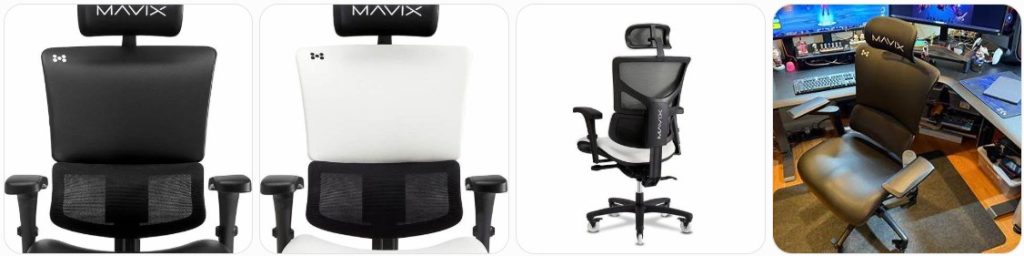
Quick Fix to Common Mavix M9 Problems
Mavix M9 keeps sinking: If your M9 slowly drops while sitting, the pneumatic gas lift is usually worn or leaking internally. First check that the height lever is not stuck in the release position. If the chair still sinks, replace the cylinder with a compatible office chair gas lift cylinder after measuring the original part.
Mavix M9 will not raise or lower: Check whether the height-control paddle is properly contacting the gas-cylinder release button under the seat. If the lever feels loose, the control mechanism may be misaligned. If the lever works but the chair does not move, the gas lift may be stuck, defective, or fully compressed and needs replacement.
Mavix M9 recline feels stuck: The M9 has a deep recline system, so make sure the recline lock is not engaged before forcing the back. Move the recline control slowly while leaning slightly back. If it still will not move, inspect the underside mechanism for loose bolts, jammed hardware, or a bent control link.
Mavix M9 reclines too easily: Adjust the recline tension so the backrest supports your body weight instead of falling backward quickly. Turn the tension knob or control according to the M9 adjustment instructions, then test in small steps. Do not overtighten the control because forcing the mechanism can damage the recline assembly.
Mavix M9 recline will not lock: Move the chair into the position you want, then engage the recline lock firmly. If the lock lever moves but does not catch, the internal lock plate may not be lining up. Sit upright, reset the recline, and try again. A failed lock mechanism usually requires a replacement tilt/recline control assembly.
Mavix M9 makes clicking noise when reclining: A small click can happen when the recline lock engages, but loud clicking or popping may mean loose hardware around the seat plate or back frame. Tighten all accessible bolts evenly. If the sound comes from inside the sealed recline mechanism, contact Mavix before attempting to open it.
Mavix M9 squeaks when leaning back: Squeaks usually come from the recline joints, seat plate, arm brackets, or backrest connections. Tighten the bolts first, then apply a small amount of dry silicone lubricant only to safe metal pivot points. Keep lubricant away from the fabric, mesh, foam, and floor.
Mavix M9 seat feels wobbly: Check the bolts connecting the seat to the mechanism and the mechanism to the back assembly. A small amount of swivel movement is normal, but side-to-side rocking is not. If tightening does not help, inspect the gas cylinder socket and chair base for wear, cracking, or poor cylinder fit.
Mavix M9 armrests feel loose: The M9 uses multidimensional armrests, so some movement is normal because they adjust in several directions. If the entire arm support wobbles, tighten the mounting bolts under the seat. If only the top pad slides too freely, check the adjustment button or pivot section for wear before replacing the arm pad.
Mavix M9 armrest pad is cracked: A cracked or peeling arm pad is normally easier to replace than repair. Measure the mounting pattern and contact Mavix for the correct M9 armrest part. If using aftermarket options, compare size, screw spacing, and shape carefully. You can also search for office chair arm pad replacement parts.
Mavix M9 armrest will not stay in place: If the height, width, or pivot adjustment keeps slipping, check whether the button is fully locking into position. Dirt inside the adjustment track can prevent the latch from seating. Clean the track gently and test each setting. If the latch teeth are worn, the armrest assembly may need replacement.
Mavix M9 headrest is loose: Make sure the headrest is fully seated and adjusted within its normal range. Tighten any accessible screws carefully without stripping the plastic or inserts. If the headrest still drops or tilts by itself, the friction joint or mounting bracket may be worn and should be replaced with the correct M9 part.
Mavix M9 headrest feels too far forward: Reposition the backrest and headrest before assuming it is broken. The M9 headrest is meant to support the neck while reclined and upright, but it may feel different depending on your posture. Try raising it slightly and changing the angle. Do not bend the headrest bracket to force a new position.
Mavix M9 lumbar support feels uncomfortable: The M9’s dynamic lumbar support is designed to move with your back, but it must be positioned correctly. Sit all the way back, adjust the backrest height if available, and test the support at different recline angles. If the lumbar pad feels loose, detached, or stuck, inspect the rear support track.
Mavix M9 lumbar support is loose: Check whether the lumbar panel or support bracket has slipped out of its track. Do not drill, glue, or tape the lumbar support because it moves as part of the chair’s ergonomic system. If the plastic tabs or bracket are cracked, request the proper replacement from Mavix rather than using a universal lumbar cushion.
Mavix M9 backrest feels crooked: Loosen the backrest mounting bolts slightly, align the back evenly, then retighten everything gradually in a cross pattern. Uneven tightening during assembly can make the chair feel twisted. If the frame itself is bent or one side sits lower after realignment, stop using the chair and contact Mavix support.
Mavix M9 seat foam feels flattened: The M9 uses a foam seat instead of a simple mesh seat, so some break-in is normal. If the foam has collapsed, feels lumpy, or no longer supports you evenly, replacement of the seat cushion or seat assembly may be needed. Avoid adding thick cushions that change your ergonomic sitting position.
Mavix M9 seat fabric is dirty: Vacuum loose dust first, then spot-clean gently with a damp microfiber cloth and mild soap. Avoid soaking the foam, using bleach, or scrubbing aggressively. Let the seat dry fully before sitting. For odor or sweat buildup, use a light upholstery cleaner made for chair fabric and test a hidden area first.
Mavix M9 mesh or back material is fraying: Small loose fibers can be trimmed carefully, but do not pull them. Fraying near a load-bearing edge can spread quickly and may require a replacement back component. Avoid glue or sewing repairs if the chair is still under warranty because unauthorized modifications can make support claims harder.
Mavix M9 caster wheels are noisy: Remove each caster and clean hair, carpet fiber, and dust from the axle area. Check that the caster stems are fully seated in the base. If the wheels are cracked or flat-spotted, replace them with compatible office chair replacement casters after measuring the stem size.
Mavix M9 does not roll smoothly: The wheels may be clogged, damaged, or unsuitable for your floor. Clean the caster axles and inspect the tread. If you use the chair on hardwood or tile, consider soft polyurethane wheels or a chair mat. Confirm compatibility before buying rollerblade office chair wheels.
Mavix M9 base is cracked: Stop using the chair immediately. A cracked base is a structural safety issue and should not be repaired with glue, tape, screws, or epoxy. Contact Mavix for the correct replacement base. If using aftermarket parts, verify cylinder socket size, caster stem size, base diameter, and weight rating.
Mavix M9 cylinder is stuck in the base: Gas cylinders are pressure-fitted and can become very tight over time. Remove the seat, apply penetrating oil around the joint, and use a rubber mallet or cylinder removal tool. A chair cylinder removal tool is safer than hammering aggressively on expensive parts.
Mavix M9 bolts keep loosening: Remove and reinstall one bolt at a time, making sure each bolt goes into the correct hole. Tighten evenly, not all on one side first. If a bolt repeatedly loosens, use a small amount of removable blue threadlocker. Do not use permanent threadlocker on chair parts.
Mavix M9 feels unstable after assembly: Recheck the assembly order, especially the backrest, seat plate, gas cylinder, and base connection. Make sure the cylinder is fully seated and all bolts are tightened evenly. If the chair rocks from the cylinder area, the cylinder or mechanism socket may not be properly seated or may be defective.
Mavix M9 ELEMAX unit is not working: If your M9 has the ELEMAX cooling, heat, and massage unit, check that it is charged, properly attached, and connected according to the instructions. Clean the contacts gently and test charging with the correct cable. If the unit still fails, contact Mavix because electronics should not be opened at home.
Mavix M9 ELEMAX fan is noisy: Remove the ELEMAX unit and inspect the vent area for dust or debris. Clean gently with a soft brush or low-pressure air. Do not spray liquid cleaner into the unit. If the fan rattles, overheats, or stops spinning, stop using it and request warranty or replacement support from Mavix.
Mavix M9 feels too tall or too low: Confirm that the original cylinder is installed correctly and that the casters are the proper size. Taller replacement wheels or a different gas cylinder can change the sitting height. If you replaced either part, compare measurements with the original M9 components before assuming the chair frame is defective.

HYEJDRV Heavy Duty 500LBs Office Chair Tilt Control Mechanism Replacement Parts, Office Chair Swivel Tilt Base W/6" x 10.2" Mounting Holes - Black

Omyoffice 5.5” Office Chair Gas Lift Cylinder Replacement, Class 4 Piston | Heavy-Duty 1000 lbs, Hydraulic Pneumatic Gas Lift, Universal Fit Most Executive Gaming Desk Chairs, Black

Besitu 500Lbs Office Chair Replacement Parts, w/ 6'' x 10.2" Mounting Holes Chair Base Heavy Duty Plate Swivel Tilt Control Seat Mechanism for Executive and Gaming Chairs
How much does it cost to repair a Mavix M9?
- Basic tightening and adjustment: $0 to $20 if you already have the proper Allen keys and cleaning supplies. This covers simple M9 fixes such as loose armrests, slightly crooked assembly, recline setting problems, and minor squeaks.
- Professional chair inspection: $40 to $100 depending on your area. This can be worth it if the chair rocks, clicks loudly, or has a recline issue but you cannot identify the damaged part.
- Gas lift cylinder replacement: $30 to $80 for a compatible cylinder, or more for premium heavy-duty cylinders. Labor may add $40 to $100 if the old cylinder is stuck in the M9 base or mechanism.
- Gas cylinder removal tool: $15 to $45. This is useful for the M9 because hammering on an expensive chair base or tilt mechanism can cause cosmetic or structural damage.
- Replacement caster wheels: $20 to $70 for a set. Standard casters cost less, while premium polyurethane or rollerblade-style wheels cost more. Always measure the M9 caster stem before ordering replacements.
- Replacement arm pads: $25 to $70 if compatible pads are available. Full M9 armrest assemblies can cost more, especially if the height, pivot, width, or 360-degree adjustment mechanism is damaged.
- Replacement armrest assembly: $60 to $150 per side depending on availability. Because the M9 armrests are multidimensional, genuine Mavix parts are usually the safest option.
- Replacement headrest: $40 to $120 depending on the part and finish. A loose headrest joint may require replacing the headrest or bracket rather than only tightening screws.
- Replacement caster base: $50 to $150. A cracked base should be replaced immediately. Aftermarket bases may fit only if the cylinder socket, caster stem size, and weight rating match.
- Replacement recline or tilt mechanism: $80 to $200 or more. The M9’s deep recline system is one of its key features, so use the correct mechanism rather than a random universal plate.
- Seat cushion or seat assembly replacement: $100 to $250 depending on whether Mavix can supply the exact part. Foam collapse, torn upholstery, or broken mounting inserts may require replacing the full seat section.
- Backrest or lumbar component replacement: $100 to $300 depending on the damaged component. The M9 back and lumbar system are model-specific, so genuine parts are strongly recommended.
- ELEMAX unit repair or replacement: $50 to $150+ depending on warranty status and the exact issue. Since it includes electronics for cooling, heat, and massage, do not open or modify it yourself.
- Cleaning and maintenance supplies: $10 to $40 for microfiber cloths, mild fabric cleaner, dry lubricant, and a soft brush. This is usually enough for regular M9 fabric, wheel, and mechanism maintenance.
- Major structural repair: $150 to $400+ if multiple premium components are damaged. If the M9 needs a new mechanism, base, armrests, and seat parts at once, contact Mavix first to check warranty coverage.
Order Parts for Your Broken Mavix M9
- Mavix official support: Use the official Mavix support and warranty pages first when you need M9-specific parts such as armrests, headrest parts, backrest pieces, lumbar parts, seat components, or recline hardware.
- Mavix accessories section: Mavix sells some official chair upgrades and accessories, including wheel and armrest-related upgrades, so check the official accessory area before buying universal parts.
- Amazon aftermarket parts: Amazon can be useful for common parts like gas cylinders, casters, chair mats, lubricants, and cylinder removal tools. Search for Mavix M9 replacement parts, but verify measurements carefully.
- Local office chair repair shops: A repair shop may help remove stuck cylinders, install wheels, tighten the mechanism, or diagnose recline problems. For M9-specific parts, ask them to confirm compatibility before ordering anything.
Before ordering parts for a broken Mavix M9, take clear photos of the chair, the damaged part, the underside mechanism, and any labels or serial information. The M9 is not a basic budget chair, so guessing with universal parts can waste money or damage the chair further. Model-specific pieces such as the recline mechanism, dynamic lumbar system, headrest, armrests, seat cushion, and ELEMAX mounting setup should be sourced from Mavix whenever possible.
For common wear parts, measure everything before ordering. For casters, measure the stem diameter and stem length. For a gas cylinder, compare the travel range, overall height, and column size. For arm pads, measure the screw spacing and pad shape. For a base, check the gas-cylinder socket and weight rating. Keep all original screws and washers until the repair is complete because replacement parts do not always include the exact hardware.
HYEJDRV Heavy Duty 500LBs Office Chair Tilt Control Mechanism Replacement Parts, Office Chair Swivel Tilt Base W/6" x 10.2" Mounting Holes - Black
Omyoffice 5.5” Office Chair Gas Lift Cylinder Replacement, Class 4 Piston | Heavy-Duty 1000 lbs, Hydraulic Pneumatic Gas Lift, Universal Fit Most Executive Gaming Desk Chairs, Black
Besitu 500Lbs Office Chair Replacement Parts, w/ 6'' x 10.2" Mounting Holes Chair Base Heavy Duty Plate Swivel Tilt Control Seat Mechanism for Executive and Gaming Chairs
Mavix M9 Repair & Service Center Near You
Mavix does not usually operate like an appliance brand with a public walk-in repair center in every city. For a broken Mavix M9, the best starting point is the official Mavix support system. Use the official Mavix Contact Us page to ask about repair help, replacement parts, warranty support, or the correct next step for your chair.
If the damage may be covered under warranty, use the official Mavix Warranty & Damages page and follow the claim instructions. Mavix states that customers must complete the warranty claim form with pictures of the damage to begin the warranty process. Take photos in good lighting and include close-ups plus a full-chair photo.
If you need in-person help, search locally for an office chair repair shop, ergonomic chair repair service, or commercial furniture repair company. Tell them the chair is a Mavix M9 with a deep recline mechanism, multidimensional armrests, dynamic lumbar support, foam seat, headrest, and possible ELEMAX unit. Avoid shops that want to drill, weld, glue, or permanently modify the chair before checking warranty coverage.
Warranty Coverage for Mavix M9
Mavix gaming chairs purchased through the official Mavix website or an official dealer/retailer are covered by the Mavix limited warranty. Mavix’s warranty page states that all parts and materials for its gaming chairs are warranted for 5 years, and non-moving metal chair-frame components are warranted for 12 years. Always check the current warranty page and your purchase documentation because warranty terms can change.
The warranty is meant for defects in material or workmanship. That means Mavix may provide replacement parts for covered damage that comes from a manufacturing defect. It does not generally cover normal wear and tear, misuse, abuse, improper assembly, transportation damage, unauthorized modifications, improper storage, natural aging of materials, color shifting, or damage caused by disasters or events outside normal use.
Damage or missing item claims must be reported within the first 30 days of receiving the product. For warranty claims, Mavix requires the warranty claim form and pictures of the damage. Before filing a claim, collect your order number, proof of purchase, model name, photos of the damaged part, photos of the full chair, and a clear explanation of what happened.
If your M9 includes the ELEMAX cooling, heat, and massage unit, note that the ELEMAX unit has its own warranty terms. Mavix lists the ELEMAX unit as covered by a limited 3-year warranty for parts and materials. Do not open or modify the ELEMAX unit because that can create safety risks and may affect warranty support.
Mavix M9 Diagram & Manual
For assembly diagrams and control guidance, use the official Mavix M9 Assembly Instructions page. This is the best place to confirm the correct assembly order, bolt placement, backrest connection, seat setup, wheel installation, headrest position, and general chair layout.
Mavix also provides official adjustment information through its support and video resources. If your problem is related to recline, tension, armrest positioning, headrest placement, lumbar feel, or seat height, review the official M9 adjustment instructions before assuming a part is broken. Many M9 problems come from a locked recline, incorrect tension setting, uneven assembly, or an adjustment that has not been fully engaged.
When using the M9 manual or diagram for repair, compare the diagram to your exact chair before removing parts. Put bolts in labeled containers, take photos before disassembly, and avoid forcing plastic covers or trim pieces. If the part you need is not shown clearly, contact Mavix with photos and ask for the correct part name. This is especially important for the recline mechanism, armrests, headrest, lumbar components, and ELEMAX parts.
Tips to Make Your Mavix M9 Last Longer
- Adjust the recline tension for your body: The M9 is built for deep reclining, but the tension should match your weight and sitting style. Too little tension can slam the chair backward, while too much tension can strain the mechanism.
- Do not force the recline lock: Engage and release the recline control smoothly. Forcing it while your full weight is pushing against the backrest can wear the locking parts.
- Keep the armrests clean: The M9 armrests move in several directions, so dust and debris can affect the adjustment buttons and sliding sections. Wipe them regularly and avoid sticky drink spills near the controls.
- Use the headrest gently: Adjust the headrest from the center or near the joint instead of pulling hard from one edge. This protects the bracket and friction mechanism.
- Sit all the way back: The dynamic lumbar system works best when your back is properly positioned against the chair. Perching on the front edge can make the lumbar support feel wrong and put extra stress on the seat cushion.
- Clean the foam seat carefully: Vacuum first, then spot-clean with mild soap and a damp cloth. Do not soak the cushion because trapped moisture can create odor and damage the foam.
- Protect the chair from sweat buildup: For long gaming sessions, clean the seat and back material regularly. Sweat and body oils can age fabric, foam, and contact surfaces faster.
- Check bolts every few months: The M9 has adjustable moving parts, so occasional bolt checks help prevent wobble, squeaking, and uneven stress on the frame.
- Clean caster wheels often: Hair and carpet fibers can wrap around the caster axles. Cleaning the wheels helps the chair roll smoothly and reduces strain on the base.
- Use the right floor protection: A chair mat or soft compatible casters can protect both the M9 wheels and your flooring. Damaged floors can also make casters wear unevenly.
- Do not exceed the chair’s intended use: Avoid standing on the chair, jumping into it, leaning heavily on one armrest, or rocking sideways. These movements stress the base, cylinder, arms, and recline system.
- Keep the ELEMAX unit clean: If your M9 has ELEMAX, keep vents free of dust and remove the unit carefully when cleaning. Do not spray liquids into the unit or block the airflow.
- Avoid direct sunlight and extreme heat: Long exposure to heat and sun can age fabric, foam, plastic, and rubberized surfaces faster. Keep the chair in a normal indoor environment.
- Fix small noises early: A new squeak, click, or wobble is often an early warning. Tighten bolts and inspect the chair before a minor issue becomes a broken mechanism.
- Keep your proof of purchase: Save your receipt, order confirmation, and warranty information. This makes it much easier to request Mavix parts or file a warranty claim.
Broken Mavix M9 Repair FAQ
Can a Mavix M9 be repaired?
Yes. Many Mavix M9 problems can be repaired, especially loose bolts, worn casters, a failed gas cylinder, squeaks, adjustment issues, or loose armrests. Model-specific problems involving the recline mechanism, lumbar system, seat cushion, headrest, frame, or ELEMAX unit are best handled through Mavix support.
Why does my Mavix M9 keep sinking?
A sinking Mavix M9 usually has a failing gas lift cylinder. First check that the height lever is not stuck or pressing the release button. If the lever is fine and the chair still drops under weight, replace the cylinder with a compatible part or ask Mavix for the correct replacement.
What gas cylinder fits the Mavix M9?
The safest option is to ask Mavix for the correct replacement cylinder. Some universal office chair cylinders may fit, but you must compare the original cylinder’s height range, diameter, travel, and taper fit. A wrong cylinder can make the M9 sit too high, too low, or feel unstable.
How do I remove a stuck Mavix M9 gas cylinder?
Remove the seat from the base, apply penetrating oil around the cylinder joints, and use a cylinder removal tool or controlled twisting with a wrench. Avoid striking the M9 base or recline mechanism aggressively because these parts are expensive. Never puncture, heat, or cut the gas cylinder.
Why will my Mavix M9 not recline?
The recline may be locked, the tension may be too tight, or the control may not be fully released. Reset the recline controls and reduce tension gradually. If the back still does not move, inspect the underside mechanism for loose hardware or contact Mavix about a possible mechanism issue.
Why does my Mavix M9 recline too far back?
The M9 is designed for a deeper recline than many office chairs, so a large recline range can be normal. If it falls back too easily, increase the recline tension and make sure the lock works properly. If the lock will not hold, the mechanism may need repair or replacement.
Can I replace Mavix M9 armrests?
Yes, but the M9 armrests are multidimensional and model-specific, so genuine parts are recommended. Universal armrests may not match the mounting holes, height system, pivot design, or pad shape. Contact Mavix first if the armrest is broken or slipping.
Why are my Mavix M9 armrests loose?
Some movement is normal because the M9 armrests adjust in multiple directions. If the whole arm support wobbles, tighten the mounting bolts under the seat. If the top pad or adjustment section slips, the internal latch or armrest mechanism may be worn.
Can the Mavix M9 seat cushion be replaced?
Yes, but the M9 seat cushion is shaped for that chair and should be replaced with the correct part if possible. If the foam is flattened, torn, or detached from the seat frame, contact Mavix for part availability before trying a universal seat cushion.
How do I clean the Mavix M9 seat?
Vacuum the seat first, then spot-clean with a damp microfiber cloth and mild soap. Do not soak the cushion or use bleach. Let the seat dry fully before use. For heavier odor or stains, use a fabric-safe upholstery cleaner and test a hidden area first.
Why is my Mavix M9 lumbar support uncomfortable?
The M9 lumbar system needs your back positioned correctly against the chair. Sit fully back, adjust the recline, and test the headrest and back position. If the lumbar piece feels loose, stuck, or uneven, inspect the support track and contact Mavix if a bracket appears damaged.
Can I remove the Mavix M9 lumbar support?
It is not recommended unless Mavix instructions specifically allow it. The lumbar support is part of the M9 ergonomic design. Removing, drilling, gluing, or modifying it can damage the chair and may affect warranty support.
Why is my Mavix M9 headrest loose?
The headrest may not be fully seated, or the friction joint may be worn. Tighten accessible screws carefully and check that the headrest is adjusted within its normal range. If it still drops or tilts by itself, contact Mavix for the correct headrest or bracket replacement.
Can I replace the wheels on a Mavix M9?
Yes. Remove one original caster and measure the stem diameter and length before buying replacements. Make sure the new wheels are rated for the chair and floor type. If the base socket is cracked, replacing only the wheel will not fix the problem.
Are rollerblade wheels safe for a Mavix M9?
They can be safe if the stem size, wheel height, and weight rating match the M9. Taller wheels may raise the chair and change the sitting height. Use quality wheels and avoid forcing stems that do not fit the base sockets.
Why does my Mavix M9 squeak?
Squeaks often come from loose bolts, dry pivot points, armrest brackets, caster wheels, or the recline assembly. Tighten all accessible hardware first. If needed, apply dry silicone lubricant sparingly to metal pivot points, but keep it away from fabric, foam, plastic grips, and electronics.
Is a cracked Mavix M9 base repairable?
No. A cracked base should be replaced, not patched. The base supports the whole chair, so glue, epoxy, screws, or tape are not safe fixes. Stop using the chair and contact Mavix for the correct replacement part.
What should I do if my Mavix M9 ELEMAX unit stops working?
Check charging, attachment, controls, and contact points first. Clean the contacts gently and make sure the unit is installed correctly. If it still does not work, contact Mavix. Do not open the ELEMAX unit because it contains electronics and may have separate warranty coverage.
Does the Mavix M9 have a warranty?
Mavix gaming chairs purchased through Mavix or an official dealer/retailer are covered by a limited warranty. Mavix lists 5 years for parts and materials and 12 years for non-moving metal chair-frame components. Always check the official warranty page for the current terms.
Where can I find Mavix M9 replacement parts?
Start with Mavix official support, especially for model-specific parts like the recline mechanism, armrests, headrest, lumbar support, seat cushion, backrest, and ELEMAX components. Common items like casters, gas cylinders, and tools may be available from Amazon if the measurements match.
Is it worth repairing a broken Mavix M9?
Usually yes, especially if the frame, recline mechanism, and seat are still in good condition. The M9 is a premium chair, so replacing a cylinder, caster set, arm pad, or loose hardware is often worth it. If multiple major parts are broken, check warranty coverage first.
Can I use universal office chair parts on a Mavix M9?
Only for certain parts, and only after measuring carefully. Casters and gas cylinders may be compatible if the dimensions match. Armrests, headrests, seat parts, lumbar components, recline mechanisms, and ELEMAX parts are model-specific and should usually come from Mavix.
Summary
A broken Mavix M9 is often fixable without replacing the whole chair. Start with simple checks like recline settings, loose bolts, dirty casters, and gas cylinder problems. For model-specific parts such as the armrests, headrest, lumbar support, recline mechanism, seat cushion, or ELEMAX unit, contact Mavix first. Since the M9 is a premium chair, measuring parts carefully and checking warranty coverage can save a lot of money.
HYEJDRV Heavy Duty 500LBs Office Chair Tilt Control Mechanism Replacement Parts, Office Chair Swivel Tilt Base W/6" x 10.2" Mounting Holes - Black
Omyoffice 5.5” Office Chair Gas Lift Cylinder Replacement, Class 4 Piston | Heavy-Duty 1000 lbs, Hydraulic Pneumatic Gas Lift, Universal Fit Most Executive Gaming Desk Chairs, Black