
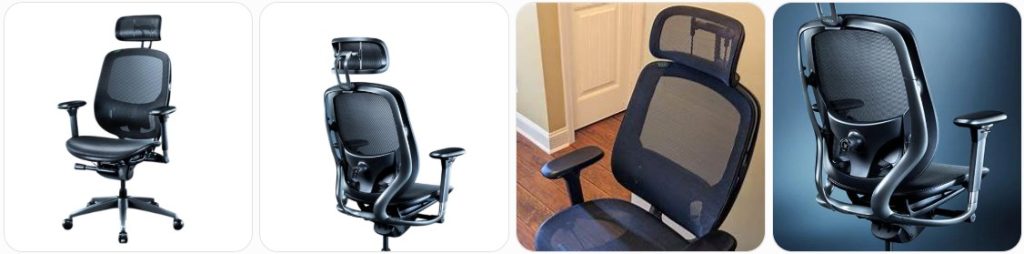
Razer Fujin Pro repairs can feel tricky because this chair has a premium mesh build, aluminum alloy frame, 4D armrests, adjustable lumbar, removable headrest, and multi-control recline system. The good news is many issues are fixable with careful adjustment, cleaning, tightening, or replacement parts.
Quick Fix to Common Razer Fujin Pro Problems
Razer Fujin Pro chair keeps sinking: If your Fujin Pro slowly drops while sitting, the gas lift cylinder is probably failing or the height lever is pressing the release pin. Check that the height-control paddle is not stuck underneath the seat. If it still sinks, replace the pneumatic lift with a compatible heavy duty office chair gas cylinder.
Razer Fujin Pro will not raise or lower: Make sure the chair is assembled correctly and the gas cylinder is fully seated into the mechanism and base. The height-control lever must press the cylinder button under the seat. If the lever moves but nothing happens, the control mechanism may be misaligned or the cylinder may be defective.
Gas cylinder is stuck in the Fujin Pro base: The cylinder is pressure-fitted, not screwed in. Apply penetrating lubricant around the base socket and seat mechanism, let it sit, then twist the cylinder using a pipe wrench. A office chair gas cylinder removal tool can help prevent damage to the aluminum-style frame and base.
Razer Fujin Pro recline feels locked: Check the recline lock control before assuming something is broken. The Fujin Pro has adjustable recline controls, so make sure the backrest is unlocked and the tension is not set too tight. Sit fully back in the chair, release the lock, and test the recline slowly without forcing the backrest.
Recline tension is too stiff: If the Fujin Pro barely leans back, reduce the tilt tension using the tension-control adjustment under the seat. The chair is designed for users up to 300 lb / 136 kg, so lighter users may need much lower tension. Adjust gradually and test between turns until the recline feels smooth.
Recline tension is too loose: If the Fujin Pro leans back too easily, increase the tension control under the seat. This is especially important if the backrest drops too quickly when unlocked. Do not compensate by slamming the recline lock on and off, because that can wear the mechanism faster over time.
Razer Fujin Pro backrest makes clicking noises: A light click can happen when the recline lock or tilt mechanism engages, but repeated loud clicking is not normal. Tighten all visible backrest and mechanism bolts evenly. If the aluminum frame or recline mechanism shifts under weight, stop using the chair and contact Razer support.
Backrest feels loose or wobbly: Inspect the connection between the mesh backrest frame and the seat assembly. Tighten the correct bolts using the tool size shown in the manual. Do not overtighten, especially near aluminum or plastic inserts. If the backrest still moves independently from the mechanism, the mounting bracket may be damaged.
Mesh backrest is sagging: The Fujin Pro uses suspended mesh instead of foam padding, so it should feel flexible but supportive. If the mesh has stretched badly, detached from the frame, or no longer supports your back, it usually cannot be tightened at home. Contact Razer while the mesh backing may still be under warranty.
Mesh seat pan feels stretched: A little flex is normal, but a sagging seat pan that lets you feel the frame edge is a problem. Check whether the seat frame is cracked or whether the mesh has separated near the edge. Avoid sewing, gluing, or puncturing the mesh. The proper repair is usually a replacement seat pan.
Mesh has a small tear: Do not pull on the tear or patch it with tape where your body weight presses. Fujin Pro mesh is load-bearing, so a small rip can spread quickly. If the chair is still covered, submit photos to Razer support. If out of warranty, look for a replacement seat or back assembly.
Headrest is loose: The Fujin Pro includes a removable adjustable headrest, so first check that it is fully inserted and seated correctly. Tighten any visible mounting hardware gently. If the hinge or adjustment joint no longer holds position, the headrest assembly may need replacement instead of glue or permanent modification.
Headrest keeps sliding down: Remove the headrest and inspect the track, locking notch, or friction joint for dust or broken plastic. Reinstall it firmly and adjust it without forcing the side pressure. If the retaining tabs are worn, contact Razer for a genuine replacement because universal headrests will not usually match the Fujin Pro frame.
Adjustable lumbar support is stuck: The Fujin Pro lumbar support adjusts vertically and by depth, so move it slowly using both sides instead of forcing one corner. Clean the track area with a dry cloth. If the lumbar pad or slider is jammed, avoid prying it with metal tools because the support rail can crack.
Lumbar support feels too hard: Reduce the lumbar depth adjustment and reposition it lower or higher until it sits naturally in your lower back curve. The Fujin Pro lumbar system is more adjustable than many basic mesh chairs, but incorrect height can feel like pressure instead of support. Small changes usually make a big difference.
Lumbar support will not stay in place: Check whether the slider teeth, locking tabs, or adjustment knob are worn. Clean dust from the track and move the support through its full range a few times. If it drops or moves forward on its own, the lumbar support assembly may need a model-specific replacement.
4D armrest is loose: Tighten the bolts under the armrest support and check the arm pad connection. The Fujin Pro armrests adjust in multiple directions, so some controlled movement is normal. Excessive wobble, rattling, or height drop usually means the locking mechanism or internal armrest rail is worn.
Armrest height button is stuck: Press the height button while gently lifting the armrest upward to remove pressure from the latch. Wipe dust from the button and sliding rail. Avoid oily lubricants near arm pads because they can transfer to skin or clothing. If the button stays jammed, replace the armrest assembly.
Arm pad slides too easily: The Fujin Pro arm pads are designed to move, but they should not shift every time your elbow touches them. Inspect the underside for loose screws or worn sliding rails. If the pad no longer clicks or holds position, the arm pad or complete 4D armrest may need replacement.
Chair squeaks when leaning back: Tighten the seat mechanism, backrest bolts, armrest mounts, and caster connections. Use a small amount of dry silicone lubricant spray only on exposed metal pivot points. Keep lubricant away from mesh, plastic grips, arm pads, flooring, and the gas cylinder.
Chair creaks from the aluminum frame: Creaking can come from frame joints, slightly loose hardware, or movement between the seat frame and mechanism. Tighten bolts evenly in a cross pattern. If the sound comes from a cracked frame joint or welded/formed metal area, stop using the chair and submit a warranty claim.
Fujin Pro feels uneven after assembly: Place the chair on a flat floor and check that all casters are fully seated. Loosen the backrest, seat, and armrest bolts slightly, align the chair, then retighten gradually. Uneven tightening during assembly can twist the frame and make a premium mesh chair feel crooked.
Casters do not roll smoothly: Pull each caster out and remove hair, thread, and debris from the wheel axle. Clean the caster sockets before reinstalling. If the wheels are damaged, replace them with compatible office chair replacement casters, but measure the original stem first because fit can vary.
Casters fall out of the base: Inspect the caster stem retaining ring and the socket in the chair base. If only the caster clip is worn, replace the wheel. If the base socket is cracked or enlarged, replacing the caster will not fix the issue. A damaged base should be replaced before using the chair again.
Chair scratches wood floors: Check the Fujin Pro wheels for trapped grit, flat spots, or rough edges. Clean the casters often and use a chair mat on delicate floors. You can also switch to compatible rollerblade office chair wheels, but confirm stem size and wheel height before ordering.
Base is cracked or bent: Stop using the chair immediately. The Fujin Pro is a heavy-duty premium chair, and the base carries the full load of the seat, cylinder, and user. Do not repair a cracked base with glue, screws, tape, or epoxy. Contact Razer support or replace the base with a properly rated compatible part.
Seat mechanism feels loose: Turn the chair over and inspect the bolts connecting the seat pan to the control mechanism. Tighten them evenly and check for stripped threads. If the mechanism moves even when the bolts are tight, the metal control plate or mounting inserts may be damaged and should be replaced.
Seat depth adjustment is stuck: Remove weight from the seat and activate the seat-depth control while gently sliding the seat pan. Debris in the track can stop smooth movement. Clean the track area and avoid forcing it. If the seat pan locks unevenly or shifts during use, the adjustment rail needs inspection.
Seat depth will not lock: Move the seat through its full range and listen for the locking points. If it slides freely without catching, the seat-depth latch may be worn or misaligned. Do not sit aggressively on the front edge because that adds extra stress to the seat slider and lock.
Bolts keep loosening: Remove one bolt at a time, clean the threads, and reinstall it into the correct mounting hole. Use removable blue threadlocker only when the bolt repeatedly loosens. Avoid permanent threadlocker because future service or warranty part replacement may become difficult.
Chair makes grinding sounds when swiveling: Grinding usually comes from debris near the cylinder/base connection, a worn cylinder bearing, or a damaged caster. Clean the base area and test the chair without rolling it. If the grinding happens only while swiveling, the gas cylinder bearing may be wearing out.
Fujin Pro feels too tall or too low: Verify that the gas cylinder is the original height range or an exact compatible replacement. Aftermarket cylinders can change the minimum and maximum seat height. If you recently installed larger casters or rollerblade wheels, they may have raised the entire chair slightly.
Fujin Pro arrived with missing or damaged parts: Do not assemble or use the chair with missing bolts, cracked plastic, damaged mesh, or bent metal. Razer’s manual says to contact support when parts are missing, broken, damaged, or worn while covered by warranty. Take photos immediately and keep all packaging until the claim is handled.

Besitu 500Lbs Office Chair Replacement Parts, w/ 6'' x 10.2" Mounting Holes Chair Base Heavy Duty Plate Swivel Tilt Control Seat Mechanism for Executive and Gaming Chairs

Omyoffice 5.5” Office Chair Gas Lift Cylinder Replacement, Class 4 Piston

HYEJDRV Heavy Duty 500LBs Office Chair Tilt Control Mechanism Replacement Parts, Office Chair Swivel Tilt Base W/6" x 10.2" Mounting Holes - Black
How much does it cost to repair a Razer Fujin Pro?
- Basic adjustment and tightening: $0 to $20 if you do it yourself. Most Fujin Pro fixes start with checking the recline lock, tilt tension, seat depth, lumbar depth, headrest position, and loose bolts.
- Professional chair inspection: Around $50 to $120 depending on your local office-furniture repair service. Since the Fujin Pro is a premium chair, a professional inspection can be worth it before replacing expensive parts.
- Gas lift cylinder replacement: Usually $30 to $80 for a compatible heavy-duty cylinder. Professional removal and installation may add $50 to $120, especially if the original cylinder is stuck in the base or mechanism.
- Gas cylinder removal tool: Around $15 to $45. This is useful if you want to replace the Fujin Pro cylinder without hammering the mechanism or damaging the base finish.
- Replacement caster set: Around $20 to $70 depending on the wheel type. Premium polyurethane wheels or rollerblade-style casters may cost more but can roll smoother on hard floors.
- Replacement armrest or arm pad: Around $40 to $150 if available outside warranty. Because the Fujin Pro uses 4D armrests, generic armrests may not fit correctly or match the adjustment style.
- Replacement headrest: Around $40 to $120 if available as a separate part. The Fujin Pro headrest is removable and adjustable, but the mount is model-specific, so contact Razer before buying a universal option.
- Replacement lumbar support assembly: Around $50 to $150 depending on availability. The Fujin Pro lumbar system adjusts by height and depth, so the correct part is usually better than a generic cushion or aftermarket bracket.
- Replacement mesh seat pan: Around $100 to $250 if sold as a part. If the chair is still within the mesh seat pan warranty period, contact Razer before paying out of pocket.
- Replacement mesh backrest: Around $120 to $300 depending on availability. The backrest includes the mesh support structure and frame connection, so it is usually replaced as a larger assembly.
- Replacement tilt or control mechanism: Around $80 to $200 for a compatible mechanism, plus labor. The Fujin Pro has multiple ergonomic controls, so a model-specific mechanism is strongly preferred.
- Replacement base: Around $50 to $150. If the base is cracked, bent, or has damaged caster sockets, replacement is safer than repair. Confirm cylinder socket size, caster stem size, and weight rating.
- Mesh cleaning and maintenance supplies: Around $10 to $35 for microfiber cloths, soft brushes, mild cleaner, and dry lubricant. Avoid harsh solvents because the Fujin Pro uses breathable mesh and finished frame surfaces.
- Major structural repair: Around $150 to $400 or more. If the frame, mesh, mechanism, and armrests all need replacement, warranty service or chair replacement may be more practical.
Order Parts for Your Broken Razer Fujin Pro
- Razer Support: Start with the official Razer Fujin Pro support page. This is the best place for model-specific help, warranty questions, documentation, and replacement-part guidance.
- Razer Store: Check the official Razer Fujin Pro product page for current product information, availability, and support links.
- Amazon replacement parts: Amazon can be useful for common parts like heavy duty gas cylinders, replacement chair wheels, lubricants, tools, and hardware. Always measure your original part before ordering.
- Office-furniture repair shops: A local ergonomic chair repair shop may help with stuck cylinders, casters, mechanism inspection, and bolt repair. For mesh, backrest, armrest, lumbar, or headrest issues, ask whether they can source Fujin Pro-specific parts before booking service.
Ordering parts for a Razer Fujin Pro is different from ordering parts for a cheap generic office chair. This chair has a model-specific mesh frame, aluminum alloy structure, advanced adjustment system, 4D armrests, removable headrest, and adjustable lumbar assembly. Before buying anything, check the model number RZ38-0494, photograph the damaged part, and measure the original component.
For common wear parts such as casters, gas cylinders, and hardware, aftermarket replacements may work if the dimensions match. For the mesh seat pan, backrest, lumbar, armrests, headrest, and control mechanism, contact Razer first. These parts affect comfort, fit, safety, and warranty coverage. Avoid drilling, gluing, welding, or modifying the chair before getting a support answer.
Besitu 500Lbs Office Chair Replacement Parts, w/ 6'' x 10.2" Mounting Holes Chair Base Heavy Duty Plate Swivel Tilt Control Seat Mechanism for Executive and Gaming Chairs
Omyoffice 5.5” Office Chair Gas Lift Cylinder Replacement, Class 4 Piston
HYEJDRV Heavy Duty 500LBs Office Chair Tilt Control Mechanism Replacement Parts, Office Chair Swivel Tilt Base W/6" x 10.2" Mounting Holes - Black
Razer Fujin Pro Repair & Service Center Near You
Razer does not usually operate walk-in repair centers specifically for the Razer Fujin Pro chair the same way some furniture brands operate local service shops. For official help, start with the Razer Fujin Pro support page or the main Razer Support website.
If you want to find a place to buy or inspect the chair locally, use the official Razer Store Finder. Store availability and service options can vary by country, so contact the location before bringing a chair or asking about parts.
For warranty or replacement-part help, prepare the following before contacting Razer:
- The model name: Razer Fujin Pro
- The model number: RZ38-0494
- Proof of purchase or order number
- Clear photos of the full chair and damaged part
- A short video showing sinking, wobbling, clicking, sagging, or adjustment failure
- Details about when the issue started
- Confirmation that the chair was used within the 300 lb / 136 kg weight limit
If the chair is out of warranty, look for an office-furniture repair company that works on ergonomic mesh chairs, not only upholstery. Ask whether they can safely remove a gas cylinder, inspect a tilt mechanism, replace casters, and handle mesh-frame chairs without damaging the frame.
Warranty Coverage for Razer Fujin Pro
The Razer Fujin Pro has official warranty coverage of up to 5 years for the chair frame, mechanisms, and armrests, and up to 1 year for the mesh backing and seat pan. Warranty coverage can depend on region, purchase date, seller, proof of purchase, and whether the damage is considered a manufacturing defect or normal wear.
The Fujin Pro is rated to support up to 300 lb / 136 kg. Staying within the rated capacity matters because the mesh, gas cylinder, base, mechanism, and frame are all load-bearing parts. Damage caused by misuse, improper assembly, accidents, modifications, unauthorized repairs, excessive force, outdoor exposure, or using the chair beyond its design limits may not be covered.
Parts that may be more likely to fall under warranty review include:
- Defective recline mechanism
- Faulty height-control mechanism
- Premature armrest failure
- Frame defects
- Mesh backing defects within the covered period
- Seat pan defects within the covered period
- Missing, broken, damaged, or worn parts on a chair still covered by warranty
Before repairing the chair yourself, contact Razer if the problem involves the mesh, frame, mechanism, armrests, or safety-related components. Keep the original part and avoid permanent fixes such as drilling, gluing, welding, cutting, or replacing hardware with incorrect bolts. These changes may make the warranty claim harder to approve.
Razer Fujin Pro Diagram & Manual
The best official diagram and repair reference is the Razer Fujin Pro Master Guide. You can view the official Razer Fujin Pro Master Guide, which includes assembly guidance, safety information, maintenance details, and basic support instructions.
You can also use the official Razer Fujin Pro support and FAQ page for specifications, documentation, and product guidance. The official support page confirms important details such as the chair dimensions, height support, 300 lb / 136 kg weight capacity, removable headrest, and warranty coverage.
When using the manual for repairs, pay attention to the assembly order and part orientation. The Fujin Pro has a mesh backrest, seat pan, lumbar assembly, headrest, armrests, gas lift cylinder, caster base, and control mechanism. Taking photos before disassembly makes it much easier to reinstall parts correctly.
Use the manual before doing any of these tasks:
- Removing or reinstalling the headrest
- Checking backrest mounting bolts
- Inspecting the lumbar support track
- Reinstalling the seat pan
- Replacing the gas cylinder
- Checking the caster base
- Understanding recline and tilt controls
- Confirming safe use and maintenance instructions
Do not open the gas cylinder, disassemble sealed controls, or force the recline mechanism beyond its designed range. If the manual does not show a repair step, contact Razer support before attempting it.
Tips to Make Your Razer Fujin Pro Last Longer
- Stay within the weight limit: The Fujin Pro is rated up to 300 lb / 136 kg. Going beyond that limit can shorten the life of the mesh, gas cylinder, armrests, base, and recline mechanism.
- Do not stand on the chair: The chair is designed for seated use only. Standing on it can damage the mesh seat pan, cylinder, caster base, or recline mechanism.
- Sit centered on the mesh: Avoid sitting on the front edge or leaning heavily to one side. The Fujin Pro mesh and aluminum frame are strongest when your weight is centered.
- Adjust the lumbar support correctly: Set the lumbar height and depth so it supports your lower back without pushing too hard. Over-forcing the lumbar track can damage the adjustment system.
- Use the recline lock properly: Do not force the backrest down when locked. Unlock the recline first, adjust tension, then recline smoothly.
- Clean the mesh gently: Use a soft damp cloth for dirt and a soft brush or vacuum attachment for dust. Avoid soaking the mesh or using harsh cleaners.
- Keep the chair out of direct sunlight: Long-term sunlight and heat can fade surfaces, weaken materials, and dry out plastic or rubber components.
- Clean the casters often: Hair, thread, and dust around the wheels can make the chair harder to roll and place extra stress on the base sockets.
- Use a chair mat on rough floors: Rough tile, concrete, or dirty flooring can wear the casters faster. A chair mat also helps protect hardwood and laminate flooring.
- Check bolts every few months: Tighten the backrest, seat mechanism, and armrest bolts before they become loose enough to damage the mounting holes.
- Do not overload the armrests: The 4D armrests support your arms, not your full body weight. Avoid using them to lift yourself aggressively out of the chair.
- Move the armrests gently: Press the adjustment buttons fully before changing height or position. Forcing the armrests can wear the locking tabs.
- Remove the headrest carefully: The Fujin Pro headrest is removable, but it should not be yanked or twisted. Follow the manual so the mounting points stay intact.
- Do not modify the mesh: Avoid cutting, sewing, drilling, stapling, or gluing the mesh seat or backrest. The mesh is structural and should be replaced if damaged.
- Use dry lubricant sparingly: For squeaks, use small amounts of dry silicone lubricant only on suitable metal pivot points. Keep it away from mesh, arm pads, and the floor.
- Save the receipt and packaging info: Keep your proof of purchase, model number, and manual. This makes warranty claims and replacement-part requests much easier.
- Stop using it if structural damage appears: A cracked frame, broken base, torn mesh, or unstable mechanism can be unsafe. Do not keep using the chair while waiting for parts.
Broken Razer Fujin Pro Repair FAQ
Can a Razer Fujin Pro chair be repaired?
Yes. Many Fujin Pro issues can be repaired, especially loose bolts, dirty casters, height-cylinder problems, squeaks, and adjustment issues. More serious problems with the mesh, frame, armrests, lumbar system, or recline mechanism may require genuine replacement parts or warranty support from Razer.
Why does my Razer Fujin Pro keep sinking?
A sinking Fujin Pro usually has a failing gas lift cylinder. First check that the height-control lever is not stuck against the cylinder release pin. If the lever is fine and the chair still drops, the gas cylinder likely needs replacement.
What gas cylinder fits the Razer Fujin Pro?
You need a heavy-duty office chair gas cylinder with the correct taper, height range, and weight rating. Measure the original cylinder before ordering. A generic cylinder may fit the socket but still change the chair’s minimum or maximum sitting height.
Can I replace Razer Fujin Pro casters?
Yes, the casters can usually be replaced if you match the stem size and wheel style. Remove one original caster and measure the stem diameter and length before buying replacements. If the caster socket in the base is cracked, replace the base instead.
Why will my Razer Fujin Pro not recline?
The recline may be locked, the tension may be too tight, or the control mechanism may be jammed. Unlock the recline, reduce tension, and test the chair slowly. If the backrest still does not move, inspect the mechanism and contact Razer support.
How do I fix a loose Razer Fujin Pro backrest?
Check the backrest mounting bolts and tighten them evenly using the correct tool. Do not overtighten or use incorrect bolts. If the backrest still shifts after tightening, the mounting bracket, frame connection, or mechanism may be damaged.
Can Razer Fujin Pro mesh be repaired?
Small cosmetic issues may be manageable, but torn or sagging load-bearing mesh should usually be replaced, not patched. Sewing, gluing, or puncturing the mesh can make the damage worse and may affect warranty coverage.
Why is my Razer Fujin Pro mesh seat sagging?
The mesh seat is designed to flex, but it should not sag so much that you feel the frame or lose support. Severe sagging can mean the mesh has stretched, detached, or failed. Contact Razer if the seat pan is still within warranty.
Is the Razer Fujin Pro headrest removable?
Yes. Razer states that the Fujin Pro headrest is removable. Use the official manual or support page before removing it so you do not damage the headrest mount or adjustment system.
How do I fix a loose Fujin Pro headrest?
Check that the headrest is fully seated in the mount and tighten any visible hardware carefully. If the height or angle adjustment no longer holds, the headrest joint or retaining tabs may be worn and may need replacement.
Why is the lumbar support stuck?
The lumbar track may be dusty, misaligned, or under pressure. Remove your weight from the chair, move the lumbar support gently with both hands, and clean the track area. Do not pry the lumbar system with metal tools.
Can I replace the Fujin Pro armrests?
Yes, but the Fujin Pro uses 4D armrests, so a generic armrest may not match the mounting pattern or adjustment design. Contact Razer first for model-specific parts, especially if the chair is still within warranty.
Why do the armrests wobble?
Some movement is normal because the armrests adjust in multiple directions. Excessive wobble may come from loose mounting bolts, worn sliders, or a damaged height-lock mechanism. Tighten the mounts first, then inspect the armrest assembly.
How do I stop my Razer Fujin Pro from squeaking?
Tighten the visible bolts, clean the casters, and check the recline mechanism. Use a small amount of dry silicone lubricant on exposed metal pivot points if needed. Avoid spraying lubricant into the gas cylinder or onto the mesh.
Is it safe to use a Razer Fujin Pro with a cracked base?
No. A cracked base is a safety issue because it supports the full chair and user weight. Stop using the chair and replace the base or contact Razer support. Do not repair a cracked base with glue, tape, or screws.
What is the Razer Fujin Pro weight limit?
The Razer Fujin Pro is designed to support up to 300 lb / 136 kg. Staying within this limit helps protect the mesh, frame, cylinder, base, and recline mechanism from premature damage.
What is the Razer Fujin Pro warranty?
The Razer Fujin Pro has up to a 5-year warranty for the chair frame, mechanisms, and armrests, plus up to a 1-year warranty for the mesh backing and seat pan. Check your region and proof of purchase for exact claim details.
Where can I find the Razer Fujin Pro manual?
You can find the official Razer Fujin Pro Master Guide through Razer’s support resources. The manual includes assembly, safety, maintenance, and basic support information for the chair.
Does Razer sell Fujin Pro replacement parts?
Razer support is the best starting point for replacement-part help. Availability can depend on your region, warranty status, and the specific part needed. For generic items like casters or gas cylinders, aftermarket parts may work if properly measured.
Is it worth repairing a broken Razer Fujin Pro?
Yes, especially for simple issues like casters, gas cylinder problems, loose bolts, or control adjustments. Because the Fujin Pro is a premium chair, replacing one part can be worthwhile. If the mesh, frame, mechanism, and armrests are all damaged, compare repair cost with replacement.
Summary
The Razer Fujin Pro is repairable, but it is not a chair you should randomly modify. Start with simple fixes like cleaning casters, tightening bolts, adjusting recline tension, and checking the gas lift. For mesh, frame, lumbar, armrest, and mechanism problems, contact Razer first, especially if the chair is still covered. Measure every part carefully before buying replacements, and stop using the chair if any structural part is cracked or unstable.
Besitu 500Lbs Office Chair Replacement Parts, w/ 6'' x 10.2" Mounting Holes Chair Base Heavy Duty Plate Swivel Tilt Control Seat Mechanism for Executive and Gaming Chairs
Omyoffice 5.5” Office Chair Gas Lift Cylinder Replacement, Class 4 Piston