
Fixing a Humanscale Path is usually about identifying the exact failed part, because this chair uses a self-adjusting Gravity Mechanism, FormSense Eco Knit back, and body-weight recline instead of lots of knobs. Use this guide to troubleshoot common Path problems before ordering parts or filing a warranty claim.
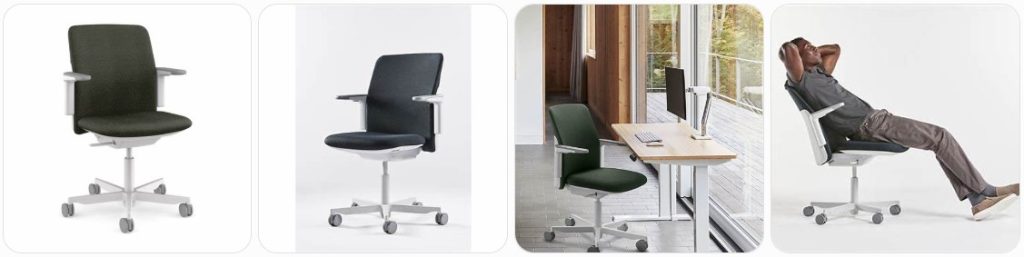
Quick Fix to Common Humanscale Path Problems
Humanscale Path will not recline smoothly: The Path uses Humanscale’s Gravity Mechanism, so it does not recline like a traditional tension-knob chair. Sit fully back, keep your feet on the floor, and lean naturally instead of forcing the back. If the recline feels sticky, check for debris under the seat and inspect the mechanism housing for damage.
Path recline feels too loose: Since the Path is designed to self-adjust using body weight, there may not be a manual tension knob to tighten. Make sure the chair is assembled correctly and that the cylinder is fully seated in the mechanism. If the recline drops backward suddenly, stop using it and contact Humanscale support.
Path recline feels too stiff: A stiff Path is often caused by sitting too far forward, incorrect seat height, or a mechanism obstruction. Raise or lower the chair until your feet sit flat, then sit all the way back. If the chair still resists movement, inspect the underside for shipping material, damaged plastic, or a jammed Gravity Mechanism.
Humanscale Path chair keeps sinking: A Path that slowly lowers during use usually has a failing pneumatic cylinder. Make sure the height paddle is not stuck or pressed against the release pin. If the lever moves normally but the chair still drops, replace the cylinder with a compatible office chair gas lift cylinder or request an official Humanscale part.
Path chair will not go up or down: Check whether the height-control paddle under the seat is correctly engaging the cylinder release button. If the chair is new, confirm that all packaging caps were removed during assembly. A stuck cylinder, bent paddle, or misaligned mechanism may require service. Do not hit, drill, heat, or puncture the gas cylinder.
Gas cylinder is stuck in the Path base: Humanscale Path cylinders are pressure-fitted into the base and seat mechanism, so they can be difficult to remove. Apply penetrating lubricant around the joint, let it sit, and use controlled twisting force. A chair cylinder removal tool can help avoid damaging the polished or matching base finish.
Path seat feels loose: Turn the chair upside down on a soft surface and inspect the seat-to-mechanism fasteners. Tighten visible bolts evenly, but do not overtighten into plastic or threaded inserts. If the looseness comes from inside the Gravity Mechanism or cylinder socket, the part may need replacement instead of simple tightening.
Path backrest feels wobbly: The Path back and arms are integrated differently than many standard task chairs, so wobble should not be ignored. Check the back connection points and arm/back structure for looseness or cracks. Tighten accessible fasteners only if they are clearly meant to be user-serviceable. If the back shifts under pressure, contact Humanscale.
FormSense Eco Knit back feels saggy: The Path’s FormSense Eco Knit textile is designed to flex and conform to the body, so some movement is normal. However, deep sagging, edge separation, loose knit panels, or uneven support may indicate textile or frame damage. Do not sew or glue the knit. Request an official backrest or warranty evaluation.
Path back fabric is torn: Do not patch a torn Path back with tape, glue, or stitched repairs if the tear is in a load-bearing area. The FormSense Eco Knit back is part of the chair’s support system. A small cosmetic snag can be monitored, but spreading tears or detached edges usually require replacement through Humanscale or an authorized dealer.
Path seat cushion feels flat: The Path may be ordered with different upholstery and textile options, so cushion feel can vary. If the seat feels suddenly flat, check whether the upholstery has separated, the foam has collapsed, or the seat shell is cracked. For a premium chair like the Path, replacing the complete seat assembly is usually better than adding loose padding.
Path armrest is loose: Path arms are attached in a way that supports natural movement with the back, so looseness may come from the arm structure, back connection, or mounting hardware. Tighten accessible bolts carefully. If an adjustable arm no longer holds position or the arm frame flexes unusually, order an official replacement rather than forcing generic arm pads.
Path adjustable arm will not stay in position: Move the arm through its full range and check for dirt in the sliding track. If the release button clicks but the arm drops, the internal latch may be worn. Avoid oil sprays around the arm mechanism because they attract dust and can stain clothing. Replacement of the arm assembly is usually the cleanest repair.
Path arm pad is cracked: Cracked arm pads are usually a replaceable wear item. Measure the pad and check whether your Path has fixed arms or adjustable arms before ordering. Humanscale warranty terms may treat arm pads differently from structural parts, so check support first. For temporary comfort, use a removable office chair armrest pad cover.
Path casters do not roll well: Pull each caster out of the base and remove hair, thread, and debris from the wheel axle. The Path can be configured with different caster types, including soft or hard casters, so replace like-for-like when possible. If buying aftermarket wheels, compare stem size before ordering office chair replacement casters.
Path casters scratch the floor: Confirm whether your Path has hard-floor or carpet casters. Using the wrong caster type can damage hardwood, vinyl, or tile. Clean embedded grit from the wheel surface and consider a chair mat. If changing to rollerblade-style wheels, verify the stem size and wheel height before buying rollerblade office chair wheels.
Path base is cracked or bent: Stop using the chair immediately. A cracked base is a safety issue, especially on a premium self-adjusting chair with a central cylinder load. Do not repair the base with glue, screws, or tape. Order the correct Humanscale base finish and size through official support or an authorized dealer.
Path makes a clicking sound when reclining: A light mechanical click can happen when the self-adjusting mechanism engages, but loud popping, grinding, or snapping is not normal. Check for loose bolts, debris under the seat, and movement at the cylinder socket. If the noise comes from inside the Gravity Mechanism, contact Humanscale before continuing daily use.
Path squeaks during movement: Squeaks often come from caster axles, the cylinder socket, or dry metal contact points. Clean the casters first, then inspect the underside. Use a tiny amount of dry silicone lubricant only on appropriate metal contact points. Keep lubricant away from upholstery, knit fabric, and plastic trim.
Path chair rocks side to side: Some movement can come from the gas cylinder connection, but excessive rocking is usually a worn cylinder, loose mechanism, or damaged base socket. Tighten visible fasteners and check that the cylinder is fully seated. If the wobble comes from inside the cylinder or mechanism, replace the part rather than trying to rebuild it.
Path seat height is too low: Humanscale Path can have different cylinder options depending on configuration. If the chair works but sits too low for your desk, check whether your model uses the standard, low, or high cylinder option. You may need an official cylinder in the correct height range instead of a random universal part.
Path seat height is too high: Aftermarket cylinders and taller replacement casters can raise the minimum seat height. If your Path no longer fits your desk after a repair, compare the new cylinder and caster dimensions with the original setup. A low-height cylinder or original caster set may be needed to restore the correct sitting range.
Path upholstery has stains: Humanscale offers different textile and leather options for Path, so cleaning should match the exact material. Blot spills quickly and avoid soaking the seat or back. Use mild cleaner only after checking fabric care guidance. For leather versions, use proper leather care instead of harsh household cleaners or alcohol-based sprays.
Path leather seat is cracking: Leather Path models need gentler care than knit or fabric models. Keep the chair out of direct sun and away from heat sources. Clean with a suitable leather cleaner and condition only as recommended for the specific leather. If cracks are deep or the leather is peeling, the seat may need professional reupholstery or replacement.
Path frame trim is scratched: Light marks on the frame or trim can often be cleaned with a damp microfiber cloth. Avoid abrasive pads because they can dull the finish. If the chair has a polished aluminum base, use a cleaner appropriate for aluminum. Deep gouges are usually cosmetic unless the frame or base structure is cracked.
Path was assembled incorrectly: If the chair feels crooked, does not raise properly, or the back does not align, compare every part with the official Humanscale installation manual. Loosen fasteners slightly, realign the seat, back, arms, base, and cylinder, then retighten evenly. Do not force mismatched parts, especially on customized Path configurations.

HYEJDRV Heavy Duty 500LBs Office Chair Tilt Control Mechanism Replacement Parts, Office Chair Swivel Tilt Base W/6" x 10.2" Mounting Holes - Black

Omyoffice 5.5” Office Chair Gas Lift Cylinder Replacement, Class 4 Piston | Heavy-Duty 1000 lbs, Hydraulic Pneumatic Gas Lift, Universal Fit Most Executive Gaming Desk Chairs, Black

Besitu 500Lbs Office Chair Replacement Parts, w/ 6'' x 10.2" Mounting Holes Chair Base Heavy Duty Plate Swivel Tilt Control Seat Mechanism for Executive and Gaming Chairs
How much does it cost to repair a Humanscale Path?
- Basic inspection and adjustment: $0 to $40 if you do it yourself. This includes checking the height paddle, caster debris, loose bolts, upholstery condition, and whether the Gravity Mechanism is obstructed.
- Professional office chair inspection: $60 to $150 depending on your area. Because the Path is a premium chair, a proper diagnosis is worth it before replacing the cylinder, base, back, or mechanism.
- Replacement gas lift cylinder: $40 to $120 for the part, depending on height range and whether it is genuine Humanscale or aftermarket. Labor can add $50 to $150 if the old cylinder is stuck.
- Gas cylinder removal service: $50 to $125 in labor. The cost can be higher if the cylinder is seized in a polished aluminum base or if the shop needs special tools to avoid damaging the finish.
- Replacement caster set: $25 to $90. Humanscale-compatible casters may cost more than generic wheels, especially if you need a specific hard-floor, soft-floor, braking, or finish-matching option.
- Replacement arm pad: $30 to $90 per pair depending on availability. Arm pads may be treated as wear items, so warranty coverage can differ from the chair’s main structural components.
- Replacement adjustable arm assembly: $100 to $250 or more depending on finish, configuration, and whether one or both arms need replacement. Path arms are more model-specific than basic office-chair arms.
- Replacement seat assembly: $150 to $400 or more. Cost depends on textile, leather, color, foam, and whether the part is ordered through Humanscale, a dealer, or a used-parts seller.
- Replacement FormSense Eco Knit back: $200 to $500 or more depending on color, frame finish, and availability. Because the Path back provides support, it is usually better to replace the assembly than repair torn knit fabric.
- Replacement Gravity Mechanism: $200 to $500 or more for the part, plus labor. This is one of the most important Path-specific parts, so official support is strongly recommended.
- Replacement base: $100 to $300 or more depending on whether the chair has a standard matching base or polished aluminum base. A cracked base should always be replaced, not repaired.
- Upholstery cleaning: $20 to $80 for DIY supplies or $75 to $200 for professional cleaning. Always match the cleaning method to your Path’s exact textile, knit, or leather finish.
- Leather care or minor leather repair: $30 to $150 for cleaning, conditioning, or small cosmetic treatment. Larger cracks, peeling, or seat damage may require a replacement seat or professional upholstery work.
- Full rebuild with multiple parts: $400 to $1,000 or more. If the chair needs a cylinder, casters, arms, seat, back, and mechanism together, compare the repair total with the price of a new or refurbished Path.
Order Parts for Your Broken Humanscale Path
- Humanscale replacement parts store: Humanscale recommends checking its official replacement-parts collection first. This is the best starting point for common service parts, especially if the chair was purchased through Humanscale’s online shop.
- Humanscale support ticket: If the part is not listed online, submit a support ticket and include the seating serial number, original order number, product line or model number, and a description of the broken Path part.
- Authorized Humanscale dealer: For customized Path chairs, commercial orders, special textiles, special cylinder heights, and polished bases, an authorized dealer may be able to quote the exact matching component.
- Amazon aftermarket parts: Amazon can be useful for generic repair items like gas cylinder replacements, replacement chair casters, lubricant, tools, and arm pad covers, but always measure carefully before ordering.
Before ordering anything for a Humanscale Path, identify the exact configuration. Path chairs can differ by upholstery, frame color, base type, caster type, arm style, and cylinder height. Look for the seating serial number or product label under the chair, then take photos of the broken part, the full chair, and the connection points.
For model-specific parts like the Gravity Mechanism, FormSense Eco Knit back, seat assembly, arm structure, base, or matching trim, official Humanscale support is usually safer than generic parts. For more universal parts like casters and cylinders, measure the original part carefully and compare stem size, cylinder length, travel range, and weight rating.
Do not throw away the old part until the repair is complete. Many Humanscale parts are easier to match when you can compare the original next to the replacement. Also avoid drilling new holes, cutting brackets, gluing structural pieces, or forcing universal parts onto the chair, because that can make warranty or future service more difficult.
HYEJDRV Heavy Duty 500LBs Office Chair Tilt Control Mechanism Replacement Parts, Office Chair Swivel Tilt Base W/6" x 10.2" Mounting Holes - Black
Omyoffice 5.5” Office Chair Gas Lift Cylinder Replacement, Class 4 Piston | Heavy-Duty 1000 lbs, Hydraulic Pneumatic Gas Lift, Universal Fit Most Executive Gaming Desk Chairs, Black
Besitu 500Lbs Office Chair Replacement Parts, w/ 6'' x 10.2" Mounting Holes Chair Base Heavy Duty Plate Swivel Tilt Control Seat Mechanism for Executive and Gaming Chairs
Humanscale Path Repair & Service Center Near You
Humanscale does not usually work like a basic retail chair brand where every city has a dedicated “Path repair center.” The best route is to use Humanscale’s official support and dealer network so the chair can be identified by serial number, order number, product line, finish, and configuration.
For product issues, damaged items, replacement requests, and warranty help, use the official Humanscale Warranty/Product Support page. Humanscale asks customers to create a support ticket for eligible product issues and include a detailed description, photos or videos, model name or number, seating serial number, Humanscale order number or PO number, and ship-to address if a replacement is needed.
To find a dealer or local buying source, use the official Humanscale Where To Buy page. This is helpful if your Path was purchased through a dealer, design firm, office furniture supplier, corporate procurement account, or commercial project. A dealer may also help order matching parts for special finishes and upholstery options.
When contacting Humanscale or a dealer, prepare the following:
- The seating serial number, usually found on a label under the chair
- The original order number, PO number, invoice, or dealer name
- Clear photos of the full Path chair and the broken area
- A short video showing sinking, wobbling, recline failure, or noise
- The chair configuration, including arms, base finish, caster type, and upholstery
- Your shipping address in case a replacement part is approved
If the chair is outside warranty, search for a local office-furniture repair company rather than a general handyman. Tell them it is a Humanscale Path with a self-adjusting Gravity Mechanism and FormSense Eco Knit or upholstered finish. This helps them understand that the recline mechanism, back support, and upholstery are more specialized than a standard low-cost task chair.
Warranty Coverage for Humanscale Path
Humanscale warranty terms can vary by region, product category, purchase channel, configuration, and date of purchase. Humanscale’s published limited warranty information lists “all other seating and products detailed in a current Humanscale Price Guide, unless otherwise specified” at 15 years, while fabric, cushions, arm pads, casters, and wood are listed separately at 5 years. Always confirm the exact warranty terms for your Path with Humanscale or your authorized dealer.
The warranty is typically intended for defects in materials and workmanship under normal use. It may not cover normal wear and tear, accidental damage, misuse, improper installation, unauthorized modifications, damage caused by harsh cleaning products, or problems from using the chair outside its intended environment.
For a Humanscale Path, the parts most likely to need separate warranty interpretation include the FormSense Eco Knit textile, upholstered seat, leather surfaces, arm pads, casters, cylinder, base, and Gravity Mechanism. A structural defect and a cosmetic stain are not treated the same way, so provide clear photos and an accurate description of the problem.
To improve your warranty claim:
- Do not disassemble the Gravity Mechanism unless Humanscale instructs you to do so.
- Do not replace the cylinder, casters, base, or arms before documenting the original failure.
- Do not use glue, tape, drilling, welding, or aftermarket brackets on structural parts.
- Save the invoice, order confirmation, dealer receipt, and product label photos.
- Record a short video if the chair sinks, wobbles, clicks, or fails to recline.
- Include the seating serial number when submitting a support ticket.
If you bought the Path secondhand, warranty coverage may be limited or unavailable depending on Humanscale’s current terms and proof-of-purchase requirements. However, Humanscale or an authorized dealer may still help identify parts for paid repair. If you purchased through a commercial office liquidation, ask whether the seller can provide the original order information.
Humanscale Path Diagram & Manual
For official Path diagrams, installation instructions, and maintenance documents, start with the official Humanscale Manuals, Installation and Maintenance library. Humanscale states that installation instructions, product manuals, and product part diagrams are available there to assist with fitting and maintenance.
You can also visit the official Humanscale Path Task Office Chair product page and look for resources, installation manuals, specification sheets, product care information, and contact options. If your region redirects to a different Humanscale site, use the same product name and choose the matching regional version.
Use the manual before removing any major component. The Path is not a basic chair with a simple tilt plate. Its body-weight recline, integrated back support, optional fixed or adjustable arms, special upholstery choices, and different caster/cylinder options make configuration matching important.
When using the diagram or manual:
- Confirm the chair is actually a Humanscale Path, not another Humanscale chair like Freedom, Liberty, Diffrient Smart, or World.
- Match the cylinder height option before ordering a replacement gas lift.
- Check whether the chair has fixed arms, adjustable arms, or no arms.
- Confirm whether the base is standard matching finish or polished aluminum.
- Identify whether the chair uses hard casters, soft casters, or braking casters.
- Take photos before removing the seat, back, mechanism, arms, or base.
- Keep bolts separated by location so they do not get mixed during reassembly.
- Never open, heat, cut, or puncture the gas cylinder.
If you cannot find a Path-specific document in the download library, submit a Humanscale support ticket and request the correct installation manual or parts diagram for your chair’s serial number. This is especially useful for customized commercial orders or chairs purchased through dealers.
Tips to Make Your Humanscale Path Last Longer
- Sit all the way back: The Path is designed to adjust around your body. Sitting too far forward can make the recline and back support feel wrong and may place uneven pressure on the seat edge.
- Let the Gravity Mechanism work naturally: Do not force the backrest or bounce aggressively in recline. The Path is built for smooth body-weight movement, not hard rocking or sudden impact.
- Keep the chair within its rated capacity: Humanscale Path specifications commonly list a 300 lb weight capacity. Staying within the rating helps protect the cylinder, base, mechanism, back, arms, and casters.
- Use the right caster type: Make sure your Path has casters suited to your floor. Hard-floor casters, soft-floor casters, and braking casters behave differently, and the wrong type can wear faster or damage flooring.
- Clean caster axles often: Hair and thread wrapped around Path caster axles can cause drag, noise, and uneven rolling. Remove the wheels and clean them before the debris damages the caster housing.
- Protect the FormSense Eco Knit back: Avoid sharp belt clips, exposed zippers, tools, pet claws, and hard objects that can snag or tear the knit textile.
- Blot spills quickly: Do not soak the Path seat or back. Blot spills with a clean cloth and follow the correct care instructions for your specific textile, knit, or leather finish.
- Avoid harsh cleaners: Alcohol, bleach, solvents, abrasive pads, and strong degreasers can damage upholstery, plastic trim, and finishes. Use mild cleaning methods unless Humanscale’s material care guide says otherwise.
- Do not drag the chair by the arms: Path arms are part of the seating support experience, not handles for pulling the chair across a room. Move the chair by holding the seat or base carefully.
- Check bolts occasionally: Even high-end chairs can loosen over time. Inspect accessible fasteners every few months and tighten them evenly if movement appears.
- Do not stand on the Path: The chair is not a ladder. Standing on the seat can overload the cylinder, casters, base, and seat shell in ways they were not designed to handle.
- Keep it indoors: Moisture, direct sunlight, and extreme temperatures can shorten the life of upholstery, plastic, cylinder seals, and metal finishes.
- Use a chair mat when needed: Thick carpet can stress casters and hard floors can scratch if the wrong wheels are used. A good mat helps the Path roll smoothly and protects both the chair and floor.
- Do not modify the mechanism: Avoid adding aftermarket brackets, drilling holes, welding parts, or changing the Gravity Mechanism. Modifications can make the chair unsafe and may affect warranty support.
- Document problems early: If the chair starts sinking, clicking, wobbling, or tearing, take photos and videos right away. Early documentation makes warranty and parts support much easier.
Broken Humanscale Path Repair FAQ
Can a Humanscale Path chair be repaired?
Yes. Many Humanscale Path problems can be repaired by replacing the cylinder, casters, arm pads, arms, seat, back, base, or mechanism. However, because the Path uses a self-adjusting Gravity Mechanism and model-specific parts, official Humanscale support or an authorized dealer is usually the safest source for major repairs.
Why does my Humanscale Path keep sinking?
A sinking Path usually has a failing pneumatic gas cylinder. First check that the height paddle is not stuck or pressing the release pin. If the paddle works normally but the seat drops under weight, the cylinder likely needs replacement.
Can I use a universal gas cylinder on a Humanscale Path?
Sometimes, but it must match the correct taper, travel range, height range, and weight rating. The Path may have different cylinder options, so measure the original part and confirm compatibility. For best fit, ask Humanscale or an authorized dealer for the correct replacement cylinder.
How do I remove a stuck Humanscale Path cylinder?
The cylinder is pressure-fitted into the chair base and mechanism. Use penetrating lubricant, controlled twisting force, and a cylinder removal tool if needed. Protect the base finish and never heat, cut, drill, or puncture the gas cylinder.
Why does my Humanscale Path not recline?
The Path reclines through a self-adjusting Gravity Mechanism, so it may not have a traditional recline knob. Sit fully back and lean naturally. If the chair still does not move, inspect for debris or damage under the seat. Internal mechanism problems should be handled by Humanscale support.
Does the Humanscale Path have recline tension adjustment?
The Path is designed to use the sitter’s body weight instead of bulky manual controls. If the recline feels wrong, check posture, seat height, assembly, and mechanism condition. Do not try to force a manual tension adjustment that the chair was not designed to have.
Can the Humanscale Path back be repaired?
Minor cleaning or cosmetic issues may be manageable, but torn FormSense Eco Knit, loose back support, or frame damage usually requires a replacement back assembly. Do not sew, glue, or tape load-bearing textile sections because the repair may fail under normal sitting pressure.
Can I patch the FormSense Eco Knit on a Path chair?
A patch may hide a small cosmetic snag, but it is not a reliable structural repair. If the knit is torn, stretched, or separating from the frame, contact Humanscale for replacement options. The back textile is part of the chair’s support system.
Why is my Path chair making a clicking noise?
A small click may occur as the mechanism engages, but loud popping or grinding can indicate loose bolts, cylinder movement, debris, or internal Gravity Mechanism wear. Stop using the chair if the seat shifts suddenly or the sound gets worse.
Can I replace the casters on a Humanscale Path?
Yes. Remove one original caster and measure the stem before ordering replacements. Also match the wheel type to your floor. Humanscale Path can be configured with different caster options, so using the wrong caster may change rolling feel or floor protection.
Why does my Path chair wobble?
Wobble can come from a loose mechanism, worn gas cylinder, damaged caster, cracked base, or loose back/arm structure. Tighten accessible fasteners and inspect the base and cylinder socket. If the wobble is inside the mechanism or cylinder, replacement is usually needed.
Can a cracked Humanscale Path base be fixed?
No. A cracked chair base is a structural safety issue and should be replaced. Do not repair it with glue, tape, screws, or metal plates. Order the correct base through Humanscale, an authorized dealer, or a verified compatible source.
Where is the serial number on a Humanscale Path?
Look underneath the seat for the seating serial number or product label. Take a clear photo before contacting support. Humanscale may use the serial number, order number, model name, or product line to identify the correct replacement part.
Does the Humanscale Path warranty cover casters and arm pads?
Humanscale’s published terms list fabric, cushions, arm pads, casters, and wood separately from many structural seating components. Coverage can depend on region, purchase date, and use, so confirm the current terms with Humanscale support or your dealer.
Is the Humanscale Path worth repairing?
Usually yes if the problem is a cylinder, caster, arm pad, loose bolt, or single replacement part. Since the Path is a premium chair, repair often makes sense. Replacement may be better if the chair needs a seat, back, mechanism, base, and multiple cosmetic parts at once.
Can I buy Humanscale Path parts on Amazon?
You can buy generic items like cylinders, casters, lubricant, tools, and arm pad covers on Amazon, but model-specific Path parts are best ordered from Humanscale or an authorized dealer. Always measure carefully because universal office chair parts may not fit correctly.
How do I clean a Humanscale Path chair?
Use a soft cloth, gentle vacuuming, and material-appropriate cleaning methods. Do not soak the FormSense Eco Knit, leather, or upholstery. Avoid bleach, solvents, abrasive pads, and strong alcohol cleaners unless the official material care instructions specifically allow them.
Can a Humanscale Path seat cushion be replaced?
Yes, but it should match the chair’s configuration, textile, color, and mounting points. A complete seat assembly is usually more reliable than adding loose foam or modifying the original seat. Contact Humanscale or a dealer for the correct matching part.
Why does my Path feel uncomfortable after repair?
The replacement cylinder, casters, arms, or seat may not match the original configuration. Taller wheels or the wrong cylinder can change posture and desk height. Check the manual, compare replacement dimensions, and confirm that all parts are seated and aligned correctly.
Should I repair the Humanscale Path myself or contact support?
Simple cleaning, caster replacement, bolt checks, and arm pad covers are usually manageable at home. For the Gravity Mechanism, FormSense Eco Knit back, cracked base, major wobble, sinking cylinder under warranty, or structural damage, contact Humanscale support before attempting repairs.
Summary
The Humanscale Path is repairable, but it is not a basic chair with generic parts everywhere. Start with simple checks like casters, height control, loose bolts, and cleaning, then move to cylinders, arms, seat, back, base, or mechanism only after confirming the exact configuration. For anything involving the Gravity Mechanism, FormSense Eco Knit back, warranty, or structural damage, Humanscale support or an authorized dealer is the safest route.
HYEJDRV Heavy Duty 500LBs Office Chair Tilt Control Mechanism Replacement Parts, Office Chair Swivel Tilt Base W/6" x 10.2" Mounting Holes - Black
Omyoffice 5.5” Office Chair Gas Lift Cylinder Replacement, Class 4 Piston | Heavy-Duty 1000 lbs, Hydraulic Pneumatic Gas Lift, Universal Fit Most Executive Gaming Desk Chairs, Black