
Razer Fujin Pro parts can be tricky because some pieces are chair-specific, while others are easier to match online. This guide breaks down the common replacement parts, where to search, what to check before buying, and how to avoid ordering the wrong thing.
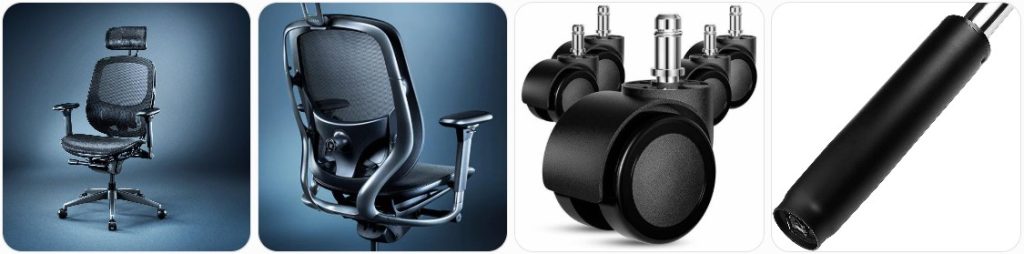
Buy Razer Fujin Pro Parts Online
The Fujin Pro uses 4D padded armrests, so check for height, width, forward/back, and pivot adjustment compatibility before ordering pads or full arm assemblies. » find on amazon / find on ebay
If only the top pads are cracked, sticky, or worn, search for replacement arm pads before buying the complete 4D armrest assembly. Match screw spacing and pad shape carefully. » find on amazon / find on ebay
The Pro model includes an adjustable 3D headrest. If it is loose, missing, or damaged, search by the exact chair model because generic headrests may not fit the back frame. » find on amazon / find on ebay
The Fujin Pro uses 60 mm casters. Replacement wheels are one of the easier parts to source, but confirm stem size and flooring type before switching to rollerblade-style wheels. » find on amazon / find on ebay
A sinking seat usually points to a failing gas lift. The Fujin Pro is listed with a Class 4 gas lift, but measure the old cylinder length and taper before ordering. » find on amazon / find on ebay
The Fujin Pro uses a metal base, so avoid cheap plastic replacement bases. Check cylinder socket size, caster stem compatibility, and overall diameter before buying a replacement. » find on amazon / find on ebay
The seat pan is a model-specific part because it connects to the tilt, seat-depth, and armrest hardware. Contact Razer first if the mesh seat is torn or sagging. » find on amazon / find on ebay
A damaged Fujin Pro backrest is usually not a simple universal swap. Look for exact RZ38-0494 compatibility or contact Razer because the frame, lumbar, and headrest mounts are specific. » find on amazon / find on ebay
The Pro has adjustable lumbar support for height and depth. If the knob, rail, or support pad fails, search the exact model number before trying generic lumbar parts. » find on amazon / find on ebay
If the recline, tilt lock, or tension control stops working, the under-seat mechanism may be the issue. This is a critical part, so exact fit is important. » find on amazon / find on ebay
The Fujin Pro seat depth adjustment lets the seat pan move forward or backward. If it jams, inspect the slider, lock lever, and rail hardware before ordering. » find on amazon / find on ebay
The Fujin Pro manual shows metric hardware including M8 x 20 mm, M6 x 18 mm, and M6 x 14 mm screws. Match length and thread pitch carefully. » find on amazon / find on ebay
Broken height, recline, tilt, or seat-depth controls can make the chair feel unusable. These are usually tied to the under-seat mechanism, so confirm model fit first. » find on amazon / find on ebay
Buy Razer Fujin Pro Parts From a Local Authorized Dealer or Repairman Near You
If you need model-specific Razer Fujin Pro parts, start with the official Razer store locator or the Razer contact page. Ask if they can order parts for the RZ38-0494 Fujin Pro, especially the headrest, armrest assembly, mesh seat pan, backrest, lumbar support, or synchro-tilt mechanism. For simple repairs like casters, loose bolts, or a gas cylinder, a local office chair repair shop may be faster. Bring photos of the label, old part, screw holes, and measurements.
Tips for Ordering Razer Fujin Pro Replacement Parts
- Use the exact model name and number: Search for Razer Fujin Pro and RZ38-0494 because parts for the regular Razer Fujin may not match the Pro version.
- Separate generic parts from proprietary parts: Casters, some screws, and some gas cylinders may be easier to match, but the backrest, seat pan, lumbar system, headrest, and armrests are more chair-specific.
- Check whether the issue is still under warranty: Before paying for expensive parts, contact Razer Support if your frame, mechanism, armrests, mesh backing, or seat pan may still be covered.
- Compare the Pro and non-Pro Fujin carefully: The Fujin Pro has a different feature set, including 4D armrests, 3D headrest, aluminum alloy frame, and depth-adjustable lumbar support, so do not assume every Fujin part fits.
- Photograph the damaged part before removal: Take pictures of the underside, screws, bracket holes, lever positions, and how the part connects to the chair before disassembly.
- Match the caster size: The Fujin Pro uses 60 mm caster wheels, so check wheel diameter and stem style before buying replacement wheels.
- Measure the gas cylinder before ordering: If replacing the Class 4 gas lift, measure the old cylinder’s extended height, compressed height, outer tube diameter, and tapered ends.
- Do not force mesh parts: The mesh seat and backrest are tensioned parts. If they are torn, detached, or sagging badly, it is usually better to seek an exact replacement instead of trying to patch the frame.
- Keep all original screws: The Fujin Pro uses different screw sizes in different areas. Store removed hardware in labeled bags so you do not mix M6 and M8 bolts.
- Ask sellers for real photos: For used Fujin Pro parts on eBay, ask for photos of the underside, mounting points, and any Razer labels before buying.
Tools Needed to Repair Razer Fujin Pro
- Metric Allen Key Set: Useful for removing and reinstalling the chair’s metric bolts, especially around the backrest, armrests, and seat mechanism.
- T-Handle Hex Key Set: Gives better leverage than a small Allen key when working on tightly installed Fujin Pro screws.
- Metric Socket Set: Helpful if you are working around brackets, under-seat hardware, or any replacement kit that includes hex-head bolts.
- Rubber Mallet: Can help loosen stuck casters or separate tight-fitting parts without damaging the aluminum frame or plastic trim.
- Office Chair Cylinder Removal Tool: Best for removing a stuck gas lift cylinder from the base or tilt mechanism without hammering too aggressively.
- Pipe Wrench: A backup option for twisting out a seized gas cylinder, but protect the surrounding chair parts and expect the old cylinder to get scratched.
- Blue Threadlocker: Useful for screws that repeatedly loosen, but only use a removable type and avoid permanent threadlocker on serviceable chair parts.
- Magnetic Parts Tray: Keeps the Fujin Pro’s small screws, washers, and spare bolts from rolling away during repair.
- Microfiber Cloth: Use it to protect the aluminum frame and mesh surfaces while the chair is upside down during repair.
- Flashlight or Work Light: Helps you inspect seat-depth rails, tilt controls, lumbar parts, and screw holes under the seat pan.
Razer Fujin Pro Diagram & Manual
The best place to find the Razer Fujin Pro diagram, assembly guide, specifications, and manual is the official Razer Fujin Pro Support & FAQs page. That page includes the device layout, dimensions diagrams, user guides, warranty information, and usage instructions. You can also open the official Razer Fujin Pro Master Guide, which shows what comes inside the box, assembly steps, usage instructions, safety notes, and warranty guidance.
How to Prevent Damage to Razer Fujin Pro Parts
- Do not exceed the recommended weight rating: The Fujin Pro is designed for up to 300 lbs / 136 kg, so staying within the limit helps protect the gas lift, base, frame, casters, and tilt system.
- Use the recline and tilt controls smoothly: Avoid slamming the backrest into the locked position because repeated impact can stress the synchro-tilt mechanism and control levers.
- Keep the mesh clean with a soft damp cloth: Dust, sweat, and debris can build up in the breathable mesh, so wipe it regularly without soaking the seat pan or backrest.
- Do not kneel or stand on the mesh seat: Concentrated pressure can overstretch or damage the mesh seat pan faster than normal sitting pressure.
- Check armrest screws periodically: Because 4D armrests move in several directions, loose screws or wobbly brackets should be tightened before the mounting points wear out.
- Roll the chair on suitable flooring: Dirty floors, deep carpet, or rough surfaces can wear the 60 mm casters faster and add stress to the metal base.
- Avoid dragging the chair sideways: Lift the chair when moving it over thresholds or thick rugs because sideways force can bend caster stems or loosen the base socket.
- Do not overtighten the lumbar knob: The 2D lumbar support is adjustable, but forcing the depth knob beyond its stop can damage the internal adjustment system.
- Keep liquids away from the adjustment controls: The mesh is designed to be durable, but spills can still run into the tilt mechanism, levers, and under-seat hardware.
- Retighten after assembly or major movement: If you moved the chair, replaced a part, or transported it, check the backrest, armrests, and seat hardware before using it heavily again.
Razer Fujin Pro Parts FAQ
Can I buy official Razer Fujin Pro replacement parts directly from Razer?
For model-specific parts, the best first step is to contact Razer Support or check with an authorized Razer dealer. Parts like the backrest, seat pan, headrest, lumbar support, and armrest assemblies are more likely to require official support than generic aftermarket matching.
What is the Razer Fujin Pro model number?
The Razer Fujin Pro is commonly listed as RZ38-0494. Use that model number when searching for replacement parts so you do not accidentally order parts for the regular Razer Fujin.
Are Razer Fujin and Razer Fujin Pro parts interchangeable?
Not always. The Fujin Pro has different premium features, including 4D armrests, a 3D headrest, aluminum alloy frame, and 2D lumbar support. Always compare the exact mounting points and part design before assuming a Fujin part fits the Fujin Pro.
What caster size does the Razer Fujin Pro use?
The Razer Fujin Pro is listed with 60 mm casters. Before buying replacement wheels, check the stem style and make sure the wheels are suitable for your flooring.
What gas lift cylinder does the Razer Fujin Pro use?
The Fujin Pro is listed with a Class 4 gas lift. If your chair slowly sinks, the cylinder may be worn out, but you should measure the original cylinder and confirm the taper fit before ordering a replacement.
Can I replace only the Razer Fujin Pro armrest pads?
Maybe, if the pad is removable and you can match the screw spacing and shape. If the 4D adjustment mechanism itself is broken, you may need a full armrest assembly instead of just the top pad.
Is the Razer Fujin Pro headrest removable?
Yes, the Fujin Pro headrest is removable. If replacing it, look for an exact Fujin Pro headrest because generic clamp-on headrests may not match the chair’s frame and mounting style.
Can I repair torn Razer Fujin Pro mesh?
Small cosmetic wear may be manageable, but a torn or sagging mesh seat/backrest is difficult to repair properly because the mesh is tensioned into the chair structure. A correct replacement seat pan or backrest is usually the better fix.
Why is my Razer Fujin Pro wobbling?
Common causes include loose screws, worn casters, a loose gas lift connection, a damaged base socket, or play in the tilt mechanism. Check the screws and wheels first before replacing expensive parts.
Where can I find the Razer Fujin Pro manual?
You can find the official manual and support information on the Razer Fujin Pro Support & FAQs page. The official Master Guide also shows the included parts, assembly steps, usage section, safety notes, and warranty information.
Summary
Finding Razer Fujin Pro parts is mostly about knowing which pieces are generic and which ones are model-specific. Casters, screws, tools, and sometimes gas cylinders are easier to source online, while the mesh seat, backrest, lumbar system, headrest, and 4D armrests should be matched carefully or requested from Razer. Take measurements, use the RZ38-0494 model number, and check warranty options before spending money.

Besitu 500Lbs Office Chair Replacement Parts, w/ 6'' x 10.2" Mounting Holes Chair Base Heavy Duty Plate Swivel Tilt Control Seat Mechanism for Executive and Gaming Chairs

HYEJDRV Heavy Duty 500LBs Office Chair Tilt Control Mechanism Replacement Parts, Office Chair Swivel Tilt Base W/6" x 10.2" Mounting Holes - Black
