If your Uplift J3 is starting to sink, wobble, or squeak every time you move, don’t panic. Most of those problems come down to a few replaceable parts and some quick maintenance. With a little DIY work, you can get your J3 feeling premium again without buying a new chair.
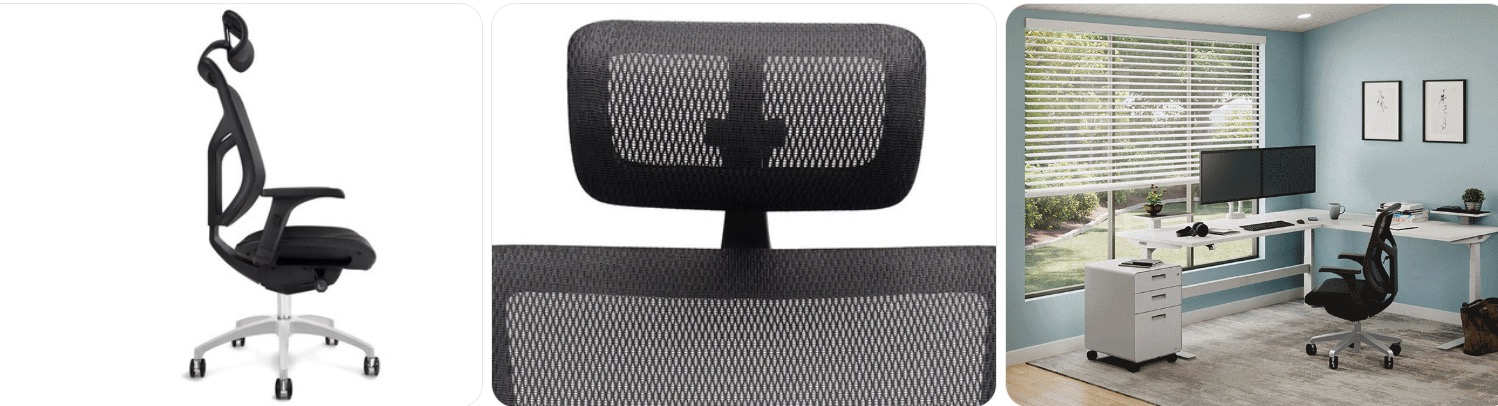
Quick Fix to Common Uplift J3 Problems
Sinking Uplift J3 (height keeps dropping): If your J3 slowly sinks while you sit, the gas lift cylinder is likely worn out. You can swap it with a compatible high-quality unit—look for a Class 4 office chair gas lift cylinder replacement. Match overall length and diameter so it fits both the mechanism and base securely.
Wobbly or off-center feeling at the base: A tilted or wobbly feel often means the gas lift isn’t fully seated in the J3’s aluminum base or one of the casters isn’t inserted all the way. Remove the chair top, reseat the cylinder, and firmly push each caster into place. Replace any cracked base or obviously bent cylinder before continuing to use the chair.
Noisy recline or “popping” when you lean back: Creaks and pops in the J3’s synchro-tilt mechanism usually come from slightly loose bolts or dry pivot points. Tighten all visible fasteners under the seat and at the backrest mount, then apply a small amount of silicone spray lubricant to moving joints. Avoid thick oils that attract dust.
Armrests wobbling or drifting out of position: The J3’s adjustable armrests can loosen at the mounting brackets over time. Tighten the bolts underneath the seat and at the arm posts using a metric Allen key. If the internal arm mechanism is damaged or the pads are torn, look for compatible replacements similar to adjustable office chair armrests.
Seat cushion feels flat or uncomfortable: If the leather seat feels hard or uneven, first check that all seat-mounting screws are tight and the pan isn’t warped. When the foam is clearly worn, you can either replace the entire seat assembly or add a high-quality topper, such as a memory foam seat cushion with good ergonomic support.
Casters grinding, squeaking, or not rolling smoothly: Hair and grit easily get trapped in the J3’s wheels. Pull each caster out, cut away hair, wipe the stems, and clean the sockets. If they still feel rough or leave marks on your floor, upgrade to rollerblade-style office chair wheels that are safe for hardwood and tile.

Besitu 500Lbs Office Chair Replacement Parts, w/ 6'' x 10.2" Mounting Holes Chair Base Heavy Duty Plate Swivel Tilt Control Seat Mechanism for Executive and Gaming Chairs

HYEJDRV Heavy Duty 500LBs Office Chair Tilt Control Mechanism Replacement Parts, Office Chair Swivel Tilt Base W/6" x 10.2" Mounting Holes - Black

Salbree Office Chair Hero Clamp Sinking Fix for Gas Cylinder Piston
How much does it cost to repair the Uplift J3?
- Basic tune-up (tightening and lubrication): If you already own tools, this can be essentially free. If not, expect around $15–$30 for a starter kit that includes a metric Allen key set and a can of silicone spray lubricant.
- Gas lift cylinder replacement: A compatible gas lift for the J3 typically costs about $20–$40. It’s one of the most effective repairs for fixing sinking issues while keeping the rest of the chair intact.
- Replacement casters (wheels): Upgraded casters usually run $20–$50 for a set of five, depending on brand and weight rating. They can dramatically improve rolling smoothness and protect your floors.
- Armrest replacements: New armrest assemblies or pads generally cost $30–$80 for a pair, depending on how close they match the original J3 design and materials.
- Seat or backrest assembly: Full seat or back modules tend to be more expensive, often $70–$160+, and availability may vary. At that price range, compare your total repair cost to a new chair to decide what makes sense.
- Professional repair service: A local ergonomic chair tech or office furniture service may charge $60–$150 or more in labor, plus parts. This is a good option if you’re not comfortable disassembling the tilt mechanism or base yourself.
Order Parts for Your Broken Uplift J3
- Official UPLIFT Desk support: Start with UPLIFT Desk if you want brand-correct J3 parts and warranty guidance. They can tell you what’s available and which components fit your exact version of the J3.
- Amazon: For generic wear parts like gas lifts, casters, and tools, browse compatible options and compare specs. A good starting point is a search for Uplift J3 chair parts and then narrowing down by part type.
- eBay and refurb sellers: Sometimes you’ll find salvaged or open-box J3 parts from returned chairs. Always confirm the color, finish, and interface (bolt pattern, cylinder size, etc.) match your current chair.
Ordering parts for your broken Uplift J3 goes smoother if you gather information first. Snap clear photos of the damaged components, measure key dimensions like gas lift travel and caster stem diameter, and keep your original invoice handy. If you’re unsure about compatibility, reach out to UPLIFT Desk support before placing a big order.
Uplift J3 Repair & Service Center Near You
Uplift doesn’t operate walk-in repair centers everywhere, but their support team can help you find the best route to service. They may recommend replacements you can install yourself, or advise on local office furniture techs familiar with their products. To get started, contact them directly through the official support page at upliftdesk.com/contact and share your J3 model details, photos, and a description of the issue.
Warranty Coverage for Uplift J3
UPLIFT Desk offers generous warranties on many of its chairs, often covering frame and mechanical defects for multiple years from the date of purchase. Exact coverage, including what’s considered normal wear versus a defect, depends on the current policy and where you bought the J3. Review the latest details on their official warranty information page and keep your proof of purchase handy. If your chair shows signs of structural failure or premature part breakdown, contact UPLIFT Desk to see if it qualifies for repair or replacement under warranty.
Uplift J3 Diagram & Manual
For accurate part names, bolt locations, and reassembly steps, rely on UPLIFT Desk’s own documentation rather than random PDFs. They host manuals, specs, and sometimes assembly videos on their product pages. Visit the official J3 page at upliftdesk.com/j3-ergonomic-chair and look for links to setup instructions, user manuals, and downloadable diagrams to guide your repair.
Tips to Make Your Uplift J3 Last Longer
- Avoid dropping your full weight into the chair or slamming back into recline, which can stress the gas lift and tilt mechanism. If you love to kick back, consider adding a supportive under-desk footrest so you sit more controlled.
- Stay within the recommended weight rating so the seat cushion, base, and casters don’t wear out prematurely. Heavier users who notice flex in the base might upgrade to a compatible heavy-duty office chair base with matching gas lift and caster specs.
- Keep the casters free of hair and grit to prevent grinding and floor damage. When they start to feel rough, swap to rollerblade-style wheels that roll smoother and treat hardwood or tile more gently.
- Every few months, check arm, seat, and backrest bolts and snug them up using a metric Allen key set. Stopping small wobbles early helps prevent cracked brackets and noisy joints later.
- Use mild, chair-safe cleaners on the leather seat and mesh back. A quality upholstery cleaner for office chairs and a soft cloth will keep the J3 looking good without drying or cracking materials.
- Keep a small office chair repair kit handy so you can quickly tighten, lubricate, or replace small parts as soon as you notice squeaks or changes in recline feel.
Conclusion
A broken Uplift J3 doesn’t automatically mean it’s time for a new chair. Most issues trace back to a tired gas lift, worn casters, or loose hardware. With a few replacement parts, basic tools, and UPLIFT’s documentation, you can bring your J3 back to smooth, comfortable, everyday use.
Besitu 500Lbs Office Chair Replacement Parts, w/ 6'' x 10.2" Mounting Holes Chair Base Heavy Duty Plate Swivel Tilt Control Seat Mechanism for Executive and Gaming Chairs
HYEJDRV Heavy Duty 500LBs Office Chair Tilt Control Mechanism Replacement Parts, Office Chair Swivel Tilt Base W/6" x 10.2" Mounting Holes - Black