Colamy Atlas chairs are pretty solid, but little things like loose armrests, sinking gas lifts, noisy recline, or a wobbly base can still happen after daily use. This guide walks through the most common Colamy Atlas repair fixes, replacement parts, warranty help, and simple maintenance tips.
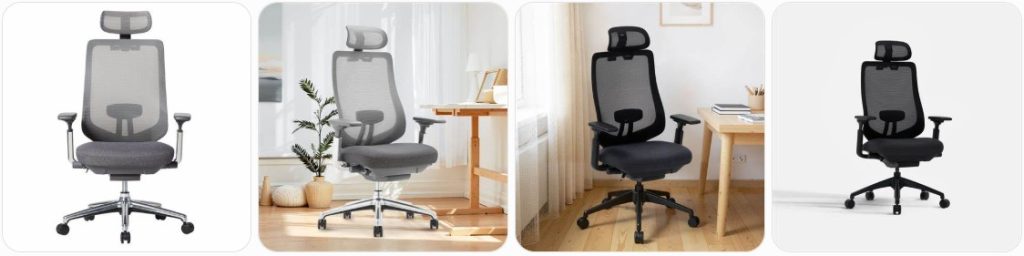
Quick Fix to Common Colamy Atlas Problems
Colamy Atlas seat sinks down while sitting: The Atlas uses a gas lift cylinder, so if the chair slowly drops after you adjust the height, the cylinder is usually losing pressure. First confirm the lift is fully seated in the mechanism and base. If it still sinks, replace it with a compatible office chair gas lift cylinder that matches the height range you want.
Colamy Atlas backrest makes a clicking sound: A small clicking noise from the headrest, armrest, or recline connection can happen because the Atlas has adjustable moving parts. Tighten the backrest bolts, check the recline lock, and make sure the headrest bracket is not loose. If the click is loud, sudden, or paired with movement, inspect the tilt mechanism before using the chair heavily.
Colamy Atlas recline will not lock properly: The Atlas has multiple backrest tilt positions, so a stuck lock often comes from the tilt control not fully engaging. Sit upright, release the backrest tension slightly, then test each lock point slowly. If the lever feels loose or the lock slips under weight, the tilt mechanism may need tightening or replacement with a compatible office chair tilt mechanism.
Colamy Atlas recline feels too stiff or too loose: Use the tension knob under the seat to tune the rocking resistance. Turn it gradually, then test the recline while sitting normally. If the Atlas reclines too easily even at high tension, check whether the tension spring or control plate is damaged. Avoid forcing the recline because that can damage the tilt housing.
Colamy Atlas 4D armrest is loose: The Atlas uses adjustable 4D armrests, so some light movement is normal. If the armrest rattles, remove the arm pad if accessible, tighten the mounting screws under the arm bracket, and check the height post. If the arm pad is cracked or the adjustment button no longer holds, replace the armrest assembly or contact Colamy for the correct Atlas part.
Colamy Atlas armrest height will not stay locked: If the armrest slides down after adjustment, the internal height latch may be worn or blocked. Raise and lower the armrest several times to clear the track, then inspect for broken plastic tabs. If one side works and the other side drops, the bad armrest likely needs replacement rather than adjustment.
Colamy Atlas headrest keeps slipping: The adjustable headrest can loosen if the screws inside the headrest support are not fully seated. Check the bracket connection behind the headrest, tighten the screws evenly, and avoid over-tightening plastic parts. If the headrest angle no longer holds, ask Colamy for an Atlas headrest bracket or look for a compatible replacement.
Colamy Atlas lumbar support feels sharp or uncomfortable: The Atlas has adjustable lumbar support, and some users may feel the edge if it sits too high or pushes too firmly. Move the lumbar support down slightly, reduce pressure by changing posture, and make sure the mesh back is not pulled unevenly. A thin fabric wrap over the lumbar plate can soften the contact point without modifying the chair.
Colamy Atlas seat depth slider is stuck: Dirt, fabric pressure, or uneven weight can make the seat depth mechanism feel jammed. Stand up, lift slightly on the front of the cushion, press the seat-depth control, and slide the seat forward and back. If it still sticks, check the rails under the cushion for loose screws or debris before applying any lubricant.
Colamy Atlas cushion feels uneven: The Atlas has a fabric seat cushion, so uneven support may come from loose seat screws, a shifted seat plate, or compressed foam. Flip the chair carefully, tighten the cushion-to-mechanism bolts, and confirm the seat is centered on the bracket. If the foam has permanently flattened, replacement cushion availability will usually need to be checked through Colamy support.
Colamy Atlas mesh back feels loose: A slightly flexible mesh back is normal, but sagging, tearing, or uneven tension is not. Check the back frame screws and confirm the lumbar support is seated correctly. If the mesh is ripped or separating from the frame, it is usually not a simple DIY repair and should be handled through warranty or a replacement backrest.
Colamy Atlas base wobbles: Wobble usually comes from the gas lift not fully seated, loose caster stems, or a damaged base socket. Remove the chair from use, press each caster firmly into the aluminum alloy base, and check whether the gas lift rocks inside the center hole. A cracked base should be replaced, not glued.
Colamy Atlas caster wheels drag or scratch the floor: Pull each caster out of the base and remove hair, dust, and debris from the wheel axle. If the wheel still sticks or leaves marks, upgrade to smooth office chair caster wheels, especially for hardwood, vinyl, or tile floors.
Colamy Atlas leans to one side: A leaning Atlas can be caused by uneven floor contact, a bent gas lift, loose mechanism bolts, or a damaged seat plate. Tighten the bolts under the cushion in a cross pattern, rotate the chair on a flat floor, and inspect the cylinder. If the tilt plate is bent, replacing the mechanism is safer than forcing it straight.
Colamy Atlas makes squeaking noises: Squeaks usually come from the tilt mechanism, caster stems, armrest posts, or backrest mounting bolts. Tighten hardware first, then apply a small amount of silicone spray or light lubricant to metal moving joints only. Keep lubricant away from the mesh back, seat fabric, and plastic adjustment buttons.
Colamy Atlas bolts keep coming loose: Daily recline and seat-depth movement can loosen hardware over time. Re-tighten the backrest, armrest, and mechanism bolts with the correct Allen key. If the same bolt loosens repeatedly, remove it, check for stripped threads, and use a small amount of removable threadlocker on metal-to-metal connections only.

HYEJDRV Heavy Duty 500LBs Office Chair Tilt Control Mechanism Replacement Parts, Office Chair Swivel Tilt Base W/6" x 10.2" Mounting Holes - Black

Omyoffice 5.5” Office Chair Gas Lift Cylinder Replacement, Class 4 Piston | Heavy-Duty 1000 lbs, Hydraulic Pneumatic Gas Lift, Universal Fit Most Executive Gaming Desk Chairs, Black

Besitu 500Lbs Office Chair Replacement Parts, w/ 6'' x 10.2" Mounting Holes Chair Base Heavy Duty Plate Swivel Tilt Control Seat Mechanism for Executive and Gaming Chairs
How much does it cost to repair a Colamy Atlas?
- Gas lift cylinder replacement: Usually around $20-$45 for the part if you repair it yourself. A shop may charge around $50-$100 total depending on labor. This is one of the most common Colamy Atlas repairs when the chair sinks or will not hold height.
- Replacement caster wheels: Usually around $15-$40 for a full set of five. This is a simple DIY repair for a Colamy Atlas that rolls poorly, scratches floors, or has one wheel that keeps popping out of the aluminum base.
- Tilt mechanism repair or replacement: Usually around $35-$80 for a compatible mechanism, or around $80-$150 with local labor. This may be needed if the Atlas recline lock slips, the tension control fails, or the chair leans because the control plate is bent.
- 4D armrest replacement: Usually around $25-$70 per side if a compatible part is available. Because the Atlas armrest has height, angle, width, and forward-back adjustment, it is better to confirm the exact side and bracket style before ordering.
- Headrest or headrest bracket replacement: Usually around $20-$60 if the part is available. This repair is common when the Atlas headrest slips, clicks loudly, or the plastic bracket cracks after repeated adjustment.
- Lumbar support repair: Usually around $0-$30 if it only needs adjustment, padding, or tightening. If the Atlas lumbar support frame is cracked or the support plate is broken, replacement availability will likely depend on Colamy support.
- Seat cushion or backrest replacement: Usually around $60-$150 if Colamy can supply the part. Full cushion or mesh-back replacement is less common than gas lift or caster repair, but it may be needed after foam collapse, mesh tearing, or frame damage.
- Professional chair repair inspection: Usually around $40-$100 before parts. This makes sense if the Atlas has a sudden lean, cracked base, broken recline lock, or a safety issue you cannot identify from the outside.
Order Parts for Your Broken Colamy Atlas
- Colamy official support: Best option for model-specific Atlas parts such as the headrest, 4D armrest, lumbar support, seat cushion, backrest frame, or warranty replacement parts.
- Amazon replacement parts: Good for universal parts like office chair gas cylinders, caster wheels, screws, and basic repair tools.
- Local office chair repair shops: Useful if the cylinder is stuck, the tilt mechanism is hard to remove, or you need someone to confirm whether the Atlas frame is still safe.
- Hardware stores: Good for small metric bolts, washers, Allen keys, removable threadlocker, and non-staining silicone lubricant for moving metal joints.
Before ordering parts for a broken Colamy Atlas, take clear photos of the damaged area, the underside mechanism, the gas lift, the caster stem, and the product label if available. Match the part by size, mounting holes, and function, not just by the product name. For Atlas-specific parts, contact Colamy first because headrests, armrests, lumbar parts, and backrest frames may not match universal office chair replacements.
HYEJDRV Heavy Duty 500LBs Office Chair Tilt Control Mechanism Replacement Parts, Office Chair Swivel Tilt Base W/6" x 10.2" Mounting Holes - Black
Omyoffice 5.5” Office Chair Gas Lift Cylinder Replacement, Class 4 Piston | Heavy-Duty 1000 lbs, Hydraulic Pneumatic Gas Lift, Universal Fit Most Executive Gaming Desk Chairs, Black
Besitu 500Lbs Office Chair Replacement Parts, w/ 6'' x 10.2" Mounting Holes Chair Base Heavy Duty Plate Swivel Tilt Control Seat Mechanism for Executive and Gaming Chairs
Colamy Atlas Repair & Service Center Near You
Colamy does not usually work like a car brand with a public local repair-center locator for every city. For a Colamy Atlas repair, the best starting point is the official Colamy support/contact page. You can contact Colamy, explain the issue, and ask whether your Atlas qualifies for warranty service, replacement parts, repair assistance, or a paid spare-part quote.
Official Colamy support/contact page: https://support.colamyhome.com/
When contacting support, include your order number, purchase date, photos, a short video of the problem, and the exact part that failed. For example, say “Atlas gas lift sinks,” “Atlas 4D armrest will not lock,” “Atlas backrest tilt lock slips,” or “Atlas lumbar support bracket is cracked.” This makes it easier for support to identify the correct part.
If your chair is out of warranty or you bought it secondhand, search locally for office chair repair, furniture repair, or ergonomic chair repair services. A local repair shop can usually handle common Colamy Atlas repairs like cylinder replacement, caster replacement, stuck cylinder removal, loose bolts, and tilt mechanism swaps.
Warranty Coverage for Colamy Atlas
The Colamy Atlas is listed with a 3-year warranty on the official Colamy Atlas product page. Colamy’s warranty page says warranty help may include replacement parts, repair assistance, product replacement, store credit, or partial reimbursement depending on the product condition and inspection result.
For the Atlas, warranty claims are usually most relevant for manufacturing defects or failure of functional chair parts such as the gas lift, casters, armrest mechanism, recline mechanism, or tilt mechanism. Normal wear, cosmetic damage, fabric/mesh wear, foam softening, damage from misuse, improper assembly, commercial use, pet damage, and accidental damage may not be covered.
Official Colamy warranty page: https://colamyhome.com/pages/warranty-information
To file a warranty claim, prepare your original order details, a clear description of the Colamy Atlas problem, photos, and video evidence. Do not throw away broken parts, packaging, or hardware until the issue is resolved, because support may need photos or part confirmation.
Colamy Atlas Diagram & Manual
The best place to find the Colamy Atlas diagram, parts list, and assembly manual is the official Colamy installation guide/manual page. Colamy lists the ATLAS Series Ergonomic Chair under its user manual section, with language options for the manual.
Official Colamy installation guide/manual page: https://colamyhome.eu/pages/installation-videos
Use the Atlas manual before removing parts from the chair. The diagram can help identify the seat mechanism, backrest bolts, armrest mounting points, headrest assembly, lumbar support position, gas lift, base, and casters. If you are ordering a part from Colamy, use the manual’s part names so support can understand exactly what you need.
Tips to Make Your Colamy Atlas Last Longer
- Recheck the backrest bolts every few months: The Atlas has an adjustable backrest and recline system, so the mounting bolts can loosen after repeated leaning and rocking.
- Do not force the recline lock: Move the backrest gently through the tilt positions and make sure the lock is fully engaged before leaning hard against it.
- Keep the seat-depth rails clean: Dust and crumbs under the cushion can make the Atlas seat slider feel rough or stuck.
- Adjust the lumbar support gently: The Atlas lumbar support is designed to move, but forcing it past its normal range can crack the bracket or make the back support uneven.
- Avoid pulling the chair by the headrest: The headrest is adjustable and should not be used as a handle when moving the Atlas around the room.
- Clean the mesh back carefully: Use a soft brush or vacuum attachment. Avoid harsh chemicals because they can weaken mesh fibers or discolor the chair.
- Use the right casters for your floor: If the original Atlas casters feel rough on hardwood or vinyl, use smooth replacement casters or a chair mat.
- Do not exceed the chair’s intended use: Do not stand on the Atlas, drop into it heavily, or use the armrests to support your full body weight when getting up.
- Keep liquid away from the mechanism: Spills can reach the tilt plate, seat-depth slider, or gas cylinder area and cause rust or sticky movement.
- Tighten armrests without over-tightening: The Atlas 4D armrests need secure screws, but over-tightening plastic-mounted parts can strip the threads.
- Lubricate only metal moving joints: Use a small amount of silicone spray on squeaky metal joints, but keep it away from the mesh, fabric seat, and plastic buttons.
- Save your order details: Keep your receipt, order number, and model information in case you need Colamy warranty support or spare parts later.
Broken Colamy Atlas Repair FAQ
Why does my Colamy Atlas keep sinking?
The gas lift cylinder is usually the problem. If the Atlas slowly lowers while you sit, the cylinder is probably losing pressure and needs replacement. Make sure the cylinder is fully seated first, but if the sinking continues, a new gas lift is the normal fix.
Can I replace the Colamy Atlas gas cylinder myself?
Yes, many owners can replace it with basic tools, but removing the old cylinder can be difficult if it is stuck tightly in the base or tilt mechanism. Use a rubber mallet, pipe wrench, or cylinder removal tool carefully, and avoid damaging the Atlas base or control plate.
Why does my Colamy Atlas make a clicking noise?
Some light clicking can come from the adjustable headrest, armrests, or recline structure because those parts have moving joints. Tighten the nearby screws and test the chair. If the click is loud, new, or comes with slipping or wobbling, inspect the tilt mechanism and backrest mount.
How do I fix a loose Colamy Atlas armrest?
Check the screws under the armrest bracket and the bolts connecting the armrest to the seat. Tighten them evenly, then test the height and angle controls. If the 4D adjustment button or internal latch is broken, the armrest assembly may need replacement.
Can the Colamy Atlas lumbar support be repaired?
Minor comfort issues can often be fixed by adjusting the lumbar height or adding a thin fabric wrap over the support area. If the lumbar bracket, rail, or support plate is cracked, contact Colamy because Atlas-specific lumbar parts may not be easy to match with universal parts.
Why does my Colamy Atlas lean to one side?
A side lean can come from loose seat bolts, an uneven floor, a bent gas lift, a damaged tilt mechanism, or a cracked base. Start by tightening the underside bolts and checking the casters. If the chair still leans, stop using it until the damaged part is identified.
Can I replace Colamy Atlas caster wheels?
Yes, caster wheels are usually one of the easiest parts to replace. Pull the old wheels straight out of the base and match the stem style and size. Smooth roller-style casters can make the Atlas roll better on hard floors and reduce floor scratches.
Where can I get Colamy Atlas replacement parts?
For Atlas-specific parts like the headrest, armrests, lumbar support, backrest, or cushion, contact Colamy support first. For universal parts like gas cylinders, caster wheels, screws, and some tilt mechanisms, Amazon or a local office chair repair shop may work.
Is the Colamy Atlas covered by warranty?
The Atlas is listed with a 3-year warranty from Colamy. Coverage usually depends on proof of purchase, original ownership, authorized purchase source, and whether the issue is a defect rather than normal wear, misuse, accidental damage, improper assembly, or commercial use.
Should I repair or replace a broken Colamy Atlas?
Repair is usually worth it for a bad cylinder, noisy mechanism, loose armrest, stuck caster, or missing hardware. Replacement may make more sense if the mesh back is torn badly, the frame is cracked, the base is damaged, or multiple major parts have failed outside warranty.
How do I stop my Colamy Atlas from squeaking?
Tighten the backrest, armrest, seat plate, and mechanism bolts first. Then apply a small amount of lubricant only to metal moving points under the chair. Do not spray lubricant on the mesh, fabric cushion, arm pads, or plastic adjustment controls.
Can I use universal office chair parts on the Colamy Atlas?
Some parts, like caster wheels and gas lift cylinders, are often universal if the size matches. Other parts, such as the 4D armrests, headrest, lumbar support, seat cushion, and backrest frame, should be matched through Colamy because the Atlas uses model-specific shapes and brackets.
Summary
Most Colamy Atlas problems are fixable if you identify the exact part first. Start with simple checks like tightening bolts, cleaning casters, adjusting the lumbar support, and testing the recline lock. For sinking, wobbling, broken armrests, or failed tilt controls, replacement parts may be needed. If your Atlas is still under warranty, contact Colamy before buying anything.
HYEJDRV Heavy Duty 500LBs Office Chair Tilt Control Mechanism Replacement Parts, Office Chair Swivel Tilt Base W/6" x 10.2" Mounting Holes - Black
Omyoffice 5.5” Office Chair Gas Lift Cylinder Replacement, Class 4 Piston | Heavy-Duty 1000 lbs, Hydraulic Pneumatic Gas Lift, Universal Fit Most Executive Gaming Desk Chairs, Black