
Fixing a broken Branch Ergonomic Chair Pro is usually pretty straightforward if you know which part is acting up. This guide walks through the common problems, repair costs, warranty basics, where to get parts, and how to keep your chair working smoothly for longer.
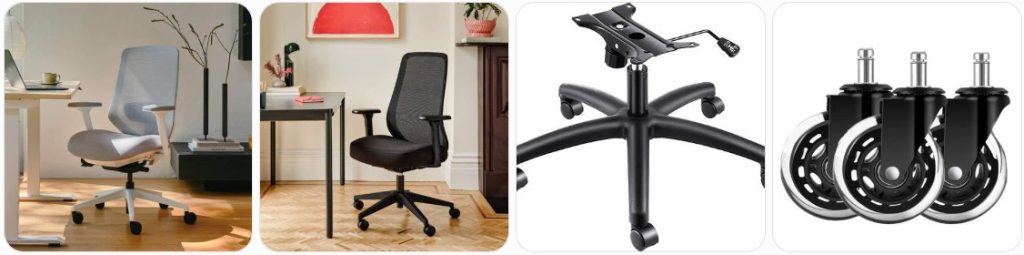
Quick Fix to Common Branch Ergonomic Chair Pro Problems
Branch Ergonomic Chair Pro seat height will not stay up: If your Branch Ergonomic Chair Pro slowly sinks while you sit, the gas lift cylinder is usually worn out. First, check that the height lever is not stuck under the seat. If the lever moves normally but the chair still drops, replace the cylinder with an office chair gas lift cylinder that matches the chair’s height range and base socket size.
Branch Ergonomic Chair Pro feels wobbly at the base: A wobble on this chair usually comes from a loose gas cylinder connection, loose seat plate bolts, or a caster that is not fully seated in the aluminum base. Flip the chair over carefully, tighten the bolts under the seat, push each caster firmly into the base, and check whether the cylinder is sitting straight in the base.
Branch Ergonomic Chair Pro 5D armrest is loose or rattling: The 5D armrests have more movement points than a basic chair arm, so rattling can come from the height post, arm pad, or pivot mechanism. Tighten the visible screws under the arm pad and at the armrest bracket. If the pad is cracked, sliding too freely, or popping off, look for office chair armrest replacement pads with a similar mounting style.
Branch Ergonomic Chair Pro lumbar support will not stay in place: The Branch Ergonomic Chair Pro uses an adjustable lumbar support, so check the track and sliding points before replacing anything. Remove dust from the backrest track, make sure the lumbar pad is properly clipped into place, and avoid forcing it above or below its intended range. If it keeps slipping, contact Branch for the correct lumbar component.
Branch Ergonomic Chair Pro recline feels stuck: If the recline will not move, check whether the tilt lock is engaged first. Sit in the chair, unlock the recline control, and lean back slowly while adjusting tension. If the chair still feels jammed, inspect the underside mechanism for loose packaging pieces, a bent lever, or a cable that has slipped out of position.
Branch Ergonomic Chair Pro reclines too easily: If the backrest drops backward with very little pressure, the recline tension is probably set too loose for your body weight. Turn the tension knob under the seat gradually until the recline feels controlled. If the knob spins without resistance, the tilt mechanism may be damaged and may need replacement through Branch support.
Branch Ergonomic Chair Pro forward tilt does not engage: The Pro model includes a forward tilt feature, but it must be adjusted in the correct seated position. Make sure the chair is not recline-locked, sit fully back, and test the forward tilt lever slowly. If the lever feels loose or does nothing, the tilt cable or internal mechanism may be disconnected under the seat.
Branch Ergonomic Chair Pro seat depth adjustment is stuck: If the seat pan will not slide forward or backward, check for debris in the seat rail and make sure you are lifting or pressing the correct seat-depth control while moving your weight slightly off the cushion. Do not force the seat pan because the rail or latch can bend. Clean the track and retest before replacing parts.
Branch Ergonomic Chair Pro makes clicking noises when leaning back: A small click can happen when the tilt lock engages, but repeated clicking usually means a loose bolt, dry pivot point, or worn recline mechanism. Tighten the under-seat bolts evenly, inspect the backrest connection, and apply a small amount of silicone spray lubricant to metal pivot points only.
Branch Ergonomic Chair Pro casters do not roll smoothly: Hair, carpet fibers, and dirt can collect around the caster axles and make the chair feel rough or uneven. Pull each caster out, clean the wheels, and check for cracked plastic or bent stems. If the wheels are damaged, replace them with office chair caster wheels that fit the standard chair base stem size.
Branch Ergonomic Chair Pro backrest feels loose: A loose backrest often means the back support bracket or mounting bolts are not fully tightened. Remove the chair from use, check the screws connecting the backrest to the seat mechanism, and tighten them evenly. If the backrest bracket is cracked or bent, stop using the chair and contact Branch for the correct replacement part.
Branch Ergonomic Chair Pro headrest is loose or sliding: If your chair has the optional or included headrest setup, check the height track and tightening points behind the upper backrest. A loose headrest can usually be corrected by reseating it in the track and tightening the adjustment knob or screws. If the plastic guide is cracked, replacement is safer than trying to glue it.
Branch Ergonomic Chair Pro mesh back feels saggy: The mesh back should feel supportive, not overly loose. If it feels saggy, inspect the frame for cracks and check whether the lumbar pad is putting pressure in the wrong place. Mesh usually cannot be tightened like fabric upholstery, so a stretched or damaged backrest may need an official replacement back assembly.
Branch Ergonomic Chair Pro cushion feels uneven: Uneven cushion support can happen if the seat pan is not locked into the depth track, the cushion foam has compressed, or the seat plate bolts are loose. Reset the seat depth, tighten the under-seat hardware, and check whether the cushion is lifting at one side. If the foam has collapsed, contact Branch about a seat replacement.
Branch Ergonomic Chair Pro lever feels loose: A loose height, tilt, or seat-depth lever may simply be out of alignment, but it can also mean the control cable is disconnected. Look under the seat and confirm the lever is still attached to the mechanism. If the lever moves freely with no resistance, the cable or control housing may need replacement.

Omyoffice 5.5” Office Chair Gas Lift Cylinder Replacement, Class 4 Piston

HYEJDRV Heavy Duty 500LBs Office Chair Tilt Control Mechanism Replacement Parts, Office Chair Swivel Tilt Base W/6" x 10.2" Mounting Holes - Black
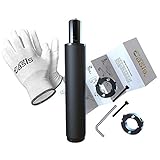
Office Chair Cylinder Replacement with Removal Tool (As Seen On PBS) - Heavy Duty Pneumatic Gas Lift Piston for Desk Chairs and Gaming Chairs - Universal Fit
How much does it cost to repair a Branch Ergonomic Chair Pro?
- Gas lift cylinder replacement: Usually around $25 to $60 for the part if you repair it yourself. Labor may add another $40 to $90 if a local furniture repair shop removes the old cylinder for you. This is one of the most common fixes when the Branch Ergonomic Chair Pro slowly sinks.
- Replacement caster wheels: Usually around $15 to $40 for a full set of wheels. The repair is simple if the caster stems pull out cleanly. If one caster socket in the base is cracked, the base may need replacement instead of just new wheels.
- Armrest pad or arm assembly repair: Replacement arm pads can cost around $20 to $60 if you find a compatible set. A full 5D armrest assembly may cost more and is best ordered from Branch because the Pro armrests have specific adjustment points and mounting holes.
- Seat mechanism or tilt control replacement: A tilt mechanism repair can cost around $50 to $150 depending on whether you use a compatible third-party mechanism or an official replacement. For the Branch Ergonomic Chair Pro, official support is the better option because the chair has seat depth, recline, forward tilt, and tension controls built into the mechanism.
- Lumbar support repair: Minor lumbar adjustment problems may cost nothing if the support is simply off track. If the lumbar pad, rail, or clip is broken, expect around $30 to $100 depending on part availability. Contact Branch first before buying a universal lumbar pad because the Pro backrest design is model-specific.
- Backrest or mesh frame replacement: This can cost around $80 to $200 or more if not covered by warranty. Since the mesh back, lumbar system, and frame shape are specific to the Branch Ergonomic Chair Pro, it is better to request the correct replacement from Branch instead of adapting a generic backrest.
- Seat cushion replacement: A worn or uneven seat cushion may cost around $60 to $150 if the seat assembly is available separately. If your chair is still under warranty and the cushion failed from normal use rather than damage, contact Branch before ordering any third-party part.
- Professional chair repair service: A local office furniture repair technician may charge around $60 to $150 for inspection and basic repair. Costs can go higher if the old cylinder is stuck, the tilt mechanism needs removal, or the chair needs a model-specific replacement part.
- Basic maintenance: Tightening bolts, cleaning caster wheels, adjusting recline tension, and lubricating metal pivot points may cost $0 to $20 if you already have tools. A small Allen key set, silicone lubricant, and a clean cloth are usually enough for basic Branch Ergonomic Chair Pro maintenance.
Order Parts for Your Broken Branch Ergonomic Chair Pro
- Branch official support: The best place to start is Branch, especially for the Pro model’s lumbar support, 5D armrests, seat mechanism, backrest, and warranty-related parts.
- Amazon replacement parts: For common wear parts like casters, gas lift cylinders, chair tools, and lubricant, Amazon can be useful. Always measure the old part before ordering and avoid guessing based only on product photos.
- Local office furniture repair shops: A local repair shop may be able to remove stuck cylinders, replace caster wheels, tighten the seat mechanism, and diagnose recline or tilt problems.
- Used or donor chair parts: If your chair is out of warranty, a used Branch Ergonomic Chair Pro may be a source for model-specific parts like an armrest, headrest, lumbar pad, or backrest. Only do this if the donor part is in better condition than yours.
Before ordering any part for a broken Branch Ergonomic Chair Pro, identify exactly what failed. Take photos of the underside mechanism, armrest mount, caster stem, cylinder label, and backrest connection. For universal parts, measure the part carefully. For model-specific parts like the 5D armrests, lumbar support, backrest, headrest, or seat mechanism, contact Branch first so you do not waste money on parts that do not fit.
If you only need common repair items, you can search for office chair gas cylinder replacement, office chair wheels replacement, office chair armrest pads, or office chair repair kit. For the Branch Ergonomic Chair Pro’s unique adjustment system, official parts are usually the safer choice.
Omyoffice 5.5” Office Chair Gas Lift Cylinder Replacement, Class 4 Piston
HYEJDRV Heavy Duty 500LBs Office Chair Tilt Control Mechanism Replacement Parts, Office Chair Swivel Tilt Base W/6" x 10.2" Mounting Holes - Black
Office Chair Cylinder Replacement with Removal Tool (As Seen On PBS) - Heavy Duty Pneumatic Gas Lift Piston for Desk Chairs and Gaming Chairs - Universal Fit
Branch Ergonomic Chair Pro Repair & Service Center Near You
Branch does not usually work like a traditional appliance brand with a large public list of local repair centers. For a broken Branch Ergonomic Chair Pro, the best first step is to contact Branch directly through the official Branch contact page. Use that page for warranty questions, replacement part requests, damaged delivery issues, assembly help, and model-specific repair guidance.
When contacting Branch, include your order number if you have it, the chair model name, photos of the broken part, a short video showing the issue, and your delivery date. This helps support confirm whether the problem is covered under warranty or whether they can help you order the correct replacement part.
If your Branch Ergonomic Chair Pro is out of warranty, search locally for office furniture repair, ergonomic chair repair, or commercial furniture service companies. These shops can often replace cylinders, casters, bolts, and some seat mechanisms. However, for parts like the 5D arms, lumbar support, backrest frame, headrest, and seat-depth mechanism, Branch is still the best source because these are not generic parts.
Warranty Coverage for Branch Ergonomic Chair Pro
Branch provides warranty protection on new products purchased from Branch, with coverage periods ranging from two to ten years depending on the product and category. Warranty periods begin from the date of delivery, and Branch states that warranty activation should be completed within seven days using the instructions included with the product or through the warranty page.
For the Branch Ergonomic Chair Pro, warranty coverage may help if the chair has a manufacturing defect, failed part, broken mechanism, or premature issue under normal use. Warranty coverage usually does not apply to accidental damage, misuse, improper assembly, normal cosmetic wear, stains, unauthorized modifications, or damage caused by using the wrong replacement part.
Before paying for a repair, check the official Branch warranty page. If your chair is still within the warranty period, contact Branch with photos, videos, and your proof of purchase. Do not throw away broken parts until Branch support tells you what to do because they may need the part details to process the claim.
Branch Ergonomic Chair Pro Diagram & Manual
The best place to find the Branch Ergonomic Chair Pro diagram, assembly guide, and usage instructions is the official Branch assembly guides page. This page is useful when you need to confirm how the backrest, seat, arms, headrest, cylinder, base, and casters are supposed to fit together.
If your chair feels loose after assembly, compare your chair to the official instructions before assuming a part is defective. Many Branch Ergonomic Chair Pro issues come from a bolt not being fully tightened, the backrest not being seated correctly, the gas cylinder not being inserted straight, or an adjustment control being used before the chair is fully assembled.
Keep the manual or assembly guide saved after the repair. It can help you identify part names, check bolt locations, and explain the issue clearly when contacting Branch support. If you bought the chair secondhand and do not have the paper guide, use the official online guide instead of relying on random third-party diagrams.
Tips to Make Your Branch Ergonomic Chair Pro Last Longer
- Use the adjustment controls gently: The Branch Ergonomic Chair Pro has multiple adjustment points, including arm movement, seat depth, lumbar support, recline, and tilt controls. Do not force a lever past its normal range. If something feels stuck, stop and inspect it before pushing harder.
- Retighten the under-seat bolts regularly: Because the chair has several moving ergonomic features, small vibrations can loosen bolts over time. Check the seat plate, armrest mounts, and backrest connection every few months, especially if you recline often or move the chair between rooms.
- Keep the caster wheels clean: Hair and dust around the caster wheels can make the chair drag, wobble, or strain the base. Remove the casters occasionally, clean the axles, and replace damaged wheels before they scratch floors or stress the aluminum base.
- Do not sit on the front edge too aggressively: The seat-depth system is designed for ergonomic adjustment, not heavy bouncing on the front lip of the cushion. Sitting heavily on the edge can stress the sliding rail, seat pan, or front cushion support.
- Adjust recline tension for your weight: If the recline tension is too loose, the backrest may drop too quickly. If it is too tight, you may strain the tilt mechanism while forcing it back. Set the recline tension so the chair moves smoothly with controlled pressure.
- Protect the mesh back from sharp objects: Avoid letting keys, tools, pet claws, or sharp desk edges catch the mesh backrest. Once mesh is cut or stretched, it is usually not a simple repair and may require a replacement back assembly.
- Avoid dragging the chair sideways: Lift the chair slightly when moving it over rugs, thresholds, or uneven flooring. Dragging can bend caster stems, loosen the base connection, or damage the gas cylinder socket.
- Clean the chair without harsh chemicals: Use a mild cleaner and soft cloth on plastic, metal, and arm pads. Avoid soaking the cushion or spraying cleaner into the tilt mechanism, lumbar track, or seat-depth rail.
- Do not exceed the chair’s intended use: The Branch Ergonomic Chair Pro is built for seated office work, not standing on, leaning sideways with full body weight, or using the arms as handles to lift the entire chair.
- Fix small noises early: Clicking, squeaking, and rattling often start as loose bolts or dry pivot points. Tightening and cleaning early can prevent damage to the recline mechanism, arm mounts, or backrest bracket.
Broken Branch Ergonomic Chair Pro Repair FAQ
Why does my Branch Ergonomic Chair Pro keep sinking?
The gas lift cylinder is the most likely cause. First check that the height lever is not stuck or pressed against anything under the seat. If the lever is fine and the chair slowly lowers while you sit, the cylinder probably needs replacement.
Can I replace the Branch Ergonomic Chair Pro gas cylinder myself?
Yes, many people can replace the cylinder at home, but removing the old cylinder can be difficult if it is stuck in the base or seat mechanism. Use the correct tools, protect the floor, and make sure the replacement cylinder matches the original size and height range.
Why is my Branch Ergonomic Chair Pro armrest loose?
The 5D armrest may be loose at the pad, pivot, height post, or mounting bracket. Tighten the screws under the arm pad and where the arm connects to the seat. If the adjustment mechanism is cracked or stripped, contact Branch for a model-specific replacement.
Can I use universal armrests on the Branch Ergonomic Chair Pro?
Universal armrests may not fit correctly because the Branch Ergonomic Chair Pro uses adjustable 5D arms with specific mounting points. Universal pads may work in some cases, but full arm assemblies should be ordered through Branch whenever possible.
Why will my Branch Ergonomic Chair Pro not recline?
The recline lock may be engaged, the tension may be too tight, or the tilt control cable may be disconnected under the seat. Unlock the recline, reduce tension slightly, and check the underside mechanism. If the lever moves freely without effect, the mechanism may need service.
Why does my Branch Ergonomic Chair Pro make a clicking noise?
Clicking can come from the tilt lock, loose bolts, dry pivot points, or a worn recline mechanism. Tighten all visible under-seat bolts, check the backrest connection, and apply a small amount of silicone lubricant to metal pivot points. Avoid spraying lubricant into fabric or mesh.
Can I repair a broken Branch Ergonomic Chair Pro lumbar support?
Minor lumbar issues can sometimes be fixed by reseating the support in its track and cleaning the adjustment area. If the lumbar pad, clip, or rail is cracked, it is better to contact Branch for the correct replacement instead of installing a generic lumbar support.
Where can I get Branch Ergonomic Chair Pro replacement parts?
Start with Branch support for model-specific parts like the backrest, lumbar support, arm assembly, seat mechanism, headrest, and seat cushion. For generic parts like casters, gas cylinders, tools, and lubricant, Amazon or a local office chair repair shop may be useful.
Is the Branch Ergonomic Chair Pro worth repairing?
Yes, it is usually worth repairing if the problem is a gas cylinder, caster, loose armrest, adjustment issue, or minor mechanism problem. If the backrest frame, seat mechanism, and multiple major parts are damaged at the same time, compare repair cost with the price of a replacement chair.
Can a local repair shop fix my Branch Ergonomic Chair Pro?
A local office furniture repair shop can usually handle common repairs like cylinder removal, caster replacement, bolt tightening, and basic mechanism inspection. For model-specific parts, they may still need Branch to supply the correct component.
What should I do before filing a Branch warranty claim?
Take clear photos of the broken part, record a short video showing the problem, find your order number or proof of purchase, and note the delivery date. Then contact Branch through the official contact page before buying replacement parts yourself.
Can I keep using my Branch Ergonomic Chair Pro if the backrest is loose?
No, not until you inspect it. A loose backrest can become unsafe if the mounting bolts, bracket, or frame are damaged. Tighten the bolts first. If the frame or bracket is cracked, stop using the chair and contact Branch support.
Summary
A broken Branch Ergonomic Chair Pro does not always mean you need a new chair. Start with the simple stuff: tighten bolts, clean the casters, reset the adjustments, and check the gas lift. For model-specific parts like the lumbar support, 5D arms, backrest, or tilt system, contact Branch first. Small repairs can save a lot of money and keep the chair comfortable for years.
Omyoffice 5.5” Office Chair Gas Lift Cylinder Replacement, Class 4 Piston
HYEJDRV Heavy Duty 500LBs Office Chair Tilt Control Mechanism Replacement Parts, Office Chair Swivel Tilt Base W/6" x 10.2" Mounting Holes - Black