
Need replacement parts for your Steelcase Series 2? This guide keeps it simple: what parts to look for, where to buy them online, what to check before ordering, and how to avoid buying the wrong part for your exact Series 2 chair.
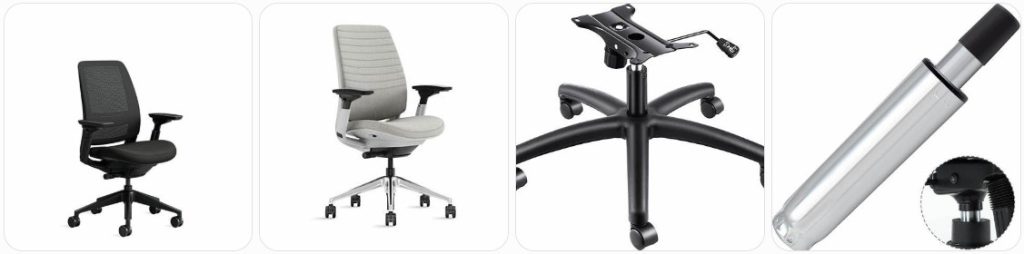
Buy Steelcase Series 2 Parts Online
Replace worn, sticky, cracked, or flattened arm pads on your Series 2. Match the pad shape to your existing arm style, especially if your chair has 4D adjustable arms. » find on amazon / find on ebay
Buy a full armrest assembly if the height button, width slider, pivot joint, or arm post is broken. Confirm left/right side and whether your chair is armless, height-adjustable, or 4D. » find on amazon / find on ebay
A sinking Series 2 usually points to a failing gas cylinder. Measure your current lift, check seat height range, and confirm whether you have the standard chair or stool version. » find on amazon / find on ebay
Replace noisy, stuck, cracked, or floor-scratching casters. Check the stem size and choose carpet casters, hard-floor casters, or rollerblade-style wheels depending on your flooring. » find on amazon / find on ebay
Look for a replacement seat if the cushion is compressed, fabric is torn, or the seat shell is cracked. Match upholstery color, seat shape, and mounting points carefully. » find on amazon / find on ebay
The Series 2 back uses a flexible geometric support design. Replace the back if the frame is cracked, loose, badly warped, or no longer supporting your posture properly. » find on amazon / find on ebay
Replace the lumbar support if it slips, rattles, cracks, or no longer holds position. Check whether your chair has upholstered, 3D microknit, or another back configuration. » find on amazon / find on ebay
The control unit affects recline, seat movement, cylinder connection, and tension feel. Replace it if adjustment levers fail, recline jams, or the chair feels unstable underneath. » find on amazon / find on ebay
If the comfort dial feels loose, clicks incorrectly, or no longer changes recline feel, search for the matching control or dial-related replacement part for Series 2. » find on amazon / find on ebay
Add or replace the Series 2 headrest if your chair supports it. Verify mounting holes, hardware, and color compatibility before ordering because Series 1 and Series 2 parts can look similar. » find on amazon / find on ebay
Replace the base if a leg is cracked, the caster sockets are damaged, or the chair wobbles even after checking the cylinder and casters. Match finish and cylinder fit. » find on amazon / find on ebay
For Series 2 stool models, the foot ring can loosen, scratch, or bend. Make sure the replacement is for the stool-height version, not the standard task chair. » find on amazon / find on ebay
Search for hardware if your arm, headrest, back, or under-seat mechanism is loose. Use the correct screw length and thread type to avoid damaging plastic mounts. » find on amazon / find on ebay
Buy Steelcase Series 2 Parts From a Local Authorized Dealer or Repairman Near You
For original Steelcase Series 2 parts, a local authorized Steelcase dealer is usually the safest place to start. Dealers can help identify the exact model, finish, upholstery, arm type, cylinder height, headrest compatibility, and warranty options before you order. Use the official Steelcase dealer locator or the Steelcase contact page to find support near you. A local office-chair repair shop may also help with labor-heavy repairs like gas cylinder removal, control replacement, caster extraction, and seat/back swaps.
Tips for Ordering Steelcase Series 2 Replacement Parts
- Confirm that your chair is actually a Steelcase Series 2: Series 1, Series 2, Amia, Think, Leap, and Gesture parts can look similar online, but they are not always interchangeable.
- Check your Series 2 configuration: Series 2 can vary by arms, upholstery, back style, lumbar support, stool height, headrest setup, caster type, and finish, so do not order only by chair name.
- Look under the seat for labels: Before buying parts, check the underside of the chair for Steelcase labels, manufacturing information, model details, or dealer/service information.
- Match left and right arm parts carefully: If replacing an armrest assembly, confirm whether the listing is for the left side, right side, pair, or only the top arm pad.
- Measure your gas cylinder before ordering: Series 2 task chairs and stool-height chairs may use different lift heights, so measure your existing cylinder and compare the extended and compressed height when possible.
- Choose the right casters for your floor: Carpet casters, hard-floor casters, and aftermarket rollerblade casters can feel very different on a Series 2, especially on tile, hardwood, vinyl, and low-pile carpet.
- Do not force backrest or lumbar parts: The Series 2 back is designed around a flexible Air LiveBack-style support system, so forcing the wrong lumbar or back component can crack the frame.
- Ask the seller for actual photos: For used Series 2 parts on eBay, request photos of mounting points, underside labels, screw holes, cracks, and wear spots before buying.
- Keep the old part until the repair is complete: You may need to compare screw length, brackets, clips, cylinder taper, caster stem, or arm-post shape against the replacement.
- Consider OEM parts for structural repairs: For the chair control, base, back frame, arms, and cylinder, original or dealer-supplied parts are usually safer than random universal parts.
Tools Needed to Repair Steelcase Series 2
- Office Chair Gas Cylinder Removal Tool: Helpful when the Series 2 gas lift is stuck inside the base or chair control and will not release by hand.
- Rubber Mallet: Useful for tapping the base, cylinder, or caster area without damaging the finish as easily as a metal hammer.
- Torx Bit Set: Needed for some Steelcase hardware, especially when working around headrest, back, arm, or bracket screws.
- Allen Wrench Set: Useful for checking under-seat hardware, arm hardware, and replacement brackets if your part uses hex fasteners.
- Socket Wrench Set: Helps remove tighter bolts from the mechanism, seat pan, or base-related parts if your chair uses bolt-style fasteners.
- Needle-Nose Pliers: Good for removing small clips, pulling stuck debris from caster sockets, and holding small hardware during reassembly.
- Flathead Screwdriver Set: Can help gently pry caster stems, plastic covers, or small tabs, but use light pressure to avoid damaging the Series 2 trim.
- Measuring Tape: Use it to measure gas cylinder height, caster stem length, arm pad size, seat dimensions, and stool foot-ring height.
- Work Gloves: Helpful when pulling stuck cylinders, handling metal brackets, or working under the chair where edges may be sharp.
- Light Chair-Safe Lubricant: Can reduce squeaks around metal movement points, but avoid spraying lubricant onto the seat fabric, arm pads, or plastic back frame.
Steelcase Series 2 Diagram & Manual
The best place to look for Steelcase Series 2 diagrams, setup help, and official instructions is Steelcase’s own resource library. Start with the official Steelcase Series 2 product page, then check the official Steelcase assembly instructions page for the Series 2 assembly instructions, adjustability video, headrest assembly instructions, and user guide. These resources are especially useful before replacing the headrest, back, arms, gas cylinder, stool foot ring, or chair control because they show how the main Series 2 parts fit together.
How to Prevent Damage to Steelcase Series 2 Parts
- Do not use the arms as handles: Lifting the Series 2 by the arm pads or arm posts can loosen the arm mechanism or crack plastic parts.
- Keep the comfort dial and recline controls clean: Dust, crumbs, and debris around the under-seat control area can make adjustments feel rough or sticky.
- Avoid dropping into the seat: The Series 2 seat cushion has flexible edges, but repeated hard drops can stress the seat pan, cylinder, and control mechanism.
- Use the right casters for the floor: Hard-floor casters on carpet or carpet casters on hard surfaces can create drag, wheel wear, and extra stress on the base.
- Do not overtighten headrest or back screws: If you add or replace a Series 2 headrest, tighten the hardware evenly and avoid stripping the mounting points.
- Keep the backrest clear of wall impact: Repeatedly pushing the Series 2 back into a wall can damage the back frame, upholstery, or lumbar support slider.
- Adjust the lumbar support gently: Move the lumbar support with even pressure instead of yanking one side, especially if the chair is older or used daily.
- Clean fabric and 3D microknit carefully: Use gentle upholstery cleaning methods and avoid soaking the seat or back, which can affect foam, adhesive, and fabric backing.
- Check loose hardware early: If the chair starts clicking, wobbling, or shifting, inspect the base, arms, headrest, seat, and under-seat mechanism before a small issue becomes a broken part.
- Do not force universal parts: If a cylinder, arm, caster, or headrest does not fit naturally, stop and recheck compatibility before damaging the Series 2 frame or control.
Steelcase Series 2 Parts FAQ
Can I buy original Steelcase Series 2 replacement parts?
Yes, the best route is usually through Steelcase, an authorized Steelcase dealer, or a reputable office furniture repair company. Online marketplaces may also have used or aftermarket parts, but you need to verify compatibility carefully.
Are Steelcase Series 1 and Series 2 parts interchangeable?
Some parts may look similar, but you should not assume they are interchangeable. Series 1 and Series 2 have different designs, and parts like the backrest, arms, lumbar support, and headrest hardware may not fit correctly.
Why does my Steelcase Series 2 keep sinking?
A Series 2 that slowly sinks usually has a failing gas lift cylinder. Before ordering, confirm whether your chair is a standard task chair or stool-height model so you buy the correct cylinder height.
Can I replace only the arm pads on a Steelcase Series 2?
In many cases, yes. If only the top pads are worn, replacing the arm pads may be enough. If the height, width, depth, or pivot adjustment is broken, you may need the full arm assembly instead.
What casters fit the Steelcase Series 2?
You need casters with the correct stem size and the right wheel type for your floor. Always compare the replacement caster stem to your original caster before installing it.
Can I add a headrest to my Steelcase Series 2?
Some Series 2 chairs can accept a headrest kit, but you should confirm the backrest configuration and mounting compatibility first. Check the official headrest assembly instructions or ask a Steelcase dealer before buying.
Where can I find a Steelcase Series 2 manual?
Steelcase provides Series 2 assembly instructions, adjustability resources, and user guide links through its official assembly instructions and product resource pages. Use those before taking the chair apart.
Is it worth repairing a Steelcase Series 2?
Usually, yes, especially for simple repairs like casters, arm pads, gas cylinder, lumbar support, or a headrest. If the back frame, control mechanism, and seat are all damaged, compare repair cost against buying another used or refurbished Series 2.
Can I use a universal office chair cylinder on a Steelcase Series 2?
Sometimes a universal cylinder may fit, but it is safer to match the taper, height range, and chair type. The wrong cylinder can make the chair sit too high, too low, or fit poorly in the control or base.
Why is my Steelcase Series 2 making clicking or popping sounds?
Clicking can come from the recline control, loose arm hardware, caster sockets, gas cylinder connection, headrest hardware, or under-seat fasteners. Check loose parts first before replacing the chair control.
Can I replace the Series 2 backrest myself?
It may be possible, but the backrest is more specific than parts like casters or arm pads. Use official instructions when available, document screw locations, and avoid forcing the flexible back frame.
Should I buy used Steelcase Series 2 parts from eBay?
Used parts can be a good option if the seller shows clear photos and confirms compatibility. Ask for pictures of mounting points, labels, cracks, arm movement, caster sockets, and hardware before buying.
Summary
Steelcase Series 2 parts are easier to shop for when you know the exact part you need: arm pads, arms, cylinder, casters, lumbar, backrest, headrest, seat, base, or control mechanism. For simple wear items, Amazon and eBay can help. For structural or model-specific parts, a Steelcase dealer is usually the safer move.

Besitu 500Lbs Office Chair Replacement Parts, w/ 6'' x 10.2" Mounting Holes Chair Base Heavy Duty Plate Swivel Tilt Control Seat Mechanism for Executive and Gaming Chairs
